After my initial post about Storage IO Control I received a whole bunch of questions. Instead of replying via the commenting system I decided to add them to a blog post as it would be useful for everyone to read this. Now I figured this stuff out be reading the PARDA whitepaper 6 times and by going through the log files and CLI of my ESXi host, this is not cast in stone. If anyone has any additional question don’t hesitate to ask them and I’ll be happy to add them and try to answer them!
Here are the questions with the answers underneath in italic:
- Q: Why is SIOC not enabled by default?
A: As datastores can be shared between clusters, clusters could be differently licensed and as such SIOC is not enabled by default. - Q: If vCenter is only needed when enabling the feature, who will keep track of latencies when a datastore is shared between multiple hosts?
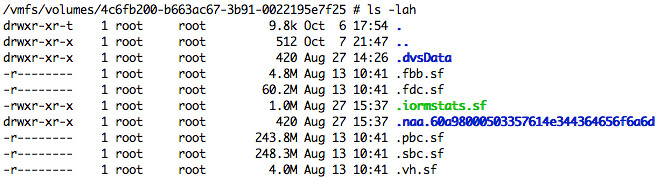
A: Latency values are actually stored on the Datastore itself. From the PARDA academic paper, I figured two methods could be used for this either through network communication or as stated by using the Datastore. Notice the file “iormstat.sf” in green in the screenshot below, I guess that answers the question… the datastore itself is used to communicate the latency of a datastore. I also confirmed with Irfan that my assessment was true.
- Q: Where does datastore-wide disk scheduler run from?
A: The datastore-wide disk scheduler is essentially SIOC or also known as the “PARDA Control Algorithm” and runs on each host sharing that datastore. PARDA consists of two key components which are “latency estimation” and “window size computation”. Latency estimation is used to detect if SIOC needs to throttle queues to ensure each VM gets its fair share. Window size computation is used to calculate what this queue depth should be for your host. - Q: Is PARDA also responsible for throttling the VM?
A: No, PARDA itself or better said the two major processes that form PARDA (latency estimation and window size computation) don’t control “host local” fairness, the Local scheduler (SFQ) is responsible for that. - Q: Can we in any way control the I/O contention in vCD VM environment (say one VM running high I/O impacting another VM running on same host/datastore)
A: I would highly recommend to enable this in vCloud Environments to prevent storage based DoS attacks (or just noisy neighbors) and to ensure IO fairness can be preserved. This is one of the reasons VMware developed this mechanism. - Q: I can’t enable SIOC with an Enterprise licence – “License not available to perform the operation”. Is it Enterprise Plus only?
A: SIOC requires Enterprise Plus - Q: Can I verify what the Latency is?
A: Yes you can, go to the Host – Performance Tab and select “Datastore”, “Real Time”, select the datastore and select “Storage I/O Control normalized latency”. Please note that the unit for measurement is microseconds! - Q: This doesn’t appear to work in NFS?
A: SIOC can only be enabled on VMFS volumes currently.
If you happen to be at VMworld next week, make sure to attend this session: TA8233 Prioritizing Storage Resource Allocation in ESX Based Virtual Environments Using Storage I/O Control!
I asked the question on the VMware Community Forums but I’d like to be able to enable alerts when SIOC engages and it lowers the queue depth(s). The non-vi workload alert is nice, but I’d like to know when SIOC engages in general without having to look at the datastores performance charts.
Hi Duncan,
Great article!
It’s a shame that SIOC is only available in Enterprise Plus licenses.
Dan
Good ccomment, I asked the developer this exact question today. There must be a way to at least monitor the queue throttling, if I get a response or figure it out I will let you know!
Hey Duncan,
I’d imagine it’s not enabled by default since it requires a specific licensing level to be available for it to run. Additionally, this means that those that aren’t licensed for it won’t be wasting resources on it running when they can’t even us it.
That’s right Linus. Didn’t even think about that. Will update it,
Hi Duncan,
Is this SIOC feature, based on PARDA, will become a standard de facto on its own or is it some sort of VMware earlier implementation of the SCSI-4 protocol?
FYI we have alrady seen an earlier insight of the new SCSI-4 protocol with VMware VAAI…
Thx,
Didier
SIOC = PARDA. It is purely queue throttling and determining the latency.
hi Duncan,
great posts on SIOC!!
what happen if 2 ESX’s have different device queue depth?
how SIOC behave in this situation?
I know that this is an old thread, but I’m looking for some information on reading the charts for SIOC. I have read through the WP on SIOC. I did not see any information in what to look for with the performance charts. The normalized latency, Aggregate IOPs, and the max queue depth per host charts are the ones I’m referring about. How do I effectively read these charts in determining disk I/O being an issue? Is a spike of 32,500 microseconds a high number to be concerned about with Normalized Latency? What is a high number to be concerned about with Aggregate IOPs and Normalized Latency? What about constant changing of the MAX Queue Depth per host? Thanks..