The first episode of 2025 features one of my favorite colleagues, Paudie O’Riordan. Paudie works for the same team as I do, and although we’ve both roamed around a lot, somehow we always ended up either in the same team, or in very close proximity. Paudie is a storage guru, and the last years helped many customers with their VCF (or vSAN) proof of concept, and on top of that helped countless customers understand difficult failure scenarios in a stretched environment when things went south. In Episode 088 Paudie discusses the many dos and don’ts! This is an episode you need cannot miss out on!
vsan stretched
What does Datastore Sharing/HCI Mesh/vSAN Max support when stretched?
This question has come up a few times now, what does Datastore Sharing/HCI Mesh/vSAN Max support when stretched? It is a question which keeps coming up somehow, and I personally had some challenges to find the statements in our documentation as well. I just found the statement and I wanted to first of all point people to it, and then also clarify it so there is no question. If I am using Datastore Sharing / HCI Mesh, or will be using vSAN Max, and my vSAN Datastore is stretched, what does VMware (or does not) support?
We have multiple potential combinations, let me list them and add whether it is supported or not, not that this is at the time of writing with the current available version (vSAN 8.0 U2).
- vSAN Stretched Cluster datastore shared with vSAN Stretched Cluster –> Supported
- vSAN Stretched Cluster datastore shared with vSAN Cluster (not stretched) –> Supported
- vSAN Stretched Cluster datastore shared with Compute Only Cluster (not stretched) –> Supported
- vSAN Stretched Cluster datastore shared with Compute Only Cluster (stretched, symmetric) –> Supported
- vSAN Stretched Cluster datastore shared with Compute Only Cluster (stretched, asymmetric) –> Not Supported
So what is the difference between symmetric and asymmetric? The below image, which comes from the vSAN Stretched Configuration, explains it best. I think Asymmetric in this case is most likely, so if you are running Stretched vSAN and a Stretched Compute Only, it most likely is not supported.
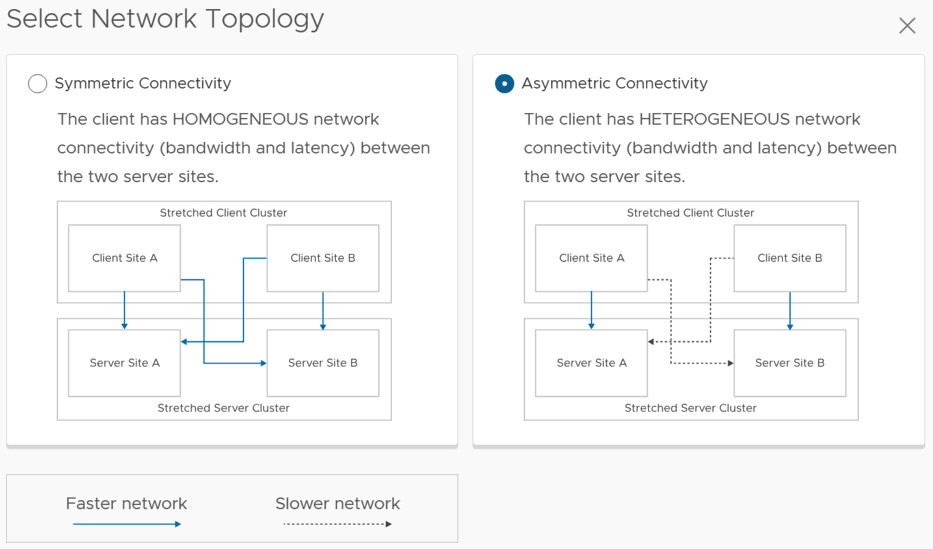
This also applies to vSAN Max by the way. I hope that helps. Oh and before anyone asks, if the “server side” is not stretched it can be connected to a stretched environment and is supported.
vSAN Stretched Cluster failure matrix
The last couple of weeks I was involved internally in a discussion around the different vSAN stretched cluster failure scenarios. I wrote a lengthy email about how vSAN and HA would respond in certain scenarios. I have documented many of these over the years on my blog already, but never really published them as a whole.

In some of the scenarios below, I discuss a “partition”, a partition is a scenario where both the L3 connection to the witness is down and the inter site / inter switch link to the other site for one of the locations. So in the diagram above for instance, if I say that Site B is partitioned then it means that Site A can still communicate with the witness, but Site B cannot communicate with the Witness and cannot communicate with Site A either.
For all of the below scenarios the following applies, Site A is the preferred location and Site B is the secondary location. When it comes to the table, the first two columns refer to the policy setting for the VM as shown in the screenshot below. The third column refers to the location where the VM runs from a compute perspective. The fourth discusses the type of failure, and the fifth and sixth columns discuss the behavior witnessed.

Time to list the various scenarios, and no, it doesn’t include all failures that could occur but should discuss most scenarios which are important for a stretched cluster configuration. Do note, the below-discussed behavior will only be witnessed when the best practices, as documented here and here, are followed. Also note that the table has multiple pages, there are close to 30 scenarios described! If there are any questions feel free to leave a comment, if you feel a failure scenario is missing, also please leave a comment.
| Site Disaster Tolerance | Failures to Tolerate | VM Location | Failure | vSAN behavior | HA behavior |
|---|---|---|---|---|---|
| None Preferred | No data redundancy | Site A or B | Host failure Site A | Objects are inaccessible if failed host contained one or more components of objects | VM cannot be restarted as object is inaccessible |
| None Preferred | RAID-1/5/6 | Site A or B | Host failure Site A | Objects are accessible as there's site local resiliency | VM does not need to be restarted, unless VM was running on failed host |
| None Preferred | No data redundancy / RAID-1/5/6 | Site A | Full failure Site A | Objects are inaccessible as full site failed | VM cannot be restarted in Site B, as all objects reside in Site A |
| None Preferred | No data redundancy / RAID-1/5/6 | Site B | Full failure Site B | Objects are accessible, as only Site A contains objects | VM can be restarted in Site A, as that is where all objects reside |
| None Preferred | No data redundancy / RAID-1/5/6 | Site A | Partition Site A | Objects are accessible as all objects reside in Site A | VM does not need to be restarted |
| None Preferred | No data redundancy / RAID-1/5/6 | Site B | Partition Site B | Objects are accessible in Site A, objects are not accessible in Site B as network is down | VM is restarted in Site A, and killed by vSAN in Site B |
| None Secondary | No data redundancy / RAID-1/5/6 | Site B | Partition Site B | Objects are accessible in Site B | VM resides in Site B, does not need to be restarted |
| None Preferred | No data redundancy / RAID-1/5/6 | Site A | Witness Host Failure | No impact, witness host is not used as data is not replicated | No impact |
| None Secondary | No data redundancy / RAID-1/5/6 | Site B | Witness Host Failure | No impact, witness host is not used as data is not replicated | No impact |
| Site Mirroring | No data redundancy | Site A or B | Host failure Site A or B | Components on failed hosts inaccessible, read and write IO across ISL as no redundancy locally, rebuild across ISL | VM does not need to be restarted, unless VM was running on failed host |
| Site Mirroring | RAID-1/5/6 | Site A or B | Host failure Site A or B | Components on failed hosts inaccessible, read IO locally due to RAID, rebuild locally | VM does not need to be restarted, unless VM was running on failed host |
| Site Mirroring | No data redundancy / RAID-1/5/6 | Site A | Full failure Site A | Objects are inaccessible in Site A as full site failed | VM restarted in Site B |
| Site Mirroring | No data redundancy / RAID-1/5/6 | Site A | Partition Site A | Objects are inaccessible in Site A as full site is partitioned and quorum is lost | VM restarted in Site B |
| Site Mirroring | No data redundancy / RAID-1/5/6 | Site A | Witness Host Failure | Witness object inaccessible, VM remains accessible | VM does not need to be restarted |
| Site Mirroring | No data redundancy / RAID-1/5/6 | Site B | Full failure Site A | Objects are inaccessible in Site A as full site failed | VM does not need to be restarted as it resides in Site B |
| Site Mirroring | No data redundancy / RAID-1/5/6 | Site B | Partition Site A | Objects are inaccessible in Site A as full site is partitioned and quorum is lost | VM does not need to be restarted as it resides in Site B |
| Site Mirroring | No data redundancy / RAID-1/5/6 | Site B | Witness Host Failure | Witness object inaccessible, VM remains accessible | VM does not need to be restarted |
| Site Mirroring | No data redundancy / RAID-1/5/6 | Site A | Network failure between Site A and B (ISL down) | Site A binds with witness, objects in Site B becomes inaccessible | VM does not need to be restarted |
| Site Mirroring | No data redundancy / RAID-1/5/6 | Site B | Network failure between Site A and B (ISL down) | Site A binds with witness, objects in Site B becomes inaccessible | VM restarted in Site A |
| Site Mirroring | No data redundancy / RAID-1/5/6 | Site A or Site B | Network failure between Witness and Site A (or B) | Witness object absent, VM remains accessible | VM does not need to be restarted |
| Site Mirroring | No data redundancy / RAID-1/5/6 | Site A | Full failure Site A, and simultaneous Witness Host Failure | Objects are inaccessible in Site A and Site B due to quorum being lost | VM cannot be restarted |
| Site Mirroring | No data redundancy / RAID-1/5/6 | Site A | Full failure Site A, followed by Witness Host Failure a few minutes later | Pre vSAN 7.0 U3: Objects are inaccessible in Site A and Site B due to quorum being lost | VM cannot be restarted |
| Site Mirroring | No data redundancy / RAID-1/5/6 | Site A | Full failure Site A, followed by Witness Host Failure a few minutes later | Post vSAN 7.0 U3: Objects are inaccessible in Site A, but accessible in Site B as votes have been recounted | VM restarted in Site B |
| Site Mirroring | No data redundancy / RAID-1/5/6 | Site B | Full failure Site B, followed by Witness Host Failure a few minutes later | Post vSAN 7.0 U3: Objects are inaccessible in Site B, but accessible in Site A as votes have been recounted | VM restarted in Site A |
| Site Mirroring | No data redundancy | Site A | Full failure Site A, and simultaneous host failure in Site B | Objects are inaccessible in Site A, if components reside on failed host then object is inaccessible in Site B | VM cannot be restarted |
| Site Mirroring | No data redundancy | Site A | Full failure Site A, and simultaneous host failure in Site B | Objects are inaccessible in Site A, if components do not reside on failed host then object is accessible in Site B | VM restarted in Site B |
| Site Mirroring | RAID-1/5/6 | Site A | Full failure Site A, and simultaneous host failure in Site B | Objects are inaccessible in Site A, accessible in Site B as there's site local resiliency | VM restarted in Site B |