• Skip to primary navigation
  • Skip to main content
  • Skip to primary sidebar

Yellow Bricks

by Duncan Epping

  • Home
  • Unexplored Territory Podcast
  • HA Deepdive
  • ESXTOP
  • Stickers/Shirts
  • Privacy Policy
  • About
  • Show Search
Hide Search

vcenter

What’s new?

Duncan Epping · Jul 20, 2011 ·

I had a lot of trouble finding the vSphere 5.0 What’s New whitepapers so I figured I would list all of them as I probably wouldn’t be the only one finding it challenging to get all of these. These are useful to quickly scan what has been introduced for a specific category. I would recommend reading these as it will give you a better understanding of what is coming up!

  • What’s New in vSphere 5.0
  • What’s New in VMware vSphere 5.0: VMware vCenter
  • What’s New in VMware vSphere 5.0: Platform Whitepaper
  • What’s New in VMware vSphere 5.0: Performance Whitepaper
  • What’s New in VMware vSphere 5.0: Storage Whitepaper
  • What’s New in VMware vSphere 5.0: Networking Whitepaper
  • What’s New in VMware vSphere 5.0: Availability Whitepaper
  • What’s New in VMware Data Recovery 2.0 Technical Whitepaper
  • VMware vSphere Storage Appliance Technical Whitepaper
  • What’s New in VMware vCenter Site Recovery Manager 5 Technical Whitepaper
  • What’s New in VMware vCloud Director 1.5 Technical Whitepaper
Migrating your 32-bit vCenter Server to 64-bit

Duncan Epping · Jul 4, 2011 ·

I am working on a whitepaper about vCenter Server migrations and stumbled upon this great tool which is hidden away on the vCenter install media called “datamigration”. The data migration tool allows you to backup a vCenter Server configuration which is hosted by the MS SQL Express databases that is packaged with vCenter. Now this might seem like a limited scenario but I bet many people start out using the Express database that comes with vCenter using a 32-bit OS and found themselves more or less locked in. If you are still using 4.0 with a 32-bit platform, this is your way out. It is fairly straight forward if I may say so. The beauty of it all is that you can keep your current vCenter config, be it disabled… but you always have a roll back option might it be needed.

  • Build a new 64-bit vCenter Server
  • Download the vCenter zip or ISO
  • Go to the “datamigration” folder and copy/extract the datamigration.zip.
  • Copy the extracted content to your “source” vCenter Server
  • Stop the vCenter Service, Update Management Service and the vCenter Web Service
  • Run  “backup.bat” under the datamigration folder from a Command Prompt
    • One decision that you need to make is if you want to backup all Host patches as well, I prefer to just download them again
  • When the process has completed copy the full “datamigration” folder to your new vCenter server
  • Run  “install.bat” under the datamigration folder from a Command Prompt
    • It will display the name of the vCenter Server you are about to “restore”, validate it and type Y
    • Provide the path to the vCenter install files
    • Provide the path to the VUM install files (probably same as previous step)
    • Now just follow the normal installation process
    • You will see an installer popping up, note that in the Command Prompt window the databases will be restored etc.
    • Takes roughly 15 minutes depending on the amount of data
  • Start the vSphere Client… done,

Is that simple or what? I was kind of amazed by this to be honest, very simple and effective tool to migrate to a new 64-bit vCenter Server while keeping your Events, Tasks, Resource Pools etc… it is all there. Use it to your advantage,

vCenter Operations Enterprise 1.0.1

Duncan Epping · Jul 2, 2011 ·

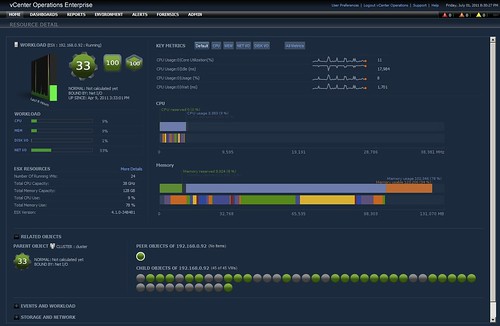
I just noticed  VC Ops Enterprise had an update, version 1.0.1 was just released. Although it is just a minor release and I more or less promised myself not to do articles about minor release or upgrades I do feel it is worth checking out. VC Ops is one of those tools that can make your life a lot easier when it comes to monitoring and pinpointing bottlenecks. Especially the new resource detail page (see screenshot below) is very useful. You can find the release notes here and you can download it here.

  • A new widget to display relationship and performance of objects in vSphere environment.
  • Introduction of resource detail page to show vSphere performance characteristics, Key Metrics, and Events.
  • Introduction of Analysis page to view performance of vSphere objects for a given metric via Heat map widget.
  • Enforcement of unique remote collector names.

vCenter Availability Survey!

Duncan Epping · Mar 22, 2011 ·

Last week there was a discussion on vCenter availability on twitter. The main outcome was that vCenter is an important component of your infrastructure and needs to be highly available. Coincidentally I received the request to repost this Survey about vCenter Availability and your thoughts on it. This is your chance to define the future around vCenter availability, take the survey today!

VMware vCenter is the critical management platform for virtualization and cloud management.  Ensuring vCenter is highly available during planned and unplanned outages is essential to make sure there is a minimal impact to your business productivity and you continue to meet your service level agreements.

This survey is about understanding your vCenter’s availability needs. We would like to understand your current needs, feedback on vCenter Server Heartbeat and your future needs.

There are total 17 questions in this survey.  This survey should not take more than 5-7 minutes.  We appreciate your time in taking this survey.  Your feedback is very important to us!

Managing availability through vCenter Alarms

Duncan Epping · Mar 3, 2011 ·

Last week a customer asked me a question about how to respond to for instance a partial failure in their SAN environment. A while back I had a similar question from one of my other customers so I more or less knew where to look, and I actually already blogged about this over a year ago when I was showing some of the new vSphere features. Although this is fairly obvious I hardly ever see people using this and hence the reason I wanted to document one of the obvious things that you can implement…. Alarms

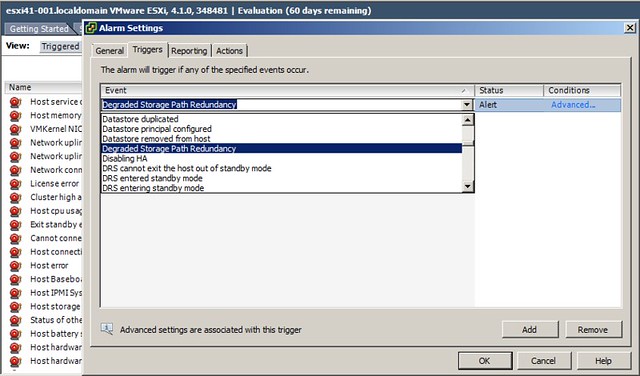
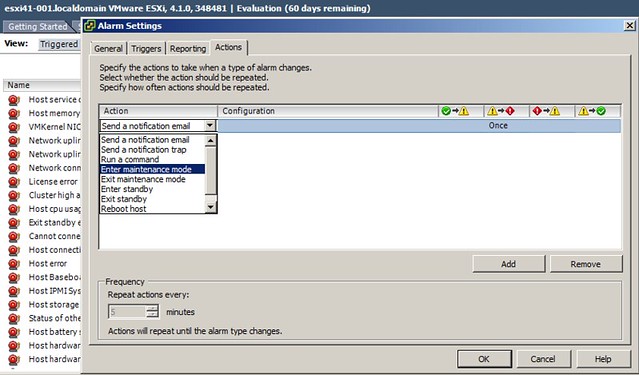
Alarms can be used to trigger an alert, and that is of course the default behavior of predefined alarms. However you can also create your own alarms and associate an action with it. I am showing the possibilities here and am not saying that this is a best practice, but the following two screenshots show that it is possible to place a host in maintenance mode based on degraded storage redundancy.

First you define the alarm:

And then you define the action:

Again, this is action could have a severe impact when a switch fails and I wouldn’t recommend it, but I wanted to ensure everyone understands the type of combinations that are possible. I would generally recommend to send an SNMP trap or even a notification email… and I would recommend to at least define the following alarms:

  • Degraded Storage Path Redundancy
  • Duplicate IP Detected
  • HA Agent Error
  • Host connection lost
  • Host error
  • Host warning
  • Host WWN changed
  • Host WWN conflict
  • Lost Network Connectivity
  • Lost Network Redundancy
  • Lost Storage Connectivity
  • Lost Storage Path Redundancy

Many of these deal with hardware issues and you might already be monitoring for them, if not make sure you monitor them through vCenter and take appropriate action when needed.

  • « Go to Previous Page
  • Page 1
  • Interim pages omitted …
  • Page 9
  • Page 10
  • Page 11
  • Page 12
  • Page 13
  • Interim pages omitted …
  • Page 27
  • Go to Next Page »

Primary Sidebar

About the Author

Duncan Epping is a Chief Technologist and Distinguished Engineering Architect at Broadcom. Besides writing on Yellow-Bricks, Duncan is the co-author of the vSAN Deep Dive and the vSphere Clustering Deep Dive book series. Duncan is also the host of the Unexplored Territory Podcast.

Follow Us

  • X
  • Spotify
  • RSS Feed
  • LinkedIn

Recommended Book(s)

Also visit!

For the Dutch-speaking audience, make sure to visit RunNerd.nl to follow my running adventure, read shoe/gear/race reviews, and more!

Do you like Hardcore-Punk music? Follow my Spotify Playlist!

Do you like 80s music? I got you covered!

Copyright Yellow-Bricks.com © 2026 · Log in