• Skip to primary navigation
  • Skip to main content
  • Skip to primary sidebar

Yellow Bricks

by Duncan Epping

  • Home
  • Unexplored Territory Podcast
  • HA Deepdive
  • ESXTOP
  • Stickers/Shirts
  • Privacy Policy
  • About
  • Show Search
Hide Search

software defined

VSAN made storage management a non issue for the 1st time

Duncan Epping · Sep 28, 2015 ·

When ever I talk to customers about Virtual SAN the question that comes up usually is why Virtual SAN? Some of you may expect it to be performance, or the scale-out aspect, or the resiliency… None of that is the biggest differentiator in my opinion, management truly is. Or should I say the fact that you can literally forget about it after you have configured it? Yes, of course that is something you expect every vendor to say about their own product. I think the reply of one of the users during the VSAN Chat that was held last week is the biggest testimony I can provide: “VSAN made storage management a non-issue for the first time for the vSphere cluster admin”. (see tweet below)

@vmwarevsan VSAN made storage management a non-issue for this first time vSphere cluster admin! #vsanchat http://t.co/5arKbzCdjz

— Aaron Kay (@num1k) September 22, 2015

When we released the first version of Virtual SAN I strongly believed we had a winner on our hands. It was so simple to configure, you don’t need to be a VCP to enable VSAN, it is two clicks. Of course VSAN is a bit more than just that tick box on a cluster level that says “enable”. You want to make sure it performs well, all drivers/firmware combinations are certified, the network is correctly configured etc. Fortunately we also have a solution for that, this isn’t a manual process.

No, you simply go to the VSAN healthcheck section on your VSAN cluster object and validate everything is green. Besides simply looking at those green checks, you can also run certain pro-active tests that will allow you to test for instance multicast performance, VM creation, VSAN performance etc. It all comes as part of vCenter Server as of the 6.0 U1 release. On top of that there is more planned. At VMworld we already hinted at it, advanced performance management inside vCenter based on a distributed and decentralized model. You can expect that at some point in the near future, and of course we have the vROps pack for Virtual SAN if you prefer that!
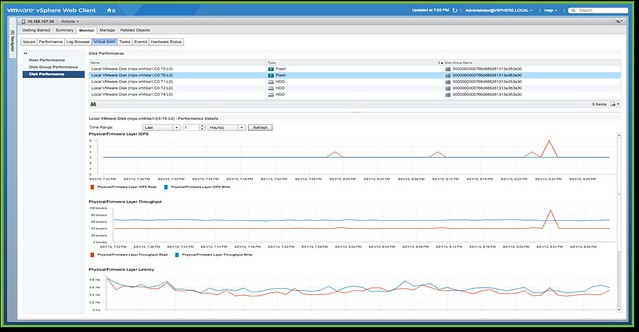
No, if you ask me, the biggest differentiator definitely is management… simplicity is the key theme, and I guarantee that things will only improve with each release.

No one ever got fired for buying IBM/HP/DELL/EMC etc

Duncan Epping · May 26, 2015 ·

Last week on twitter there was a discussion about hyper-converged solutions and how these were not what someone who works in an enterprise environment would buy for their tier 1 workloads. I asked the question: well what about buying Pure Storage, Tintri, Nimble or Solid Fire systems? All non-hyper converged solutions, but relatively new. Answer was straight forward: not buying those either, big risk. Then the classic comment came:

No one ever got fired for buying IBM (Dell, HP, NetApp, EMC… pick one)

Brilliant marketing slogan by the way (IBM) which has stuck around since the 70s and is now being used by many others. I wondered though… Did anyone ever get fired for buying Pure Storage? Or for buying Tintri? What about Nutanix? Or VMware Virtual SAN? Hold on, maybe someone got fired for buying Nimble, yeah probably Nimble then. No of course not, even after a dozen google searches nothing shows up. Why you may ask yourself, well because typically people don’t get fired for buying a certain solution. People get fired for being incompetent / lazy / stupid. In the case of infrastructure and workloads that translates in to managing and placing workloads incorrectly or misconfiguring infrastructure. Fatal mistakes which result in dataloss or long periods of downtime, that is what gets you fired.

Sure, buying from a startup may impose some risks. But I would hope that everyone reading this weighs those risks against the benefits, that is what you do as an architect in my opinion. You assess risks and you determine how to mitigate those within your budget. (Yes of course taking requirements and constraints in to account as well.)

Now when it comes to these newer storage solutions, and “new” is relative in this case as some have been around for over 5 years, I would argue that the risk is in most cases negligible. Will those newer storage systems be free of bugs? No, but neither will your legacy storage system be. Some of those systems have been around for over a decade and are now used in scenarios they were never designed for, which means that new problems may be exposed. I am not saying that legacy storage systems will break under your workload, but are you taking that risk in to account? Probably not, why not? Because hardly anyone talks about that risk.

If you (still) don’t feel comfortable with that “new” storage system (yet) but they do appear to give you that edge or bigger bang for the buck simply ask the sales rep a couple of questions which will help building trust:

  • How many systems are sold world wide similar to what you are looking to buy and for similar platforms
    • If they sold thousands, but none of them is using vSphere for instance then what are the chances of you hitting that driver problem firsts? If they sold thousand it will be useful to know…
  • How many customers for that particular model
    • Wouldn’t be the first time a vendors sells thousands of boxes to a single customer for a very specific use case and it works great for them, just not in your particular use case.
    • But if they have many customers, maybe ask…
  • If you can talk to a couple of customers
    • Best thing you can ask for in my opinion, reference call or visit. This is when you find out if what is promised actually is reality.

I do believe that the majority of infrastructure related startups are great companies with great technology. Personally I see a bigger threat in terms of sustainability, rather than technology. Not every startup is going to be around 10 years from now. But if you look at all the different storage (or infra) startups which are out there today, and then look at how they are doing in the market it shouldn’t be too difficult to figure out who is in it for the long run. Whether you buy from a well-established vendor or from a relatively new storage company, it is all about your workload. What are the requirements and how can those requirements be satisfied by that platform. Assess the risks and weigh them against the benefit and make a decision based on that. Don’t make decisions based on a marketing slogan that has been around since the 70s. The world looks different now, technology is moving faster than ever before, being stuck in the 70s is not going to help you or your company compete in this day and age.

Requirements Driven Data Center

Duncan Epping · Apr 22, 2015 ·

I’ve been thinking about the term Software Defined Data Center for a while now. It is a great term “software defined” but it seems that many agree that things have been defined by software for a long time now. When talking about SDDC with customers it is typically referred to as the ability to abstract, pool and automate all aspects of an infrastructure. To me these are very important factors, but not the most important, well at least not for me as they don’t necessarily speak to the agility and flexibility a solution like this should bring. But what is an even more important aspect?

I’ve had some time to think about this lately and to me what is truly important is the ability to define requirements for a service and have the infrastructure cater to those needs. I know this sounds really fluffy, but ultimately the service doesn’t care what is running underneath, and typically the business owner and the application owners also don’t when all requirements can be met. Key is delivering a service with consistency and predictability. Even more important consistency and repeatability increase availability and predictability, and nothing is more important for the user experience.

When it comes to user experience and providing a positive one of course it is key to figure out first what you want and what you need first. Typically this information comes from your business partner and/or application owner. When you know what those requirements are then they can be translated to technical specifications and ultimately drive where the workloads end up. A good example of how this works or would look like is VMware Virtual Volumes. VVols is essentially requirements driven placement of workloads. Not just placement, but of course also all other aspects when it comes to satisfying requirements that determine user experience like QoS, availability, recoverability and whatever more is desired for your workload.

With Virtual Volumes placement of a VM (or VMDK) is based on how the policy is constructed and what is defined in it. The Storage Policy Based  Management engine gives you the flexibility to define policies anyway you like, of course it is limited to what your storage system is capable of delivering but from the vSphere platform point of view you can do what you like and make many different variations. If you specify that the object needs to thin provisioned, or has a specific IO profile, or needs to be deduplicated or… then those requirements are passed down to the storage system and the system makes its placement decisions based on that and will ensure that the demands can be met. Of course as stated earlier also requirements like QoS and availability are passed down. This could be things like latency, IOPS and how many copies of an object are needed (number of 9s resiliency). On top of that, when requirements change or when for whatever reason SLA is breached then in a requirements driven environment the infrastructure will assess and remediate to ensure requirements are met.

That is what a requirements driven solution should provide: agility, availability, consistency and predictability. Ultimately your full data center should be controlled through policies and defined by requirements. If you look at what VMware offers today, then it is fair to say that we are closing in on reaching this ideal fast.

It is all about choice

Duncan Epping · Sep 25, 2014 ·

The last couple of years we’ve seen a major shift in the market towards the software-defined datacenter. This has resulted in many new products, features and solutions being brought to market. What struck me though over the last couple of days is that many of the articles I have read in the past 6 months (and written as well) were about hardware and in many cases about the form factor or how it has changed. Also, there are the posts around hyper-converged vs traditional, or all flash storage solutions vs server side caching. Although we are moving towards a software-defined world, it seems that administrators / consultants / architects still very much live in the physical world. In many of these cases it even seems like there is a certain prejudice when it comes to the various types of products and the form factor they come in and whether that is 2U vs blade or software vs hardware is beside the point.

When I look at discussions being held around whether server side caching solutions is preferred over an all-flash arrays, which is just another form factor discussion if you ask me, the only right answer that comes to mind is “it depends”. It depends on what your business requirements are, what your budget is, if there are any constraints from an environmental perspective, hardware life cycle, what your staff’s expertise / knowledge is etc etc. It is impossible to to provide a single answer and solution to all the problems out there. What I realized is that what the software-defined movement actually brought us is choice, and in many of these cases the form factor is just a tiny aspect of the total story. It seems to be important though for many people, maybe still an inheritance from the “server hugger” days where hardware was still king? Those times are long gone though if you ask me.
In some cases a server side caching solutions will be the perfect fit, for instance when ultra low latency and use of existing storage infrastructure  is a requirement. In other cases bringing in an all-flash array may make more sense, or a hyper-converged appliance could be the perfect fit for that particular use case. What is more important though is how these components will enable you to optimize your operations, how these components will enable you to build that software-defined datacenter and help you meet the demands of the business. This is what you will need to ask yourself when looking at these various solutions, and if there is no clear answer… there is plenty of choice out there, stay open minded and go explore.

Why Queue Depth matters!

Duncan Epping · Jun 9, 2014 ·

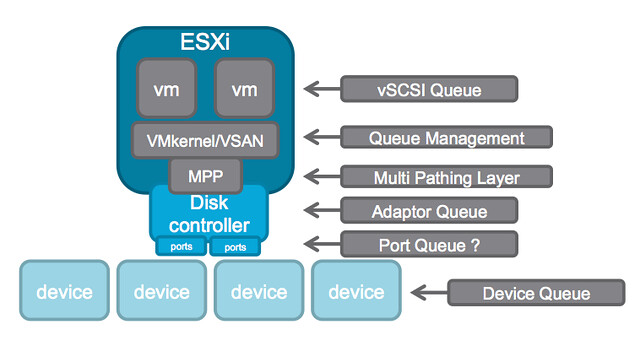
A while ago I wrote an article about the queue depth of certain disk controllers and tried to harvest some of the values and posted those up. William Lam did a “one up” this week and posted a script that can gather the info which then should be posted in a Google Docs spreadsheet, brilliant if you ask me. (PLEASE run the script and lets fill up the spreadsheet!!) But some of you may still wonder why this matters… (For those who didn’t read some of the troubles one customer had with a low-end shallow queue depth disk controller, and Chuck’s take on it here.) Considering the different layers of queuing involved, it probably makes most sense to show the picture from virtual machine down to the device.

queue depth

In this picture there are at least 6 different layers at which some form of queuing is done. Within the guest there is the vSCSI adaptor that has a queue. Then the next layer is VMkernel/VSAN which of course has its own queue and manages the IO that is pushed to the MPP aka muti-pathing layer the various devices on a host. On the next level a Disk Controller has a queue, potentially (depending on the controller used) each disk controller port has a queue. Last but not least of course each device (i.e. a disk) will have a queue. Note that this is even a simplified diagram.

If you look closely at the picture you see that IO of many virtual machines will all flow through the same disk controller and that this IO will go to or come from one or multiple devices. (Typically multiple devices.) Realistically, what are my potential choking points?

  1. Disk Controller queue
  2. Port queue
  3. Device queue

Lets assume you have 4 disks; these are SATA disks and each have a queue depth of 32. Total combined this means that in parallel you can handle 128 IOs. Now what if your disk controller can only handle 64? This will result in 64 IOs being held back by the VMkernel / VSAN. As you can see, it would beneficial in this scenario to ensure that your disk controller queue can hold the same number of IOs (or more) as your device queue can hold.

When it comes to disk controllers there is a huge difference in maximum queue depth value between vendors, and even between models of the same vendor. Lets look at some extreme examples:

HP Smart Array P420i - 1020
Intel C602 AHCI (Patsburg) - 31 (per port)
LSI 2008 - 25
LSI 2308 - 600

For VSAN it is recommended to ensure that the disk controller has a queue depth of at least 256. But go higher if possible. As you can see in the example there are various ranges, but for most LSI controllers the queue depth is 600 or higher. Now the disk controller is just one part of the equation, as there is also the device queue. As I listed in my other post, a RAID device for LSI for instance has a default queue depth of 128 while a SAS device has 254 and a SATA device has 32. The one which stands out the most is the queue depth of the SATA device, only a queue depth of 32 and you can imagine this can once again become a “choking point”. However, fortunately the shallow queue depth of SATA can easily be overcome by using NL-SAS drives (nearline serially attached SCSI) instead. NL-SAS drives are essentially SATA drives with a SAS connector and come with the following benefits:

  • Dual ports allowing redundant paths
  • Full SCSI command set
  • Faster interface compared to SATA, up to 20%
  • Larger (deeper) command queue [depth]

So what about the cost then? From a cost perspective the difference between NL-SAS and SATA is for most vendors negligible. For a 4TB drive the difference at the time of writing on different website was on average $ 30,-. I think it is safe to say that for ANY environment NL-SAS is the way to go and SATA should be avoided when possible.

In other words, when it comes to queue depth: spent a couple of extra bucks and go big… you don’t want to choke your own environment to death!

  • Page 1
  • Page 2
  • Page 3
  • Go to Next Page »

Primary Sidebar

About the Author

Duncan Epping is a Chief Technologist and Distinguished Engineering Architect at Broadcom. Besides writing on Yellow-Bricks, Duncan is the co-author of the vSAN Deep Dive and the vSphere Clustering Deep Dive book series. Duncan is also the host of the Unexplored Territory Podcast.

Follow Us

  • X
  • Spotify
  • RSS Feed
  • LinkedIn

Recommended Book(s)

Also visit!

For the Dutch-speaking audience, make sure to visit RunNerd.nl to follow my running adventure, read shoe/gear/race reviews, and more!

Do you like Hardcore-Punk music? Follow my Spotify Playlist!

Do you like 80s music? I got you covered!

Copyright Yellow-Bricks.com © 2026 · Log in