• Skip to primary navigation
  • Skip to main content
  • Skip to primary sidebar

Yellow Bricks

by Duncan Epping

  • Home
  • Unexplored Territory Podcast
  • HA Deepdive
  • ESXTOP
  • Stickers/Shirts
  • Privacy Policy
  • About
  • Show Search
Hide Search

PDL

Trigger APD on iSCSI LUN on vSphere

Duncan Epping · Jun 21, 2018 ·

I was testing various failure scenarios in my lab today for the vSphere Clustering Deepdive session I have scheduled for VMworld. I needed some screenshots and log files of when a datastore hit an APD scenario, for those who don’t know APD stands for all paths down. In other words: the storage is inaccessible and ESXi doesn’t know what has happened and why. vSphere HA has the ability to respond to that kind of failure. I wanted to test this, but my setup was fairly simple and virtual. So I couldn’t unplug any cables. I also couldn’t make configuration changes to the iSCSI array as that would rather trigger a PDL (permanent device loss), so how do you test and APD scenario?

After trying various things like killing the iSCSI daemon (it gets restarted automatically with no impact on the workload) I bumped in to this command which triggered the APD:

  • SSH in to the host you want to trigger the APD on, run the following command
    esxcli iscsi session remove  -A vmhba65
  • Make sure of course to replace “vmhba65” with the name of your iSCSI adapter

This triggered APD, as witness in the fdm.log and vmkernel.log, and ultimately resulted in vSphere HA killing the impacted VM and restarting it on a healthy host. Anyway, just wanted to share this as I am sure there are others who would like to test APD responses in their labs or before their environment goes in to production.

There may be other easy ways as well, if you know any, please share in the comments section.
Using HA VM Component Protection in a mixed environment

Duncan Epping · Nov 29, 2017 ·

I have some customers who are running both traditional storage and vSAN in the same environment. As most of you are aware, vSAN and VMCP do not go together at this point. So what does that mean for traditional storage, as in with traditional storage for certain storage failure scenarios you can benefit from VMCP.

Well the statement around vSAN and VMCP is actually a bit more delicate. vSAN does not propagate PDL or APD in a way which VMCP understands. So you can enable VMCP in your environment, without it having an impact on VMs running on top of vSAN. The VMs which are running on the traditional storage will be able to use the VMCP functionality, and if an APD or PDL is declared on the LUN they are running on vSphere HA will take action. For vSAN, well we don’t propagate the state of a disk that way and we have other mechanisms to provide availability / resiliency.

In summary: Yes, you can enable HA VMCP in a mixed storage environment (vSAN + Traditional Storage). It is fully supported.

Disable “Disk.AutoremoveOnPDL” in a vMSC environment!

Duncan Epping · Nov 8, 2013 ·

** UPDATE 20-March 2016 **

When using vSphere 6.0 or higher, please be advised that Disk.AutoremoveOnPDL needs to be set to 1 (default value) in order for “PDL Scenarios” to be handles correctly in vMSC based infrastructures. Please do not change the default value, or when upgrading to vSphere 6.x please set this value to 1 when changed in previous version.

** UPDATE 20-March 2016 **

Last week I tweeted the recommendation to disable the advanced setting Disk.AutoremoveOnPDL in a vSphere 5.5 vMSC environment:

https://twitter.com/DuncanYB/status/394740133079298048

Based on this tweet I received a whole bunch of questions. Before I explain why I want to point out that I have contacted the folks in charge of the vMSC program and have requested them to publish a KB article asap on this subject.

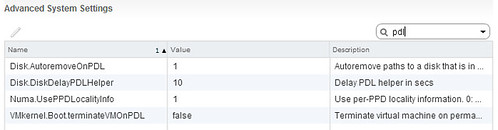
With vSphere 5.5 a new setting was introduced called “Disk.AutoremoveOnPDL”. When you install 5.5 this setting is set to 1 which means it is enabled. What it does is the following:

The host automatically removes the PDL device and all paths to the device if no open connections to the device exist, or after the last connection closes. If the device returns from the PDL condition, the host can discover it, but treats it as a new device. Data consistency for virtual machines on the recovered device is not guaranteed.

(Source: http://pubs.vmware.com/vsphere-55/index.jsp?topic=%2Fcom.vmware.vsphere.storage.doc%2FGUID-45CF28F0-87B1-403B-B012-25E7097E6BDF.html)

In a vMSC environment you can understand that removing devices which are in a PDL state is not desired. As when the issue that caused the PDL has been solved (from a networking or array perspective) customers would expect the LUNs to automatically appear again. However, as they have been removed a “rescan” is needed to show these devices again instantly, or you will need to wait for the vSphere periodic path evaluation to occur. As you can imagine, in a vSphere Metro Storage Cluster environment (stretched storage) you expect devices to always be there instantly on recovery… even when they are in a PDL or APD state they should be available instantly when the situation has been resolved.

For now, I recommend to set Disk.AutoremoveOnPDL to 0 instead of the default of 1:

Hopefully soon this KB on the topic of Disk.AutoremoveOnPDL will be updated to reflect this.

Change in Permanent Device Loss (PDL) behavior for vSphere 5.1 and up?

Duncan Epping · Aug 1, 2013 ·

Yesterday someone asked me a question on twitter about a whitepaper by EMC on stretched clusters and Permanent Device Loss (PDL) behavior. For those who don’t know what a PDL is, make sure to read this article first.  This EMC whitepaper states the following on page 40:

Note:

In a full WAN partition that includes cross-connect, VPLEX can only send SCSI sense code (2/4/3+5) across 50% of the paths since the cross-connected paths are effectively dead. When using ESXi version 5.1 and above, ESXi servers at the non-preferred site will declare PDL and kill VM’s causing them to restart elsewhere (assuming advanced settings are in place); however ESXi 5.0 update 1 and below will only declare APD (even though VPLEX is sending sense code 2/4/3+5). This will result in a VM zombie state. Please see the section Path loss handling semantics (PDL and APD)

Now as far as I understood, and I tested this with 5.0 U1 the VMs would not be killed indeed when half of the paths were declared APD and the other half PDL. But I guess something has changed with vSphere 5.1. I knew about one thing that has changed which isn’t clearly documented so I figured I would do some digging and write a short article on this topic. So here are the changes in behavior:

Virtual Machine using multiple Datastores:

  • vSphere 5.0 u1 and lower: When a Virtual Machine’s files are spread across multiple Datastores it might not be restarted in the case a Permanent Device Loss scenario occurs.
  • vSphere 5.1 and higher: When a Virtual Machine’s files are spread across multiple Datastores and a Permanent Device Loss scenario occurs then vSphere HA will restart the virtual machine taking availability of those datastores on the various hosts in your cluster in to account.

Half of the paths in APD state:

  • vSphere 5.0 u1 and lower: When a datastore on which your virtual machine resides is not in a 100% declared in a PDL state (assume half of the paths in APD) then the virtual machine will not be killed and restarted.
  • vSphere 5.1 and higher: When a datastore on which your virtual machine resides is not in a 100% declared in a PDL state (assume half of the paths in APD) then the virtual machine will be killed and restarted. This is a huge change compared to 5.0 U1 and lowe

These are the changes in behavior I know about for vSphere 5.1, I have asked engineering to confirm these changes for vSphere Metro Storage Cluster environments. When I have received an answer I will update this blog.

Enabling PDL enhancements in a non-stretched environment?

Duncan Epping · Sep 20, 2012 ·

I received two questions on the same topic last week. The question was around using the PDL enhancements in a non-stretched environment… does it make sense? The question was linked to a scenario where for instance a storage admin makes a mistake and removes access for a specific host to a LUN. For those who don’t know what a PDL is read this article, but in short it is a SCSI sense code issued by an array when it believes storage will be permanently unavailable.

First of all, the vSphere HA advanced option “das.maskCleanShutdownEnabled” is enabled by default as of vSphere 5.1. In other words, HA is going to assume a virtual machine needs to be restarted when it is powered and isn’t able to update the config files. (Config files contain the details about the shutdown state normally, was it an admin initiated shutdown?)

Now, one thing to note is that “disk.terminateVMOnPDLDefault” is not on by default. If this setting is not explicitly enabled then the virtual machine will not be killed and HA won’t be able to take action. In other words, if your storage admin changes the presentation of your LUNs and removes a host accidentally the virtual machine will just sit there without access to disk. The OS might fail at some point, your application will definitely not be happy, but this is it.

To answer the question, yes even in a non-stretched environment it makes sense to enable both disk.terminateVMOnPDLDefault and das.maskCleanShutdownEnabled. Virtual machines will be automatically restarted by HA if they are killed by the VMkernel when a PDL has been detected.

Primary Sidebar

About the Author

Duncan Epping is a Chief Technologist and Distinguished Engineering Architect at Broadcom. Besides writing on Yellow-Bricks, Duncan is the co-author of the vSAN Deep Dive and the vSphere Clustering Deep Dive book series. Duncan is also the host of the Unexplored Territory Podcast.

Follow Us

  • X
  • Spotify
  • RSS Feed
  • LinkedIn

Recommended Book(s)

Also visit!

For the Dutch-speaking audience, make sure to visit RunNerd.nl to follow my running adventure, read shoe/gear/race reviews, and more!

Do you like Hardcore-Punk music? Follow my Spotify Playlist!

Do you like 80s music? I got you covered!

Copyright Yellow-Bricks.com © 2026 · Log in