• Skip to primary navigation
  • Skip to main content
  • Skip to primary sidebar

Yellow Bricks

by Duncan Epping

  • Home
  • Unexplored Territory Podcast
  • HA Deepdive
  • ESXTOP
  • Stickers/Shirts
  • Privacy Policy
  • About
  • Show Search
Hide Search

edge

Project Dimension – VMware’s Edge Computing effort

Duncan Epping · Nov 20, 2018 ·

Internally some of my focus has been shifting, going forward I will spend more time on edge computing besides vSAN. Edge (and IoT for that matter) has had my interest for a while, and when VMware announced an edge project I was intrigued and interested instantly. At VMworld US the edge computing efforts were announced. The name for the effort is Project Dimension. There were several sessions at VMworld, and I would recommend watching those if you are looking for more info then provided below. The session out of which I took most of the below info was IOT2539BE, titled “Project Dimension: the easy button for edge computing” by Esteban Torres and Guru Shashikumar. Expect more content on Project Dimension in the future as I start getting involved more.

What is Project Dimension? What discussed at VMworld was the following:

  • A new VMware Cloud service; starting at edge locations
  • Enable enterprises to consume compute, storage, and networking at the edge like they consume public cloud
  • VMware will work with OEM partners to deliver and manage hyperconverged appliances in edge locations
    • All appliances will be managed by VMware via VMware Cloud

So what does it include? Well as mentioned it includes hardware, the type etc hasn’t been mentioned, but it was said that Dell and Lenovo are the first two OEMs to support Project Dimension. This hyperconverged solution will include:

  • vSphere
  • vSAN
  • Velocloud

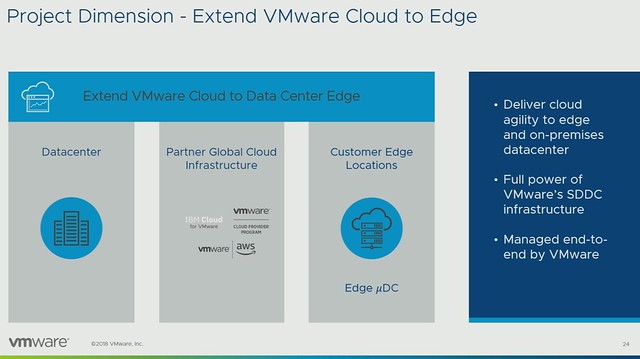
This solution will be managed by a “hybrid cloud control plane” as it is referred to, all by VMware. Architecturally this is what the service will look like:
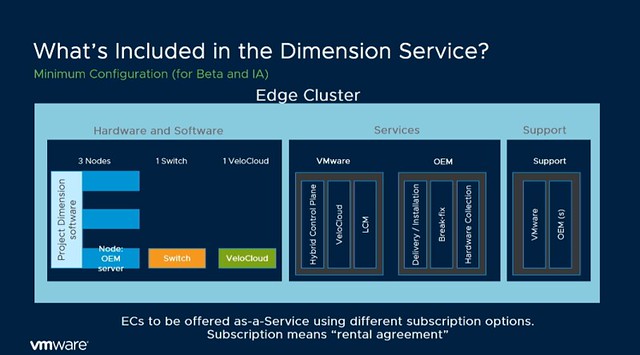
Now what I found very interesting is that during the session someone asked about the potential for Dimension in on-prem datacenters, and the answer was: “Edge is where we are beginning, but the long-term plan is to offer the same model for data centers as well”. Some may notice that in the above list and diagram NSX is missing, as mentioned during the session, this is being planned for, but preferably will be a “lighter” flavor. What also stands out is that the HCI solution includes not only compute but also networking (switches and SD-WAN appliance).

Now, what is most interesting is the management aspect, VMware and the OEM partner will do the full maintenance/lifecycle management for you. This means that if something breaks the OEM will fix it, you as a customer however always contact VMware, single point of contact for everything. If there’s an upgrade then VMware will go through that motion for you. Every edge cluster for instance also has a vCenter Server instance, but you as an administrator/service owner will not be managing that vCenter Server instance, you will be managing the workloads that run in that environment. This to me makes sense, as when you scale out and potentially have hundreds or thousands of locations you don’t want to spend most of your time managing the infra for that, you want to focus on where the company’s revenue is.

Now getting back to the maintenance/upgrades. How does this work, how do you know you have sufficient capacity to allow for an upgrade to happen? VMware will also ensure this is possible by doing some form of admission control, which prevents you to claim 100% of the physical resources. Another interesting thing mentioned is that Dimension will allow you to chose when the upgrade or patches will be applied. In most environments maintenance will have an impact on workloads in some shape or form, so by providing blackout dates a peak season/time can be avoided.

From a hardware point of view and procurement perspective, this service is also different then you are used to. The services will be on a subscription basis. 1 year or 3-year reserved edge clusters, or more of course. And from a hardware perspective, it kind of aligns with what you typically see in the cloud: Small, Medium or Large instance. Which then refers to the number of resources you get per node. Starting with 3 nodes, of course, have the ability to scale up and potentially start smaller than 3 nodes in the future. The process in terms of sign up / procurement is displayed in the diagram below, delivery would be within 1-2 weeks, which seems extremely fast to me.
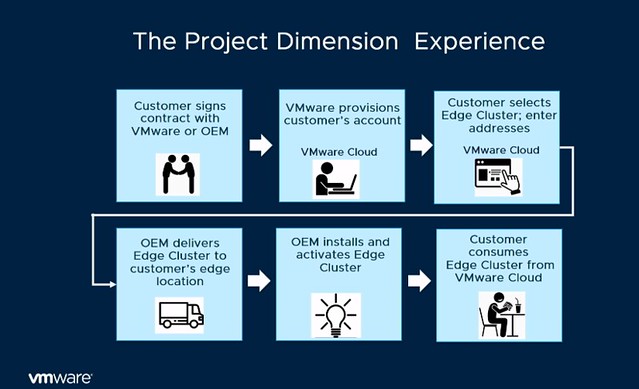
What I also found interesting was the mention of a “try and buy” option, you pay for 3 months and if you like it you keep it, and your 3 months contract will go to 1 year (or so) automatically.

At this point you may be asking: why is VMware doing this? Well, it is pretty simple: demand and industry changes. We are starting to see a clear trend, more and more workloads are shifting closer to the consumer. This allows our customers to process data faster and more importantly respond faster to the outcome, and of course, take action through machine learning. But the biggest challenge customers have is consistently managing these locations at a global scale, and this is what Project Dimension should solve. This is not just a challenge at the edge, but across edge, on-prem and public cloud if you ask me. There are so many moving parts, various different tools, and interfaces, which just makes things overly complex.

So what is VMware planning on delivering with Project Dimension? Consistently, reliable and secure hyperconverged infrastructure which is managed through a Cloud Control Plane (single pane of glass management for edge environments) and edge-to-cloud connectivity through Velocloud SD-WAN. (Management traffic for now, but “edge to edge” and “edge to on-prem” soon!) There’s a lot of innovation happening at the back-end when it comes to managing and maintaining 1000s of edge locations, but you as a customer are buying simplicity, reliability, and consistency.

Please note, Project Dimension is in beta, and the team is still looking for beta customers. You need to have a valid use case, as I can see some of you thinking “nice for a home lab for a couple of weeks”, but that, of course, is not what the team is looking for. For those who have a good use case, please go to the product page and leave your details behind: http://vmwa.re/dimension
CTO3509BU: Embracing the Edge: Automation, Analytics, and Real-Time Business

Duncan Epping · Sep 7, 2018 ·

This is the last post in this VMworld Sessions series. Although the title lists “CTO3509BU: Embracing the Edge: Automation, Analytics, and Real-Time Business” which is by Chris Wolf and Daniel Beveridge, I would also highly recommend watching Daniel’s other session titled “CTO2161BU Smart Placement of Workloads in Tomorrow’s Distributed Cloud“. Both sessions discuss a similar topic and this Edge vs Cloud and where workloads and data should be placed. Both very interesting topics if you ask me, and definitely topics I am starting to explore more.

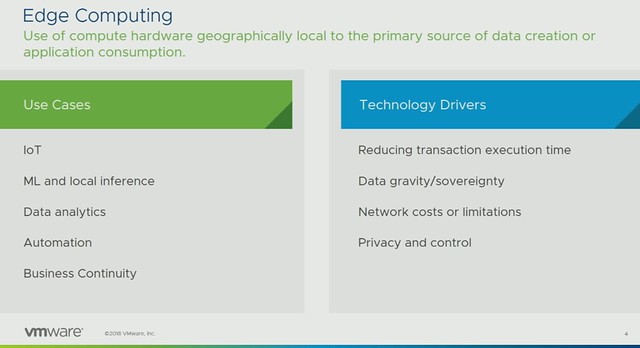
Chris discussed the various use cases around Edge Computing and the Technology Drivers, some of these very obvious but some of them not so much. What often is skipped is the business continuity aspect of edge but also things like network costs, limitations, and even data gravity. It is good to see that Chris addressed these. Some people still seem to be under the impression that every workload can run in the cloud, but in many cases it simply isn’t possible to send data to the cloud. Could be that the volume is too high, could be that the time it takes to transfer and analyze is too long (transaction execution time), or maybe it is physically impossible. It could also be that the application is mission-critical, meaning that the service can’t rely on a connection to the internet.

As a company, VMware is aiming to provide a solution for Edge and IoT, yet work closely with the very rich partner ecosystem and the main focus is providing a “native experience” for developers. Which provides customers choice as it avoids lock-in. Now I don’t want to start a lock-in discussion here as one could claim that it is difficult to migrate between platforms, and this is always the case, if not only because of the operational aspects (tooling/processes). A diagram which explains the different initiatives was then presented, and I like this diagram a lot as it differentiates between “device edge” and “compute edge”, on top of that it shows a differentiation between the device edge focussed on things vs people (big difference).

Next discussed is IoT management, Chris explains how Pulse 2.0 will be capable of managing up to 500 million managed objects. Pulse provides central management across different IoT device manufacturers. Instead of having a point solution for each manufacturer we introduced an abstraction layer and automate things like updates etc. (Sounds familiar?) Then ESXi for ARM is briefly touched upon, as Christ mentioned this is not for general purpose intended. VMware is looking for very specific use cases, if you are one of those partners/customers that has a use case for ESXi on ARM then please reach out to us and let’s discuss the use case and opportunity!

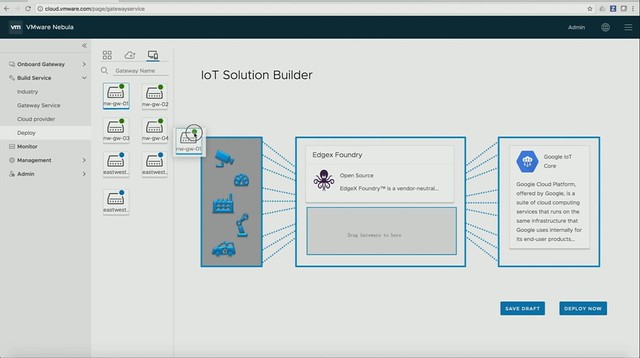
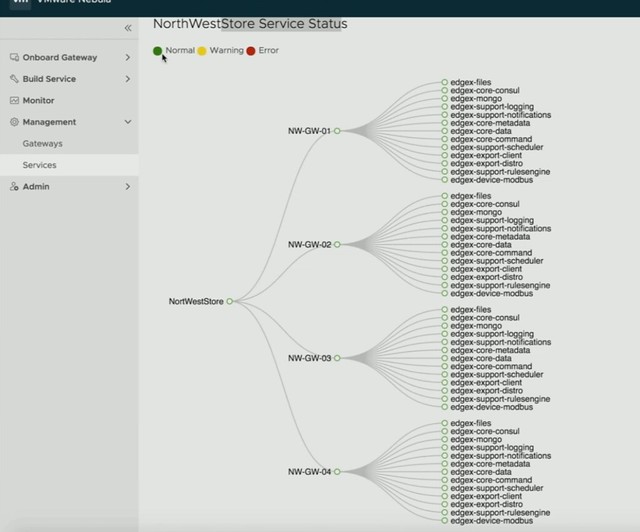
First, a new project is introduced by Daniel, it is called Project Nebula. Nebula brings an IoT marketplace, in this marketplace you can select various IoT services (which come in the form of containers), which are then sent to the IoT gateways. It looks pretty cool, as Daniel shows how he simply pushed various IoT services down to capable IoT gateways. So there’s a validation there if the edge services can run on the specific devices. On top of that, a connection to specific cloud services can also be provided so that certain metrics can be send up and analyzed when needed. Pretty smooth, I also like the fact that it provides monitoring, even down to the sensor and individual service as shown in the second screenshot below.

Next, it is briefly discussed why vSphere/VMware is the right platform, and then they jump into the momentum there is around cloud services and edge computing today. A brief overview of Amazon RDS on VMware is given and more importantly why this is a valuable solution, especially the replication of instances from on-premises to cloud and across regions. Of course, AWS Greengrass is mentioned, VMware also has a story in this space. You can run Greengrass on-premises in a highly available manner and it is dead simple to implement. For those who have not seen the announcements around that, read up here. Next Chris and Daniel go over various use cases, I guess Daniel likes wine as he explains how a Winery leverages AWS Lamba and Greengrass to analyze data coming from sensors which then drives control systems. On top of that, based on customer (and sommelier) ratings of wine, leveraging the data provided by sensors and matching that with customer behavior the winery can predict which barrels will score higher and most likely sell better etc. Very interesting story.

Compute edge is discussed next, this is where project dimension comes in to play, however first Chris defines the difference between the different option people have for consuming certain services. When does Cloud, Compute or Device Edge make sense? It is all about “time” or “latency”, how fast do you or the process need a response from the system? Transaction time window within 500ms and latency lower than 5ms? Well then you need to process at “device edge layer”, if a transaction time of below 1s is acceptable and latency of around 20ms then the “compute edge would work. Is a transaction time of larger than 1s okay and latency of higher than 20ms, then the cloud may be an option. As I said, it all revolves around how long you can wait.

Project Dimension delivers a compute edge solution which runs on-premises but is managed by VMware and delivered as a service. What I also liked is that the “micro” and “nano” data center is discussed, meaning that there potentially will be an option in the future to buy small form factor solutions which allow you to run a handful of VMs. More importantly, these solutions will consume less power and require less cooling. These things can make a big difference, especially as many Edge locations don’t have a data center room. Again ESXi for ARM is mentioned, this sounds very interesting, would be interesting to see if there are plans to mix this with Project Dimension over time, but that is just me thinking out loud.

From a networking perspective of course VeloCloud is discussed, and some very cool projects where cloud networks can be utilized and per traffic type certain routes can be used based on availability and performance (I probably should say QoS).

That was it for now as I don’t want to type out the whole session verbatim, for more specifics please watch the two sessions, worth your time, TO3509BU: Embracing the Edge: Automation, Analytics, and Real-Time Business” and/or “CTO2161BU Smart Placement of Workloads in Tomorrow’s Distributed Cloud“.

Avoid changing your VMs IP in a DR procedure…

Duncan Epping · Jan 19, 2012 ·

I was thinking about one of the most challenging aspects with DR procedures, IP changes. This is a very common problem. Although changing the IP address of a VM is usually straight forward it doesn’t mean that this is propagated to the application layer. Many applications use hardcoded IP addresses and changing these is usually a huge challenge.

But what about using vShield Edge? If you look at how vShield Edge is used in a vCloud Director environment, mainly NAT’ing and Firewall functionality, you could use it in exactly the same way for your VMs in a DR enabled environment. I know there are many Apps out there which don’t use hardcoded IP adresses and which are simple to re-IP. But for those who are not, why not just leverage vShield Edge… NAT the VMs and when there is a DR event just swap out the NAT pool and update DNS. On the “inside” nothing will change… and the application will continue to work fine. On the outside things will change, but this is an “easy” fix with a lot less risk than re-IP’ing that whole multi-tier application.

I wonder how some of you out in the field do this today.


Error during creation of NAT Routed network via VMware vCloud Director (vCD)

Duncan Epping · Sep 10, 2010 ·

Internally I have seen this one a couple of times so I knew what the issue was, but outside of VMware not many people have played with VMware vCloud Director (vCD) yet. Here’s the full error that is shown when you create a NAT Router Org network of vApp network:

Error creating Shield network appliance.
– vClould-Shield edge error: Creating/configuring the VR failed: vsmHandle.initializeEdge() net:1948253845/dvportgroup-218 vse:vm-220 VSM IP:10.0.0.10 failed.
– HTTP/1.1 403 Forbidden – The user does not have permission to perform this operation.

This usually means that the vShield Edge license key has not been added to vCenter. You can simply add it as follows:

  1. From a vSphere Client host that is connected to a vCenter Server system, select Home > Licensing.
  2. For the report view, select Asset.
  3. Right‐click a vShield asset and select Change license key.
  4. Select Assign a new license key and click Enter Key.
  5. Enter the license key, enter an optional label for the key, and click OK.
  6. Click OK.
  7. Repeat these steps for each vShield component for which you have a license.

That should resolve this issue. Yes I agree, the error could have been more “user friendly” and I will ask the Engineering team if they can change this.

  • « Go to Previous Page
  • Page 1
  • Page 2

Primary Sidebar

About the Author

Duncan Epping is a Chief Technologist and Distinguished Engineering Architect at Broadcom. Besides writing on Yellow-Bricks, Duncan is the co-author of the vSAN Deep Dive and the vSphere Clustering Deep Dive book series. Duncan is also the host of the Unexplored Territory Podcast.

Follow Us

  • X
  • Spotify
  • RSS Feed
  • LinkedIn

Recommended Book(s)

Also visit!

For the Dutch-speaking audience, make sure to visit RunNerd.nl to follow my running adventure, read shoe/gear/race reviews, and more!

Do you like Hardcore-Punk music? Follow my Spotify Playlist!

Do you like 80s music? I got you covered!

Copyright Yellow-Bricks.com © 2026 · Log in