• Skip to primary navigation
  • Skip to main content
  • Skip to primary sidebar

Yellow Bricks

by Duncan Epping

  • Home
  • Unexplored Territory Podcast
  • HA Deepdive
  • ESXTOP
  • Stickers/Shirts
  • Privacy Policy
  • About
  • Show Search
Hide Search

5.x

How to disable Datastore Heartbeating

Duncan Epping · Feb 25, 2013 ·

I have had this question multiple times now, how do I disable datastore heartbeating? Personally, I don’t know why you would ever want to do this… but as multiple people have asked I figured I would write it down. There is no “disable” button unfortunately, but there is a work-around. Below are the steps you need to take to disable datastore heartbeating.

vSphere Client:

  • Right Cluster object
  • Click “Edit Settings”
  • Click “Datastore Heartbeating”
  • Click “Select only from my preferred datastores”
  • Do not select any datastores

Web Client:

  • Click “Cluster object”
  • Click “Manage” tab
  • Click “vSphere HA”
  • Click “Edit button” on the right side
  • Click “Datastore Heartbeating”
  • Click “Select only from my preferred datastores”
  • Do not select any datastores

It is as simple as that… However, let me stress that this is not something that I would recommend doing. Only when you are troubleshooting and need it disabled for whatever reason, please make sure to enable it when you are done.
vSphere HA 5.x restart attempt timing

Duncan Epping · Feb 18, 2013 ·

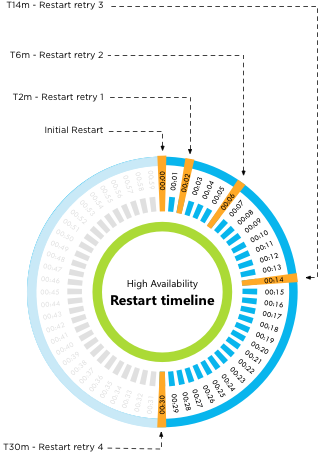
I wrote about how vSphere HA 5.x restart attempt timing works a long time ago but there appears still to be some confusion about this. I figured I would clarify this a bit more, I don’t think I can make it more simple than this:

  • Initial restart attempt
  • If the initial attempt failed, a restart will be retried after 2 minutes of the previous attempt
  • If the previous attempt failed, a restart will be retried after 4 minutes of the previous attempt
  • If the previous attempt failed, a restart will be retried after 8 minutes of the previous attempt
  • If the previous attempt failed, a restart will be retried after 16 minutes of the previous attempt

After the fifth failed attempt the cycle ends. Well that is, unless a new master host is selected (for whatever reason) between the first and the fifth attempt. In that case, we start counting again. Meaning that if a new master is selected after attempt 3, the new master will start with the “initial restart attempt.

Or as Frank Denneman would say:

vSphere HA 5.x restart attempt timing


** Disclaimer: This article contains references to the words master and/or slave. I recognize these as exclusionary words. The words are used in this article for consistency because it’s currently the words that appear in the software, in the UI, and in the log files. When the software is updated to remove the words, this article will be updated to be in alignment. **

Do I still need to set “HaltingIdleMsecPenalty” with vSphere 5.x?

Duncan Epping · Feb 4, 2013 ·

I received a question last week from a customer. They have a fairly big VDI environment and are researching the migration to vSphere 5.1. One of the changes they made in the 4.1 time frame was the advanced setting “HaltingIdleMsecPenalty” in order to optimize hyper threading fairness for their specific desktop environment. I knew that this was no longer needed but didn’t have an official reference for them (There is a blog post by Tech Marketing performance guru Mark A. that mentions it though). Today I noticed it was mentioned in a whitepaper which was recently released titled “The CPU Scheduler in VMware vSphere 5.1“. I recommend everyone to read this whitepaper as it gives you a better understanding of how the scheduler works and how it has been improved over time.

The following section is an outtake from that white paper.

Improvement in Hyper-Threading Utilization

In vSphere 4.1, a strict fairness enforcement policy on HT systems might not allow achieving full utilization of all logical processors in a situation described in KB article 1020233 [5]. This KB also provides a work-around based on an advanced ESX host attribute, “HaltingIdleMsecPenalty”. While such a situation should be rare, a recent change in the HT fairness policy described in “Policy on Hyper-Threading,” obviates the need for the work-around. Figure 8 illustrates the effectiveness of the new HT fairness policy for VDI workloads. In the experiments, the number of VDI users without violating the quality of service (QoS) requirement is measured on vSphere 4.1, vSphere 4.1 with “HaltingIdleMsecPenalty” tuning applied, and vSphere 5.1. Without the tuning, vSphere 4.1 supports 10% fewer users. On vSphere 5.1 with the default setting, it slightly exceeds the tuned performance of vSphere 4.1.

Primary Sidebar

About the Author

Duncan Epping is a Chief Technologist and Distinguished Engineering Architect at Broadcom. Besides writing on Yellow-Bricks, Duncan is the co-author of the vSAN Deep Dive and the vSphere Clustering Deep Dive book series. Duncan is also the host of the Unexplored Territory Podcast.

Follow Us

  • X
  • Spotify
  • RSS Feed
  • LinkedIn

Recommended Book(s)

Also visit!

For the Dutch-speaking audience, make sure to visit RunNerd.nl to follow my running adventure, read shoe/gear/race reviews, and more!

Do you like Hardcore-Punk music? Follow my Spotify Playlist!

Do you like 80s music? I got you covered!

Copyright Yellow-Bricks.com © 2026 · Log in