• Skip to primary navigation
  • Skip to main content
  • Skip to primary sidebar

Yellow Bricks

by Duncan Epping

  • Home
  • Unexplored Territory Podcast
  • HA Deepdive
  • ESXTOP
  • Stickers/Shirts
  • Privacy Policy
  • About
  • Show Search
Hide Search

Archives for 2009

Meet the VMTN Experts

Duncan Epping · Feb 3, 2009 ·

Tom and Eric already broke the news… VMworld Europe will also have a “Meet the VMTN Experts” session:

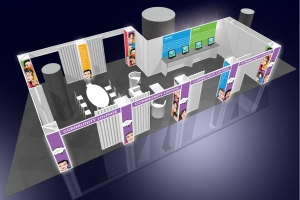
Tom Howarth already spread the word. Richard Garsthagen has confirmed, the VMworld Europe VMTN Panel gets green light. It’s not going to be a break-out session, VMware choose another format for this year’s VMTN Panel. It will be more like a meet and greet. Richard is working out the details. In the picture you can get a glimpse of the VMworld Europe Community Lounge. Looks cool, doesn’t it. The attendees so far are:

Duncan Epping of Yellow Bricks fame
Alan Renouf of powershell fame
Steve Beaver of Tripwire
Eric Sloof of NTPRO.NL
Tom Howarth The community King and the driving force behind PlanetVM.

This was a shameless copy and paste from ntpro.nl. If you want to meet the VMTN Community Experts or some of the PlanetV12n bloggers keep looking here for more details soon. It will not only be a meet and greet. You will have the chance to ask questions to specific individuals on specific topics. Discuss your current or future design. Maybe you’ve got some weird problem that you just can’t seem to fix. Or well maybe you just want to shake hands… All is possible. More details soon on when, where and who. (A couple more Experts will be announced in the upcoming days.)

Well where, it will be held in the Community Lounge, which looks awesome:
VMware Update Manager and port changes

Duncan Epping · Feb 2, 2009 ·

Today I’ve been troubleshooting a weird problem with a VMware Update Manager installation. VMware Update Manager was installed with a different port than usual because IIS was already running on the server.

When trying to install the plugin the following error appeared:

Unable to connect to the remote server

I would have expected that in either extension.xml or vci-integrity.xml in the VUM installation directory I would find a misconfigured option but this clearly wasn’t the case. Next stop: the vCenter database.

After clicking around in the database I wanted to run a query, but I still needed to find out which table the rows belonged to. I didn’t wanted to click every single table and start querying so I gave SQL this procedure a chance. The procedure is pretty straight forward, it gives you the option to enter a search string and search the entire database instead of doing “select * from emp” everytime.

EXEC SearchAllTables ‘vum-servername’

After running this procedure I found two entries which still contained the old port values which I updated with the following query:

update VPX_EXT_CLIENT set URL = ‘http://vumserver.yellow-bricks.com:8081/vci/downloads/VMware-UMClient.exe’ where Ext_Client_ID = ‘3’

I did some Oracle SQL courses back in the day when I still worked for Oracle, this is probably the first time I ever used it in real life though. 🙂

XenApp on ESX or XenServer

Duncan Epping · Feb 1, 2009 ·

There has been a lot of talk about Project VRC:

Project Virtual Reality Check (VRC) is a joint venture of Log•in Consultants and PQR, who have researched the optimal configuration for the different available hypervisors (hardware virtualization layers). The project arises from the growing demand for a founded advice on how to virtualise Terminal Server and Virtual Desktop (VDI) workloads. Through a number of researches, Log•in Consultants and PQR show you the scaling possibilities for Terminal Server environments as well as Virtual Desktops.

Most of the talk about VRC was of course on the results. (You need to login to be able to download the pdf’s.) In short: VMware ESX beats Citrix Xenserver on VDI deployments and Citrix Xenserver beats VMware ESX on XenApp deployments. I’ve heard a lot of people argue about the fact if the used test methodology was correct and if the used optimization for ESX was necessary or not. (Mem.ShareScanGhz and Mem.AllocHighThreshold, unnecessary in my opinion.) But VRC will start testing again without the “optimization” to see if these effected the results or not.

A week after the VRC published there findings Team VROOM, VMware’s Performance Team, also published a blog article on XenApp performance. They also used ESX 3.5 and Xenserver 5. But the results they harvested from their test had a different conclusion. Of course their test methodology and tools were different from Project VRC’s so it’s hard, and in my opinion impossible, to compare them. I guess both test show that you CAN virtualize a XenApp environment with little extra overhead, that’s the most important thing to remember.

Please visit both VROOM and Project VRC and start reading these excellent articles. Both have put a lot of time in testing and writing and definitely deserve your full attention, and feedback/comments!

New VMware Healthcheck Script!

Duncan Epping · Feb 1, 2009 ·

A couple of days ago I wrote an article about a “quick migration” script by William Lam.William seems to have some spare time on his hands or works 24 hours a day cause he just finished up a Health Check script. His script can be compared to the powershell healthcheck scripts and the Service Console script.

The script reports on the following:

  • vCenter Build/Release
  • ESX/ESXi Build/Release
  • Cluster(s) Name/Statistics (Hosts,CPU and MEM availabity, HA,DRS and DPM enabled)
  • ESX/ESXi Hardware configuration (NICs/HBAs)
  • ESX/ESXi State
  • ESX/ESXi Config (WIP)
  • ESX/ESXi Datastore summary
  • Virtual Machines summary
  • VM Storage summary
  • VM Network summary
  • VM w/Snapshots
  • VM w/RDMs
  • VM w/NPIV enabled
  • VM w/connected CD-ROMs
  • VM w/connected Floppys

For more details, please take a look at the sample report located at here. There’s an extensive VMTN blog article here which contains usage information. The requirements for this script is: vCenter 2.5, ESX(i) 3.5, VI-Perl Toolkit or VIMA.

Patches for 3.5

Duncan Epping · Jan 31, 2009 ·

VMware just released 9 new patches for ESX 3.5:

  • ESX350-200901401-SG – PATCH – Security – KB 1006651 – Updates VMkernel VMX hostd. But most important fix that this patch containts definitely is: VMware ESX and ESXi 3.5 U3 I/O failure on SAN LUNs, and LUN queue is blocked indefinitely. For a full description of this issue, see http://kb.vmware.com/kb/1008130.
  • ESX350-200901402-SG – PATCH – Security – KB 1006652 – Security Update to ESX Scripts
  • ESX350-200901404-BG – PATCH – Critical – KB 1006654 – Updates VMware Tools
  • ESX350-200901405-BG – PATCH – General – KB 1006655 – Updates VMware-esx-lnxcfg
  • ESX350-200901406-BG – PATCH – General – KB 1006656 – Updates Kernel Source and VMNIX
  • ESX350-200901407-BG – PATCH – General – KB 1006657 – Updates Pegasus
  • ESX350-200901408-BG – PATCH – Critical – KB 1006658 – Updates SATA Drivers
  • ESX350-200901409-SG – PATCH – Security –KB 1006659 – SNMP Security Update
  • ESX350-200901410-SG – PATCH – Security – KB 1006660 – Security Update for libxml2

There’s one “patch” released for ESXi (installable and embedded) 3.5:

  • ESXe350-200901401-O-SG – PATCH – Security – KB 1006661 – KB 1006662 – KB 1007058 – Firmware Update
    If you are using SRM in combination with ESX besure to read the KB1006661 cause this patch contains several fixes related to SRM.

There’s also a whole bunch of 3.0.x patches released, so if you’re still running 3.0.x besure to look into these new patches.

  • « Go to Previous Page
  • Page 1
  • Interim pages omitted …
  • Page 74
  • Page 75
  • Page 76
  • Page 77
  • Page 78
  • Interim pages omitted …
  • Page 85
  • Go to Next Page »

Primary Sidebar

About the Author

Duncan Epping is a Chief Technologist and Distinguished Engineering Architect at Broadcom. Besides writing on Yellow-Bricks, Duncan is the co-author of the vSAN Deep Dive and the vSphere Clustering Deep Dive book series. Duncan is also the host of the Unexplored Territory Podcast.

Follow Us

  • X
  • Spotify
  • RSS Feed
  • LinkedIn

Recommended Book(s)

Also visit!

For the Dutch-speaking audience, make sure to visit RunNerd.nl to follow my running adventure, read shoe/gear/race reviews, and more!

Do you like Hardcore-Punk music? Follow my Spotify Playlist!

Do you like 80s music? I got you covered!

Copyright Yellow-Bricks.com © 2026 · Log in