• Skip to primary navigation
  • Skip to main content
  • Skip to primary sidebar

Yellow Bricks

by Duncan Epping

  • Home
  • Unexplored Territory Podcast
  • HA Deepdive
  • ESXTOP
  • Stickers/Shirts
  • Privacy Policy
  • About
  • Show Search
Hide Search

Archives for 2009

Cisco and VMware teaming up: Unified Computing System

Duncan Epping · Mar 16, 2009 ·

“Cisco and VMware today announced a comprehensive, strategic original equipment manufacturer (OEM) agreement which will incorporate product engineering and integrated sales and support strategies for datacenter virtualization and unified computing. The resulting combination of the Cisco Unified Computing System with VMware’s upcoming virtual datacenter operating system, the VMware vSphere™, will provide customers with access to a unique and powerful virtualized and physical computing system over an intelligent, unified network fabric”

Read all about it on the press section of the  VMware website or the Cisco website. More technical details will be revealed on this section of the Cisco website. And be sure to read the view of EMC’s Chuck Hollis on these announcements, it contains some valuable information!
esxcfg-scsidevs, Exploring the next version of ESX!

Duncan Epping · Mar 16, 2009 ·

Whenever I do a beta test of a product / OS the first thing I do is check if all the features / commands that I used with the previous version still exist. When I did an “esxcfg- tab tab” on the next version of ESX one thing stood out, esxcfg-vmhbadevs was gone. I use this command a lot when investigating SAN problems, same goes for esxcfg-mpath by the way. Both print really valuable information that I usually copy & paste for keeping track of changes.

With the upcoming version of ESX(vSphere) a new command will be introduced which replaces esxcfg-vmhbadevs: esxcfg-scsidevs.

This new command has a couple of extra command line options and prints more detail than ever before, of which -l is probably the most useful. Using “esxcfg-scsidevs -l” results in:

mpx.vmhba2:C0:T0:L0
   Device Type: Direct-Access
   Size: 6144 MB
   Display Name: Local VMware, Disk (mpx.vmhba2:C0:T0:L0)
   Plugin: NMP
   Console Device: /dev/sda
   Devfs Path: /vmfs/devices/disks/mpx.vmhba2:C0:T0:L0
   Vendor: VMware,   Model: VMware Virtual S  Revis: 1.0
   SCSI Level: 2  Is Pseudo: false Status: on
   Is RDM Capable: false Is Removable: false
   Is Local: true
   Other Names:
      vml.0000000000766d686261323a303a30

One of the options I used the most with esxcfg-vmhbadevs was “-m”, which would result in the following:

vmhba0:0:0:5 /dev/sdb5 49b785f3-f263cec4-a4bd-000c29123ede

For esxcfg-scsidevs the option -m also displays this information, but VMware has added the VMFS name which makes it clear what the relationship is and saves me the extra step of matching ID’s with names manually:

mpx.vmhba0:C0:T0:L0:5 /dev/sdb5
  49b785f3-f263cec4-a4bd-000c29123ede  0  Storage1

So far I’m happy with the improvements in the service console / remote cli! Up next: iSCSI.

New sponsors, Veeam and Hyper9.

Duncan Epping · Mar 16, 2009 ·

As you might have already noticed, there are two new sponsors! I’m proud to announce that Veeam has signed up for 3 months and Hyper9 has signed up for 1 year. I want to thank both for their support and of course VMPeople for renewing for 3 months!

Cool tool update: RVTools 2.4

Duncan Epping · Mar 15, 2009 ·

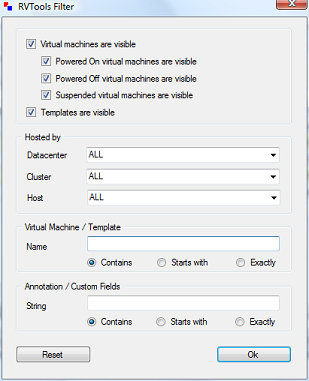
Another update again by Rob de Veij, RVTools 2.4. This release includes a new feature, filtering. Rob also revealed that the upcoming version will contain health checks. Here are the changes:

Version 2.4 (March 2009)

  • On the vDatastore tab you can now see which hosts are connected to the datastore.
  • The data on the vInfo, vCpu, vMemory, vDisk, vFloppy, vCD, vSnapshot and vTools tab pages can now be filtered.

Now head over to Rob’s website and download the new version!

Top 10 referrers over the last 30 days

Duncan Epping · Mar 14, 2009 ·

I was just looking at my stats, and every once in a while I check my top 10 referrers just to get an idea who drives the most traffic to my website. I guess most are obvious but at least two surprised me:

  1. vmware.com/vmtn/planet/v12n
  2. vmware-land.com
  3. vmwaretips.com
  4. twitter.com
  5. vmetc.com
  6. it.slashdot.org
  7. vmworld.com
  8. blogs.netapp.com
  9. rtfm-ed.co.uk
  10. virtualgeek.typepad.com

Most surprising definitely Slashdot and Twitter. (I removed the search engines and rss readers by the way.) Thanks for linking / aggregating guys!

  • « Go to Previous Page
  • Page 1
  • Interim pages omitted …
  • Page 59
  • Page 60
  • Page 61
  • Page 62
  • Page 63
  • Interim pages omitted …
  • Page 85
  • Go to Next Page »

Primary Sidebar

About the Author

Duncan Epping is a Chief Technologist and Distinguished Engineering Architect at Broadcom. Besides writing on Yellow-Bricks, Duncan is the co-author of the vSAN Deep Dive and the vSphere Clustering Deep Dive book series. Duncan is also the host of the Unexplored Territory Podcast.

Follow Us

  • X
  • Spotify
  • RSS Feed
  • LinkedIn

Recommended Book(s)

Also visit!

For the Dutch-speaking audience, make sure to visit RunNerd.nl to follow my running adventure, read shoe/gear/race reviews, and more!

Do you like Hardcore-Punk music? Follow my Spotify Playlist!

Do you like 80s music? I got you covered!

Copyright Yellow-Bricks.com © 2026 · Log in