• Skip to primary navigation
  • Skip to main content
  • Skip to primary sidebar

Yellow Bricks

by Duncan Epping

  • Home
  • Unexplored Territory Podcast
  • HA Deepdive
  • ESXTOP
  • Stickers/Shirts
  • Privacy Policy
  • About
  • Show Search
Hide Search

Archives for 2009

VMworld 2009 – Ask the Experts – Question Submission

Duncan Epping · Jul 9, 2009 ·

I’m proud to announce that the session is locked and speakers are confirmed.  Rick Scherer, Tom Howarth, Scott Lowe, Chad Sakac and myself will be running an Ask the Experts panel session at VMworld 2009 – and this is your chance to submit a question to be reviewed during the panel session!

Simply fill out the form below and your submission will be sent for review, around the beginning of August we will be notifying the submission owners if we will be using their submission or not.

So, here is your chance to have that hard hitting Virtualization/Design question answered by the best in the world!

One question that came up was if we were still going to have an open floor portion, and the answer is YES! The majority of the session will be open floor, but we do want to have a handful of good questions to help spin off the session and also for those quiet moments.
Google Chrome OS

Duncan Epping · Jul 8, 2009 ·

People have been speculating about it for a while. Just when everyone thought it would not happen anymore Google announced the Chrome OS.

Google Chrome OS is an open source, lightweight operating system that will initially be targeted at netbooks. Later this year we will open-source its code, and netbooks running Google Chrome OS will be available for consumers in the second half of 2010. Because we’re already talking to partners about the project, and we’ll soon be working with the open source community, we wanted to share our vision now so everyone understands what we are trying to achieve.

Speed, simplicity and security are the key aspects of Google Chrome OS. We’re designing the OS to be fast and lightweight, to start up and get you onto the web in a few seconds. The user interface is minimal to stay out of your way, and most of the user experience takes place on the web. And as we did for the Google Chrome browser, we are going back to the basics and completely redesigning the underlying security architecture of the OS so that users don’t have to deal with viruses, malware and security updates. It should just work.

Google Chrome OS is a new project, separate from Android. Android was designed from the beginning to work across a variety of devices from phones to set-top boxes to netbooks. Google Chrome OS is being created for people who spend most of their time on the web, and is being designed to power computers ranging from small netbooks to full-size desktop systems. While there are areas where Google Chrome OS and Android overlap, we believe choice will drive innovation for the benefit of everyone, including Google.

Don’t know about you guys but I think this sounds awesome and as a serious threat for Microsoft. Google has been taking over the world in a rapid pace and if this is being picked up who knows what happens… let the games begin!

VMware offers upgrade path to Virtual Iron customers

Duncan Epping · Jul 8, 2009 ·

I tweeted it yesterday and several bloggers already picked up. I wasn’t able to blog it cause I was at a customer site but still want to make sure the word is out. If you are a Virtual Iron customer and don’t want to get stuck on a dead end road this might be the perfect opportunity to make a U-Turn and head in the right direction!

Source: VMware Offers Safe Passage to Virtual Iron Customers
VMware, Inc. (NYSE: VMW), the global leader in virtualization solutions from the desktop through the datacenter and to the cloud, today announced that it is offering existing Virtual Iron customers an easy way to migrate their Virtual Iron deployments to VMware vSphere™ 4, the industry’s leading virtualization platform. In light of news reports that Oracle will discontinue development of existing Virtual Iron products, the VMware offer gives companies a cost-effective way to upgrade to VMware vSphere™ 4, and provides customers a clear virtualization roadmap that will help meet their needs as their business grows.

The VMware offer gives Virtual Iron end customers who have a current license and support contract compelling savings on VMware vSphere™ 4 and VMware vCenter™ Server. More specifically, eligible Virtual Iron end customers receive aggressive discounts off the list price on the below products and services:

  • VMware vSphere 4 Advanced Edition, VMware vSphere 4 Enterprise Plus Edition, VMware vCenter Server Foundation and VMware vCenter Server Standard
  • Support and subscription (SnS) on VMware vSphere 4 Advanced Edition, VMware vSphere 4 Enterprise Plus Edition, VMware vCenter Server Foundation and VMware vCenter Server Standard

Proof of a current Virtual Iron license and support contract will be required to qualify for the VMware offer. Promotional pricing is limited to the number of Virtual Iron licenses supported by a current support agreement. The offer is valid through September 30, 2009.

VMware vSphere 4 delivers Virtual Iron customers the unparalleled efficiency and performance required to run critical applications in large scale environments, uncompromised control over application security and service levels, and unmatched flexibility of hardware, OS, application architecture and on-premise vs. off-premise application hosting.

VMware vSphere 4 also delivers “Always On IT” for small and midsized businesses (SMBs) and remote and branch office (ROBO) IT environments. With VMware vSphere 4, smaller IT environments can achieve zero-downtime application availability, enterprise-class data protection, disaster recovery and simplified management at an affordable price point.

Existing Virtual Iron customers can learn more about how to migrate now to VMware vSphere 4 by visiting www.vmware.com/go/safepassage or by contacting VMware at SafePassage@vmware.com.

Max amount of VMs per VMFS volume

Duncan Epping · Jul 7, 2009 ·

Two weeks ago I discussed how to determine the correct LUN/VMFS size. In short it boils down to the following formula:

round((maxVMs * avgSize) + 20% )

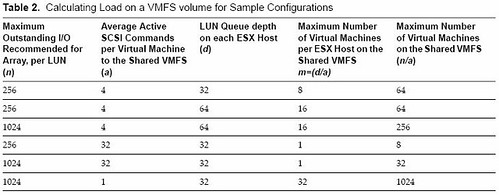
So in other words, the max amount of virtual machines per volume multiplied by the average size of a virtual machine plus 20% for snaps and .vswp rounded up. (As pointed out in the comments if you have VMs with high amounts of memory you will need to adjust the % accordingly.) This should be your default VMFS size. Now a question that was asked in one of the comments, which I already expected, was “how do I determine what the maximum amount of VMs per volume is?”. There’s an excellent white paper on this topic. Of course there’s more than meets the eye but based on this white paper and especially the following table I decided to give it a shot:

No matter what I tried typing up, and believe me I started over a billion times, it all came down to this:

  1. Decide your optimal queue depth.
    I could do a write up, but Frank Dennenman wrote an excellent blog on this topic. Read it here and read NetApp’s Nick Triantos article as well. But in short you’ve got two options:

    • Queue Depth = (Target Queue Depth / Total number of LUNs mapped from the array) / Total number of hosts connected to a given LUN
    • Queue Depth = LUN Queue Depth / Total number of hosts connected to a given LUN

    There are two options because some vendors use a Target Queue Depth and others specifically specify a LUN Queue Depth. In the case they mention both just take the one which is most restrictive.

  2. Now that you know what your queue depth should be you, let’s figure out the rest.
    Let’s take a look at the table first. I added “mv” as it was not labeled as such in the table.
    n = LUN Queue Depth
    a = Average active SCSI Commands per server
    d = Queue Depth (from a host perspective)

    m = Max number of VMs per ESX host on a single VMFS volume
    mv = Max number VMs on shared VMFS volume

    First let’s figure out what “m”, max number of VMs per host on a single volume, should be:

    • d/a = m
      queue depth 64 / 4 active I/Os on average per VM = 16 VMs per host on a single VMFS volume

    The second one is “mv”, max number of VMs on a shared VMFS volume

    • n/a = mv
      Lun Queue Depth of 1024 / 4 active I/Os on average per VM = 256 VMs in total on a single VMFS volume but multiple hosts
  3. Now that we know “d”, “m” and “mv” it should be fairly easy to give a rough estimate of the maximum amount of VMs per LUN if you actually know what your average active I/Os number is. I know this will be your next question so my tip of today:
    Windows perfmon – average disk queue length. This contains both active and queued commands.
    For Linux this is “top” and if you are already running a virtual environment open up esxtop and take a look at “qstats”.
    Another option of course would be running Capacity Planner.

Please don’t overthink this. If you are experiencing issues there are always ways to move VMs around that’s why VMware invented Storage VMotion. Standardize your environment for ease of management and also make sure you feel comfortable about the number of “eggs in one basket”.

Howto: vCenter on Windows 2008 with Oracle

Duncan Epping · Jul 6, 2009 ·

I received this how to in my email a couple of days ago from colleague Daniel Langenhan. Daniel was so kind to let my share this with you. If you are looking into installing vCenter on Windows 2008 with an Oracle database this might come in handy:

  1. Download 32bit Oracle client (even on a 64 bit system). Oracle 9i is not supported and the installer actually checks that. You only can use 10 or 11″.
  2. (10g) Download patch 5699495
  3. Install the 32 bit client using full Admin mode
  4. Use Net Manager to setup connection to Oracle server and test
  5. Use 32 bit ODBC [windows]/sysWOW64/obdcad32.exe
    The 64 bit is the one that shows up in Administrative tools and the installer will not use this.
  6. Create system DSN’s and test connection
    (10g) if error pop up doing so the patch from step 2 was not installed
  • « Go to Previous Page
  • Page 1
  • Interim pages omitted …
  • Page 32
  • Page 33
  • Page 34
  • Page 35
  • Page 36
  • Interim pages omitted …
  • Page 85
  • Go to Next Page »

Primary Sidebar

About the Author

Duncan Epping is a Chief Technologist and Distinguished Engineering Architect at Broadcom. Besides writing on Yellow-Bricks, Duncan is the co-author of the vSAN Deep Dive and the vSphere Clustering Deep Dive book series. Duncan is also the host of the Unexplored Territory Podcast.

Follow Us

  • X
  • Spotify
  • RSS Feed
  • LinkedIn

Recommended Book(s)

Also visit!

For the Dutch-speaking audience, make sure to visit RunNerd.nl to follow my running adventure, read shoe/gear/race reviews, and more!

Do you like Hardcore-Punk music? Follow my Spotify Playlist!

Do you like 80s music? I got you covered!

Copyright Yellow-Bricks.com © 2026 · Log in