• Skip to primary navigation
  • Skip to main content
  • Skip to primary sidebar

Yellow Bricks

by Duncan Epping

  • Home
  • Unexplored Territory Podcast
  • HA Deepdive
  • ESXTOP
  • Stickers/Shirts
  • Privacy Policy
  • About
  • Show Search
Hide Search

Archives for 2009

vscsiStats output in esxtop format?

Duncan Epping · Dec 17, 2009 ·

This week we(Frank Denneman and I) played around with vscsiStats, it’s a weird command and hard to get used to when you normally dive into esxtop when there are performance issues. While asking around for more info on the metrics and values someone emailed us nfstop. I assumed it was NDA or at least not suitable for publication yet  but William Lam pointed me to a topic on the VMTN Communities which contains this great script. Definitely worth checking out. This tool parses the vscsiStats output into an esxtop format. Below a screenshot of what that looks like:

vscsiStats

Duncan Epping · Dec 17, 2009 ·

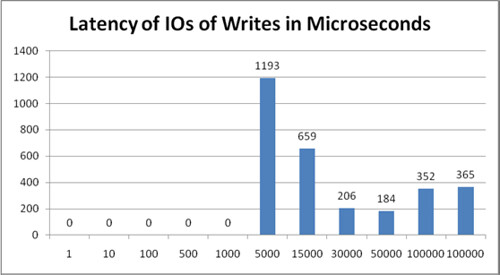
I was doing performance troubleshooting with Frank Denneman this week and we wanted to use “vscsiStats” to verify if there was any significant latency.

We checked multiple whitepapers before we went onsite and our primary source was this excellent article by Scott Drummonds. After start vscsiStats and receiving a “successful started”  we waited for 15 minutes and verified if we could see any data at all. Unfortunately we did not see anything. What is happening here? We checked the build/patch level and it was ESX 3.5 Update 4. Nothing out of the ordinary I would say. After trying several VMs we still did not see anything with “vscsiStats -s -w <worldID>”. For some weird reason, in contrary to what all blog articles are stating and what Scott Drummonds states we had to use the following command:

vscsiStats -s -t -w <worldID>

This might not be the case in most situations, but again we had to add “-t” to capture any data. You can find the world ID of the VM you want to monitor the performance by using the following command:

vscsiStats -l

After a couple of minutes you can verify if any data is being collected by using the following command:

vscsiStats -p all -w <worldID>

If you want to save your data in a CSV file to import it in Excel use the following:

vscsiStats -p all -c -w <worldID> > /tmp/vmstats-<vmname>.csv

Don’t forget to stop the monitoring:

vscsiStats -x -w <worldID>

So what’s the outcome of this all? Well with vscsiStats you can create great diagrams which for instance show the latency. This can be very useful in NFS environments as esxtop does not show this info:

If you don’t want to do this by hand, check out this article by Gabe.

VMware vCenter Appspeed 1.2 has just been released

Duncan Epping · Dec 16, 2009 ·

VMware has just released Appspeed 1.2. AppSpeed inspects traffic flowing over the vSwitch, discovers and maps the environment, monitors performance against SLAs and enables root cause analysis. Does sound like a tool you could use in your virtualized environment doesn’t it?

New Features:

VMware vCenter AppSpeed provides proactive performance management and service-level reporting for applications running within virtual appliances. By analyzing the traffic that flows between end-users, Web applications, and back-end servers, AppSpeed provides visibility into multitier applications and enables rapid identification of performance issues originating from inadequate resource allocation and application problems.

  • Enhanced AppSpeed scalability AppSpeed scalability has been enhanced, enabling a single AppSpeed Server to monitor significantly larger environments (more servers, applications and transactions). You can now specifically exclude servers that do not need to be monitored.
  • Central management for multiple AppSpeed Servers You can now install more than one AppSpeed Server and control the environment of each AppSpeed Server from a single user interface. This enables additional scalability for monitoring large environments, while delivering centralized visibility of application performance and service levels.
  • Enhanced mapping capabilities Improvements have been made in the mapping algorithms, enabling smarter, more accurate application grouping and transaction analysis.
  • Topology editing from the user interface You can now merge, split or delete applications, providing greater control over how your monitoring data is presented. All of the operations are accessible from the AppSpeed user interface.
  • Enhanced security using a vCenter-based authentication model Connection to AppSpeed Servers is now authenticated against vCenter. A new AppSpeed privilege has been introduced and AppSpeed access is now only granted to AppSpeed-privileged users.
  • New latency-focused Analysis views Two new latency-focused analysis views have been introduced in the AppSpeed user interface, enabling more detailed visibility for latency analysis and troubleshooting:
    • A view that compares a single application or transaction latency between servers
    • A view that compares transaction or server latency with their latency baselines, pointing to latency anomalies

Blogging about View

Duncan Epping · Dec 15, 2009 ·

I had discussion with Richard Garsthagen during the Dutch VMUG about View/VDI related blogs, or better said the lack of. It appears that desktop is a topic bloggers are avoiding. The weird thing about it is that in the industry View is picking up more and more.

Yes there are a couple of bloggers out there who are focussing onView like my colleague Christoph Dommermuth but compared to the “core” product their share is tiny. For me personally there’s a simple reason you don’t see me blogging about View, it’s not part of my focus area.

Something I overlooked during the discussion are the two excellent whitepapers/articles Herco van Brugh wrote. The first one is a brand new whitepaper and discusses how to correctly scale your storage based on a couple simple formulas.

  1. Download whitepaper here. (NEW!)
    Virtual Desktop Infrastructure, or VDI, is hot. It’s cool, secure, centrally managed, flexible – it’s an IT manager’s dream.
    However, as it turns out, there is a hidden danger to VDI. There’s a killer named “IOPS”.
  2. Creating a VDI template
    This guide is based on Windows XP because of its low resources usage compared to Vista and even Windows 7. The general idea however also applies to those versions although specific services and registry keys will most likely not work. Skipping Vista, the next version of this guide will focus on Windows 7.

Another thing I overlooked when I was doing a little research were the Reference Architectures EMC did. There’s some good info to be found in these. So it seems that there is info out there, I guess the “problem” is that there are only 1 or 2 bloggers who are solely focusing on View. So if you are a VDI/View Consultant now it is time to speak up. Step into the world of blogging and let your voice be heard!

Cool Tool: vAudit

Duncan Epping · Dec 14, 2009 ·

For some weird reason I never picked up on this tool. Months ago Richard Garsthagen released a beta version of vAudit and recently it was updated to version 1.5.

Why would you use vAudit? vAudit has been developed to show you when your VDI Users are logging in and for how long they are using the virtual desktop. I think it is the ideal auditing tool during a Proof of Concept. Are your users actually using it as much as they are saying? When are they using it and for how long?

vAudit has an export to CSV feature which enables you to analyze trends regarding usage. Below you can find the release notes and a link to the download section of Richard’s site.

Download Version 1.5

  • vAudit now also checks for login failures, so you can detect if people are trying to hack into your system.
  • You can now resize the username column, so you can actually read the username if you have long domain names.
  • When you MouseOver a session, it will display the machine name and time information.

In the next release, I will try to add information about your top users, make an export function and at some point will give your a graph with daily concurrent usage.

  • « Go to Previous Page
  • Page 1
  • Page 2
  • Page 3
  • Page 4
  • Page 5
  • Interim pages omitted …
  • Page 85
  • Go to Next Page »

Primary Sidebar

About the Author

Duncan Epping is a Chief Technologist and Distinguished Engineering Architect at Broadcom. Besides writing on Yellow-Bricks, Duncan is the co-author of the vSAN Deep Dive and the vSphere Clustering Deep Dive book series. Duncan is also the host of the Unexplored Territory Podcast.

Follow Us

  • X
  • Spotify
  • RSS Feed
  • LinkedIn

Recommended Book(s)

Also visit!

For the Dutch-speaking audience, make sure to visit RunNerd.nl to follow my running adventure, read shoe/gear/race reviews, and more!

Do you like Hardcore-Punk music? Follow my Spotify Playlist!

Do you like 80s music? I got you covered!

Copyright Yellow-Bricks.com © 2026 · Log in