• Skip to primary navigation
  • Skip to main content
  • Skip to primary sidebar

Yellow Bricks

by Duncan Epping

  • Home
  • Unexplored Territory Podcast
  • HA Deepdive
  • ESXTOP
  • Stickers/Shirts
  • Privacy Policy
  • About
  • Show Search
Hide Search

Archives for 2009

What’s that ALUA exactly?

Duncan Epping · Sep 29, 2009 ·

Of course by now we have all read the excellent and lengthy posts by Chad Sakac on ALUA. I’m just a simple guy and usually try to summarize posts like Chad’s in a couple of lines which makes it easier for me to remember and digest.

First of all ALUA stands for “Asymmetric Logical Unit Access”. As Chad explains and as a google search shows it’s common for midrange arrays these days to have ALUA support. With midrange we are talking about EMC Clariion, HP EVA and others. My interpretation of ALUA is that you can see any given LUN via both storage processors as active but only one of these storage processors “owns” the LUN and because of that there will be optimized and unoptimized paths. The optimized paths are the ones with a direct path to the storage processor that owns the LUN. The unoptimized paths have a connection with the storage processor that does not own the LUN but have an indirect path to the storage processor that does own it via an interconnect bus.

In the past when you configured your HP EVA(Active/Active according to VMware terminology) attached VMware environment you would have had two(supported) options as pathing policies. The first option would be Fixed and the second MRU. Most people used Fixed however and tried to balance the I/O. As Frank Denneman described in his article this does not always lead to the expected results. This is because the path selection might not be consistent within the cluster and this could lead to path thrashing as one half of the cluster is accessing the LUN through storage processor A and the other half through storage processor B.

This “problem” has been solved with vSphere. VMware vSphere is aware of what the most optimal path is to the LUN. In other words VMware knows which processor owns which LUNs and sends traffic preferably directly to the owner. If the optimized path to a LUN is dead an unoptimized path will be selected and within the array the I/O will be directed via an interconnect to the owner again. The pathing policy MRU also takes optimized / unoptimized paths into account. Whenever there’s no optimized path available MRU will use an unoptimized path; when an optimized path returns MRU will switch back to the optimized path. Cool huh!?!

What does this mean in terms of selecting the correct PSP? Like I said you will have three options: MRU, Fixed and RR. Picking between MRU and Fixed is easy in my opinion as MRU is aware of optimized and unoptimized paths it is less static and error prone than Fixed. When using MRU however be aware of the fact that your LUNs need to be equally balanced between the storage processors, if they are not you might be overloading one storage processor while the other is doing absolutely nothing. This might be something you want to make your storage team aware off. The other option of course is Round Robin. With RR 1000 commands will be send down a path before it switches over to the next one. Although theoretically this should lead to a higher throughput I haven’t seen any data to back this “claim” up. Would I recommend using RR? Yes I would, but I would also recommend to perform benchmarks to ensure you are making the right decision.
It’s a sad day…

Duncan Epping · Sep 28, 2009 ·

For me personally it’s a sad day because my colleague, Yvo, has just resigned. Yvo is part of the VMware PSO Benelux team as a Senior Consultant and Operational Readiness Practice Lead and besides a great guy also one of the best consultants I ever worked with. Of course I am happy for Yvo and fully understand his decision as this is a great career opportunity and wish him all the best in the world at Cisco. (Get me a box UCS will you?!?! ;-))

As you can imagine we will more than likely need someone to fill Yvo’s spot as a Senior Consultant. So for one of you this might just be what you have been waiting for. If you are fluently Dutch and English, willing to travel, flexible and an expert on virtualization and have got solid consultancy skills you might just be the person we need. If you think you are or if you want more info, drop me an email and I will get you in contact with the right people or we can have an informal chat about the position. (duncan at yellow-bricks.com)

Fixed: Memory alarms triggered with AMD RVI and Intel EPT?

Duncan Epping · Sep 25, 2009 ·

I wrote about two weeks ago and back in March but the issues with false memory alerts due to large pages being used have finally been solved.

Source

Fixes an issue where a guest operating system shows high memory usage on Nehalem based systems, which might trigger memory alarms in vCenter. These alarms are false positives and are triggered only when large pages are used. This fix selectively inhibits the promotion of large page regions with sampled small page files. This provides a specific estimate instead of assuming a large page is active when one small page within it is active.

BEFORE INSTALLING THIS PATCH: If you have set Mem.AllocGuestLargePage to 0 to workaround the high memory usage issue detailed in the Summaries and Symptoms section, undo the workaround by setting Mem.AllocGuestLargePage to 1.

Six patches have been released today but this fix was probably the one that people talk about the most that’s why I wanted to make everyone aware of it! Download the patches here.

Using limits instead of downscaling….

Duncan Epping · Sep 25, 2009 ·

I’ve seen this floating around the communities a couple of times and someone also mentioned this during a VCDX Panel: setting limits on VMs when you are not allowed to decrease the memory. For example you want to P2V a server with 8GB of memory and an average utilization of 15%. According to normal guidelines it would make sense to resize the VM to 2GB, however due to political reasons (I paid for 8GB and I demand…) this is not an option. This is when people start looking into using limits. However I don’t recommend this approach and there’s a good reason for it.

Using limits can lead to serious performance issues when the VM starts swapping. As many of you know the first thing that happens when you reach the limit is that the balloon driver kicks in. The balloon driver will force the OS to swap out. Of course this will affect performance but at least when the OS gets to pick the pages it will do this in a smart way. When the OS reaches its limits the VMkernel will start swapping and this is where it gets nasty because the VMkernel does not take anything into account. It could easily swap out pages actively being used by your application or operating system which will affect the performance of your VM heavily. (That’s a short summary of the process, if you want a more in-depth explanation of this please read this excellent post by Scott “VMGuru” Herold.)

Swapping, either VMkernel or OS, is the reason I don’t recommend using limits. Just think about it for a minute. You probably convinced the application owner to virtualize their services with arguments like availability, flexibility and equal performance. Setting a limit will more than likely affect performance when the threshold is in reach and thus hurt their trust in virtualization and the IT organization. Another side effect is that there’s no way to recover from swapping without a reboot, which will mean availability will also be decreased. In other words; avoid setting limits.

I do however understand why admins take these drastic steps; but again I don’t agree. If you want to convince your application owner that their VM needs to be resized monitor it. Prove to them that the server is not utilizing the memory and claim it back. Claiming back is difficult, that’s why I personally recommend to invest more time and effort during the first phase of your P2V project, educate the application owner and convince them with the outcome of your capacity planning tools. Explain them how easy it is to increase memory and make them feel more comfortable by adding a week of aftercare which includes resource monitoring. If you really want to convince them, but that’s dependent on the level of maturity within the organization, change the cost-model and make it more attractive to downsize…

dvSwitch?

Duncan Epping · Sep 24, 2009 ·

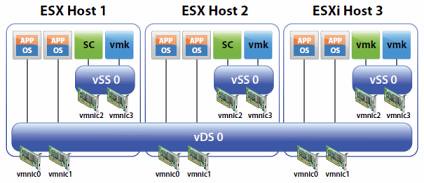
I receive the same question around dvSwitches almost every week; should I only use dvSwitches or go for a hybrid model? The whitepaper that has been released a couple of months ago clearly states that a hybrid model is a supported configuration but would I recommend it? Or would a pure vDS model make more senses?

Let me first start with the most obvious answer: it depends. Let’s break it down and create two categories:

  1. Hosts with two NIC ports
  2. Hosts with more than two NIC ports

Now most of you would probably say who the hell would only have two NIC ports? Think 10Gbe in blade environments for instance. With only two physical NIC ports available you would not have many options. You would have exactly two options(if not using Flex-10 of course):

  1. Pure vDS
  2. Pure vSwitch

Indeed, no hybrid option as you would still want to have full redundancy which means you will need at least 2 physical ports for any virtual switch. Now what would I recommend when there are only two physical NIC ports available; I guess it depends on the customer. There are multiple pros and cons for both models but I will pick the most obvious and relevant two for now:

  1. PRO vDS: Operational benefits. Updating port groups, consistency and increased flexibility with vDS.
  2. CON vDS: If vCenter fails there’s no way to manage your vDS

There it is; probably the most important argument on why or why not to run your Service Console on a vDS. If vCenter fails there’s no way to manage your vDS. For me personally this is the main reason why I would most like not recommend running your Service Console/VMkernel portgroups on a dvSwitch. In other words: Hybrid is the way to go…

<update 21-April-2011>
I guess it all comes down to what you are comfortable with and a proper operational procedure! But why? Why not just stick to Hybrid? I guess you could, but than again why not benefit from what dvSwitches have to offer? Especially in a converged network environment being able to use dvSwitches will make your life a bit easier from an operational perspective. On top of that you will have that great dvSwitch only Load Based Teaming to your disposal, load balancing without the need to resort to IP-Hash. I guess my conclusion is: Go Distributed… There is no need to be afraid if you understand the impact and risks and mitigate these with solid operational procedures.
</update 21-April-2011>


  • « Go to Previous Page
  • Page 1
  • Interim pages omitted …
  • Page 15
  • Page 16
  • Page 17
  • Page 18
  • Page 19
  • Interim pages omitted …
  • Page 85
  • Go to Next Page »

Primary Sidebar

About the Author

Duncan Epping is a Chief Technologist and Distinguished Engineering Architect at Broadcom. Besides writing on Yellow-Bricks, Duncan is the co-author of the vSAN Deep Dive and the vSphere Clustering Deep Dive book series. Duncan is also the host of the Unexplored Territory Podcast.

Follow Us

  • X
  • Spotify
  • RSS Feed
  • LinkedIn

Recommended Book(s)

Also visit!

For the Dutch-speaking audience, make sure to visit RunNerd.nl to follow my running adventure, read shoe/gear/race reviews, and more!

Do you like Hardcore-Punk music? Follow my Spotify Playlist!

Do you like 80s music? I got you covered!

Copyright Yellow-Bricks.com © 2026 · Log in