• Skip to primary navigation
  • Skip to main content
  • Skip to primary sidebar

Yellow Bricks

by Duncan Epping

  • Home
  • Unexplored Territory Podcast
  • HA Deepdive
  • ESXTOP
  • Stickers/Shirts
  • Privacy Policy
  • About
  • Show Search
Hide Search

Archives for 2009

Working on a book with @roidude and @vcdx001

Duncan Epping · Oct 21, 2009 ·

The vSphere Quick Start Guide has not even been officially published yet(But it will be within 3 weeks, that’s a promise!) and I am already working on a “new” book. Well “new” it’s not actually brand new, it’s an update of “Deploying the VMware Infrastructure” published in 2008 by SAGE/Usenix. I wrote a short article about it back in 2008 when John Arrasjid(@vcdx001) mailed me a copy of the book for reviewing. There’s more info to be found on the previous book at SAGE.

This book is not a technical deepdive. It’s an overview of the VMware product line and where each of these products fit in. We are on extreme short deadlines and will be trying to update the contents of the book before the end of November so we can get it out asap with the help of SAGE/Usenix. I’m very excited I can work with both Steve Kaplan(@roidude) and John Arrasjid on this book as I highly respect both individuals and think they are thought leaders in their respective field of expertise. More info to follow hopefully soon…
Which Metrics does DRS use?

Duncan Epping · Oct 15, 2009 ·

I received a question a while back about DRS initiated VMotions. One of my customers wanted to know which metrics were used by DRS for deciding if a VM needs to be VMotioned to a different host or not. These metrics are:

Host CPU: Active (includes run and ready Mhz)

Host Memory: Active

Just a little something that’s nice to know I guess. I need to dive into the actual algorithm that is being used by DRS and if I can find some decent info and have some spare time on my hands I will definitely write an article about it.

Active / Standby etherchannels?

Duncan Epping · Oct 12, 2009 ·

I’ve seen this a couple of times already and just had a very long phone call with a customer who created the following set up:

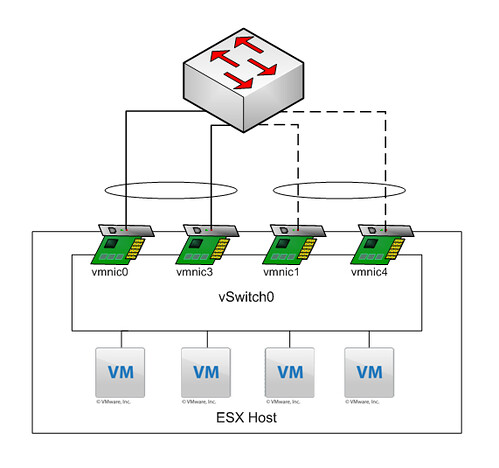
So basically the first two nics are active with load balancing set to IP-Hash and configured as an Etherchannel on the stacked Cisco 3750’s. The second pair are “standby”. Also with load balancing set to IP-Hash and configured as a second Etherchannel on the stacked Cisco 3750’s. A diagram probably makes more sense:

Explanation: All NICs belong to the same vSwitch. Etherchannel 01 consist of “vmnic0” and “vmnic3” and both are active. Etherchannel 02 consists of “vmnic1” and “vmnic4” and both are standby.

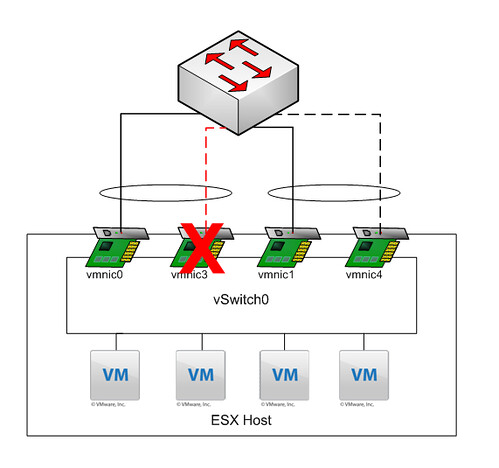
My customer created this to ensure a 2Gb link is always available. In other words if “vmnic3” fails “vmnic1” and “vmnic4” should take over as they are a “pair”. But is this really what happens when “vmnic3” fails?

As you can clearly see, what they expected to happen did not happen. When “vmnic3” failed VMware ESX “promoted” the first standby NIC to active, which in this case belongs to a different Etherchannel. What happened next was not a pretty sight, mac-address table went completely nuts with “MACFLAPS” all over the place. I’m not a networking guy but I can tell you this introducing a loop when you configured portfast is not a smart idea. DON’T DO THIS AT HOME KIDS!

SRM 4.0, Howto’s by Cormac Hogan

Duncan Epping · Oct 12, 2009 ·

One of my colleagues, Cormac Hogan, posted some excellent guides for SRM 4.0:

  1. Steps to setup VMware vCenter Site Recovery Manager 4.0 with IBM SVC
    VMware vCenter Site Recovery Manager 4.0 is a disater recovery product which uses array replication technologies to failover from one site to another. This particular document looks at one particular vendor (IBM) and one particular array model (SVC). The document will take you through the replication and snapshot setup steps.
  2. Steps to setup VMware vCenter Site Recovery Manager 4.0 with EMC Celerra NAS Replications
    VMware vCenter Site Recovery Manager 4.0 is a disater recovery product which uses array replication technologies to failover from one site to another. This particular document looks at one particular vendor (EMC) and one particular array model (Celerra). This document also focuses on configuring a new feature introduced in SRM 4.0, namely NAS (NFS) replictions. The document will take you through the replication and snapshot setup steps using only the command line interface (CLI).
  3. Steps to setup VMware vCenter Site Recovery Manager 4.0 with NetApp NAS Replications
    VMware vCenter Site Recovery Manager 4.0 is a disater recovery product which uses array replication technologies to failover from one site to another. This particular document looks at one particular vendor (NetApp) and uses their FAS simulator. However the steps are also applicable to their standard arrays. This document also focuses on configuring a new feature introduced in SRM 4.0, namely NAS (NFS) replictions. The document will take you through the replication and snapshot setup steps using only the command line interface (CLI).

Make sure to read them if you are implementing SRM in combination with one of the mentioned arrays!

Best Practices: running vCenter virtual (vSphere)

Duncan Epping · Oct 9, 2009 ·

Yesterday we had a discussion on running vCenter virtual on one of the internal mailinglists. One of the gaps identified was the lack of a best practices document. Although there are multiple for VI3 and there are some KB articles these do need seem to be easy to find or complete. This is one of the reasons I wrote this article. Keep in mind that these are my recommendations and they do not necessarily align with VMware’s recommendations or requirements.

Sizing

Sizing is one of the most difficult parts in my opinion. As of vSphere the minimum requirements of vCenter have changed but it goes against my personal opinion on this subject. My recommendation would be to always start with 1 vCPU for environments with less than 10 hosts for instance. Here’s my suggestion:

  • < 10 ESX Hosts
    • 1 x vCPU
    • 3GB of memory
    • Windows 64Bit OS(preferred) or Windows 32Bit OS
  • > 10 ESX Hosts but < 50 ESX Hosts
    • 2 x vCPU
    • 4GB of memory
    • Windows 64Bit OS(preferred) or Windows 32Bit OS
  • > 50 ESX hosts but < 200 ESX Hosts
    • 4 x vCPU
    • 4GB of memory
    • Windows 64Bit OS(preferred) or Windows 32Bit OS
  • > 200 ESX Hosts
    • 4 x vCPU
    • 8GB of memory
    • Windows 64Bit OS(requirement)

My recommendation differ from VMware’s recommendation. The reason for this is that in small environments(<10 Hosts) there’s usually more flexibility for increasing resources in terms of scheduling down time. Although 2 vCPUs are a requirement I’ve seen multiple installations where a single vCPU was more than sufficient. Another argument for starting with a single vCPU would be “Practice What You Preach”. (How many times have you convinced an application owner to downscale after a P2V?!) I do however personally prefer to always use a 64Bit OS to enable upgrades to configs with more than 4GB of memory when needed.

vCenter Server in a HA/DRS Cluster

  1. Disable DRS(Change Automation Level!) for your vCenter Server and make sure to document where the vCenter Server is located (My suggestion would be the first ESX host on the cluster).
  2. Make sure HA is enabled for your vCenter Server, and set the startup priority to high. (Default is medium for every VM.)
  3. Make sure the vCenter Server VM gets enough resources by setting the shares for both Memory and CPU to “high”.
  4. Make sure other services and servers on which vCenter depends are also starting automatically, with a high priority and in the correct order like:
    1. Active Directory.
    2. DNS.
    3. SQL.
  5. Write a procedure to boot the vCenter / AD / DNS / SQL manually in case of a complete power outage occurs.

Most of these recommendations are pretty obvious but you would be surprised how many environments I’ve seen where for instance MS SQL had a medium startup priority and vCenter a high priority. Or where after a complete power outage no one knows how to boot the vCenter Server. Documenting standard procedures is key here; especially know that with vSphere vCenter is more important than ever before.

Source:
http://kb.vmware.com/kb/1009080

http://kb.vmware.com/kb/1009039
ESX and vCenter Server Installation Guide
Upgrade Guide

  • « Go to Previous Page
  • Page 1
  • Interim pages omitted …
  • Page 12
  • Page 13
  • Page 14
  • Page 15
  • Page 16
  • Interim pages omitted …
  • Page 85
  • Go to Next Page »

Primary Sidebar

About the Author

Duncan Epping is a Chief Technologist and Distinguished Engineering Architect at Broadcom. Besides writing on Yellow-Bricks, Duncan is the co-author of the vSAN Deep Dive and the vSphere Clustering Deep Dive book series. Duncan is also the host of the Unexplored Territory Podcast.

Follow Us

  • X
  • Spotify
  • RSS Feed
  • LinkedIn

Recommended Book(s)

Also visit!

For the Dutch-speaking audience, make sure to visit RunNerd.nl to follow my running adventure, read shoe/gear/race reviews, and more!

Do you like Hardcore-Punk music? Follow my Spotify Playlist!

Do you like 80s music? I got you covered!

Copyright Yellow-Bricks.com © 2026 ยท Log in