• Skip to primary navigation
  • Skip to main content
  • Skip to primary sidebar

Yellow Bricks

by Duncan Epping

  • Home
  • Unexplored Territory Podcast
  • HA Deepdive
  • ESXTOP
  • Stickers/Shirts
  • Privacy Policy
  • About
  • Show Search
Hide Search

Archives for November 2009

Creating a VDI template

Duncan Epping · Nov 18, 2009 ·

Herco van Brug wrote a great article on how to build a solid VDI/View Windows XP Template. Herco recently designed and implemented a large View environment and this article is the outcome. I only quoted the first paragraph as the article is subject to change. Please visit the source article for the full details, it is worth reading!

A basic Windows XP machine can do a lot of things. Apart from facilitating an environment for a user’s applications, it can do things like self maintenance, updates, hardware changes, etc. This is nice in a physical environment with lots of different pieces of hardware but in a virtual instance things hardly change, the environment is pretty much set and all tricks to speed things up usually have an adverse effect on the infrastructure. All these virtual instances need to share the often rather limited amount of resources.

To keep things in check, there’s a lot of things that can be done to optimize an XP image for a virtual desktop. This guide is created from several documents that are already out there but also from our own experience and experience from a couple of other VDI specialists.

This guide is based on Windows XP because of its low resources usage compared to Vista and even Windows 7. The general idea however also applies to those versions although specific services and registry keys will most likely not work. Skipping Vista, the next version of this guide will focus on Windows 7.

Iomega IX4-200d

Duncan Epping · Nov 16, 2009 ·

This friday I received a package. I felt 10-years old again, it was like unwrapping a Christmas present. One hell of a Christmas present I must say and I want to thank EMC and especially Chad Sakac! I un-boxed the two Iomega IX4-200d units and turned them on.
After a couple of minutes I had them up and running. It’s a matter of turning them on and wait until they receive an ip-address from your DHCP server. Of course I changed the DHCP address to a fixed address, this is literally a couple of clicks.

I guess that’s the story of the Iomega IX4-200d, everything is just a couple of clicks. You want to enable iSCSI? Three clicks. You want to set Quotas? Three clicks. You want to add a user? Three clicks… I see a trend don’t you?!

Within a matter of minutes I did not only had both devices running I also setup a replication schedule for the CIFS share… That’s another great thing about this device: CIFS, NFS, iSCSI, Apple File Sharing and FTP. There should at least be one that fits your needs. I will try to do some decent testing soon when I receive my new desktop and a decent 1Gb switch…

For now I can recommend the Iomega IX4-200d to everyone. They are simple to use and look awesome.

Performance: Thin Provisioning

Duncan Epping · Nov 15, 2009 ·

I had a discussion about Thin Provisioning with a colleague last week. One of the reasons for me not to recommend it yet for high I/O VMs was performance. I had not seen a white-paper or test yet that showed their was little impact of growing the VMDK. Eric Gray of Vcritical.com had the scoop, VMware just published an excellent whitepaper called “Performance study of VMware vStorage Thin Provisioning“. I highly recommend it!

Surprisingly enough there is no performance penalty for writing to a Thin Provisioned VMDK when it comes to locking. I expected that due to SCSI reservations there would at least be some sort of hit but there isn’t. (Except for zero’ing of course, see paragraph below) The key take away for me still is: operational procedures.

Make sure you set the correct alarms when thin provisioning a VMDK. You need to regularly check what the level of “overcommitment” is, what the total capacity is and the percentage of disk space still available.

Another key take away is around performance though:

The figure shows that the aggregate throughput of the workload is around 180MBps in the post-zeroing phase of both thin and thick disks, and around 60MBps when the disks are in zeroing phase.

In other words, when the disk is zeroed out while writing there’s a HUGE and I mean HUGE performance hit. To avoid this for thick disks there’s an option called “eager zeroed thick”. Although this type is currently only available from the command line and takes longer to provision, as it zeroes out the disk on creation, it could lead to a substantial performance increase. This would only be beneficial for write intensive VMs of course, but it definitely is something that needs to taken into account.

Please note: On page two, bottom, it states that VMDKs on NFS are thin by default. This is not the case. It’s the NFS server that dictates the type of disks used. (Source: page 99)

VCP 4 exam…

Duncan Epping · Nov 14, 2009 ·

Today, Friday the 13th, I did my VCP 4 exam. I was a bit nervous as I, literally, only had a couple of hours to prepare. I did however pass. Because I only had a couple of hours to prepare I focused on what I expected to be the most difficult part to score on, the max configs. I used Simon’s VCP vSphere practice exam to test if I actually knew them or not. Here are the links to the resources I used:

  • Configuration Maximums for VMware vSphere 4.0 (Updated 9/23/2009)
  • http://www.simonlong.co.uk/blog/vcp-vsphere-4-practice-exam/
  • Resource Management Guide
  • What’s New in VMware vSphere 4.0

So who’s next?

Resource Pools and Shares

Duncan Epping · Nov 13, 2009 ·

I just wanted to write a couple of lines about Resource Pools. During most engagements I see environments where Resource Pools have been implemented together with shares. These Resource Pools are usually labeled “Low”, “Normal” and “High” with the shares set respectively. This is the traditional example being used during the VMware vSphere / VI3 course. Why am I writing about this you might ask yourself as many have successfully deployed environments with resource pools.

The problem I have with default implementations is the following:

Sibling resource pools share resources according to their relative share values.

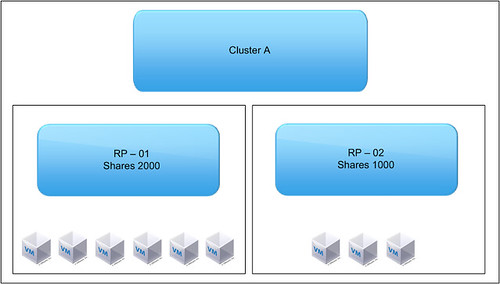
Please read this line a couple of times. And then look at the following diagram:

What’s the issue here?

RP – 01 -> 2000 Shares -> 6 VMs
RP – 02 -> 1000 Shares -> 3 VMs

So what happens if these 9 VMs start fight for resources. Most people assume that the 6 VMs, which are part of RP-01,  get more resources than the 3 VMs. Especially when you name them “Low” and “Normal” you expect the VMs which are part of “Low” to get a “lower” amount of resources than those which belong to the “Normal” resource pool. But is this the case?

No it is not. Sibling resource pools share resources according to their relative share values. In other words, resources are divided on a resource pool level, not on a per VM level. So what happens here? RP-01 will get 66% of the resources and RP-02 will get 33% of the resources. But because RP-01 contains twice as many VMs as RP-02 this will not make a difference when all VMs are fighting over resources… Each VM will roughly get the same amount of processor time. This is something that not many people take into account when designing an infrastructure or when implementing resource pools.

  • « Go to Previous Page
  • Page 1
  • Page 2
  • Page 3
  • Page 4
  • Page 5
  • Page 6
  • Go to Next Page »

Primary Sidebar

About the Author

Duncan Epping is a Chief Technologist and Distinguished Engineering Architect at Broadcom. Besides writing on Yellow-Bricks, Duncan is the co-author of the vSAN Deep Dive and the vSphere Clustering Deep Dive book series. Duncan is also the host of the Unexplored Territory Podcast.

Follow Us

  • X
  • Spotify
  • RSS Feed
  • LinkedIn

Recommended Book(s)

Also visit!

For the Dutch-speaking audience, make sure to visit RunNerd.nl to follow my running adventure, read shoe/gear/race reviews, and more!

Do you like Hardcore-Punk music? Follow my Spotify Playlist!

Do you like 80s music? I got you covered!

Copyright Yellow-Bricks.com © 2026 · Log in