• Skip to primary navigation
  • Skip to main content
  • Skip to primary sidebar

Yellow Bricks

by Duncan Epping

  • Home
  • Unexplored Territory Podcast
  • HA Deepdive
  • ESXTOP
  • Stickers/Shirts
  • Privacy Policy
  • About
  • Show Search
Hide Search

Archives for January 2009

“Quick” Migration for VM’s running on ESXi 3.5u2+

Duncan Epping · Jan 27, 2009 ·

Mike D was the first one that actually wrote a powershell quick migration script that exactly does the same as Microsofts Quick Migration. (Suspend on host 1, Resume on host 2.) Yesterday William Lam emailed me about a script that he created that actually does the same as Mike D’s script. But, William’s script was specifically designed for ESXi and he used Perl to do the job. Before we get into the “is this supported with the current API/RCLI discussion“, William contacted VMware and certain procedures used will be restricted again in the next update for ESXi.

William described his script as follows:

ESXi is a formidable hypervisor solution in both licensed and free operation mode. When fully licensed in a Virtual Center cluster, ESXi’s features (VMotion, HA, DRS, VCB, etc…) are indistinguishable from ESX. One feature of importance, VMotion, is used to perform live migrations of VMs that reside on shared storage from one host to another. In free operation mode however, ESXi hosts are independent of each other, in which case, useful features like VMotion become unusable.

The motivation for this script (ghettoQuickMigrate.sh) then is to provide administrators running the free version of ESXi on several hosts with the capability to perform Hyper-V-like “quick” migrations of virtual machines residing on shared storage between the hosts. VMware’s VIMA virtual appliance was chosen as the central launch point for the quick migration process. ghettoQuickMigration.sh is executed from within VIMA and is compatible with ESXi 3.5u2+.

William wrote an extensive Communities blog post on how this script works, what the requirements are and how to set this up. Another reason for you to start using VIMA!
High Availability “Deepdive” page

Duncan Epping · Jan 26, 2009 ·

I’ve just created a new Page. This page will also deal about VMware HA. I threw all my “deepdive” posts into one page which makes it easier to find for you guys and search engines. But most important, easier to maintain. When I’ve got more technical in-depth information I will add it to the page.

Check it out and let me know what you think.

Failover using SRM might be slow…

Duncan Epping · Jan 26, 2009 ·

I was just reading an excellent weekly technical digest by VMware’s Michael White and noticed the mention of a KB article on SRM. This KB article has the following describtion:

With VMware Site Recovery Manager 1.0 Update 1, recovery of a VM might take a long time.  The recovery time during a test or real recovery will be longer when more VM’s are involved.  The Change Network Settings task might time out during the test or real failover.  This is due to the serial fashion in which Site Recovery Manager waits until a guest heartbeat is seen prior to customizing the VM.

This problem can be encountered when running the following ESX versions:

  • ESX 3.5 Update 2 and Update 3
  • ESX 3.0.2 and 3.0.3

In other words, the behaviour of ESX has changed and it might be useful and beneficial for SRM to change this behaviour again. We are talking about a 5 minute delay, that’s 5 minutes for each VM. You can imagine that running a recovery plan can and will take a long time when this setting isn’t changed. Here’s the solution which has also been outlined in the KB article.

Set hostd heartbeat delay to 40.
Disconnect the host from VC (Right click on host in VI Client and select “Disconnect” )
Login as root to the ESX Server with SSH.
Using a text editor such as nano or vi , edit the file /etc/vmware/hostd/config.xml
Set the “heartbeatDelayInSecs” tag under “vmsvc” to 40 seconds as shown here:

<vmsvc>
<heartbeatDelayInSecs>40</heartbeatDelayInSecs>
<enabled>true</enabled>
</vmsvc>

Restart the management agents for this change to take effect. See Restarting the Management agents on an ESX Server (1003490).
Reconnect the host in VC ( Right click on host in VI Client and select “Connect” )

Run the Cloud on your netbook…

Duncan Epping · Jan 25, 2009 ·

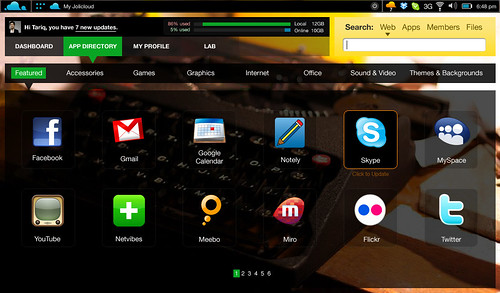
The Jolicloud that is. Jolicloud is an initiative by Tariq Krim and is a heavily modified and probably JeOS version of Linux. It’s designed to run on Netbooks and I think the interface looks amazing it kinda reminds me of the iPhone interface.

We love netbooks: they are cheap, compact, light and always connected via 3G. What we didn’t like so much was the user experience so we decided to build our own. We used Linux and made it boot faster and we optimized it for surf and cloud computing. We redesigned the interface and integrated some cool stuff. This is how the jolicloud project started. The next step is to let you try it out and have your opinion so together we can build the best netbook experience!

Here’s a screenshot, if you own a netbook Jolicloud might be worth following on twitter. Or sign up for their mailinglist on jolicloud.com. It will run on any Asus EEE, Dell Mini etc.

VMReference Card 1.3

Duncan Epping · Jan 25, 2009 ·

Forbes just released version 1.3 of his VMReference Card.This card can be very useful for those studying for VCP/VCDX. But it might also come in handy when doing troubleshooting on the Service Console:

I’ve just finished updating my reference card.  The biggest change is that I’ve moved everything to the latest update of 3.5 as the default.

  • Updated the details to the latest Confuguration Maximiums PDF.
  • Updated it to include 3.5 update 3 release notes.
  • Changed the versioning to include the latest VMware release, so its more obvious how up to date (or not) your card is.
  • Some minor additions (NAS maximums) and corrections.

Many thanks to all the readers who have written in with comments.  Always welcome.

Go and grab it here: http://www.vmreference.com/vi3-card

Go to VMReference.com and download the Card. Leave a comment while you are there!

  • « Go to Previous Page
  • Page 1
  • Page 2
  • Page 3
  • Page 4
  • Page 5
  • Interim pages omitted …
  • Page 9
  • Go to Next Page »

Primary Sidebar

About the Author

Duncan Epping is a Chief Technologist and Distinguished Engineering Architect at Broadcom. Besides writing on Yellow-Bricks, Duncan is the co-author of the vSAN Deep Dive and the vSphere Clustering Deep Dive book series. Duncan is also the host of the Unexplored Territory Podcast.

Follow Us

  • X
  • Spotify
  • RSS Feed
  • LinkedIn

Recommended Book(s)

Also visit!

For the Dutch-speaking audience, make sure to visit RunNerd.nl to follow my running adventure, read shoe/gear/race reviews, and more!

Do you like Hardcore-Punk music? Follow my Spotify Playlist!

Do you like 80s music? I got you covered!

Copyright Yellow-Bricks.com © 2026 · Log in