• Skip to primary navigation
  • Skip to main content
  • Skip to primary sidebar

Yellow Bricks

by Duncan Epping

  • Home
  • Unexplored Territory Podcast
  • HA Deepdive
  • ESXTOP
  • Stickers/Shirts
  • Privacy Policy
  • About
  • Show Search
Hide Search

Archives for 2009

Limit your Cluster Size to 8?

Duncan Epping · Dec 30, 2009 ·

Lately I have been seeing more and more people recommending to limit clusters to eight hosts. I guess I might be more or less responsible for this “myth“, unintentionally of course as I would never make a recommendation like that.

My article was based on the maximum amount of VMs per host in a HA cluster with 9 hosts or more. The current limit is 40 VMs per host when there are 9 hosts or more in a cluster. With a maximum of 1280 VMs per cluster. (32 hosts x 40 VMs)

So why this post? I want to stress that you don’t need to limit your cluster based on these “limitations”. Just think about it for a second, how many environments do you know where they have 40+ VMs running on every single host? I don’t know many environments where they do exceed these limits, I guess exceptions are VDI environments…

So why would you want to “risk” exceeding these limits? Simple answer: TCO. Having two clusters is more expensive than a single a cluster. For those who don’t understand what I am trying to say: N+1. In the case of a single cluster you will have 1 spare host. In the case of two clusters you will have two spare hosts in total.

Another justification for a single cluster is DRS. More hosts in a cluster leads to more opportunities for DRS to balance the cluster. A positive “side effect” is also that the chances of resource congestion are reduced because there are more VM placement combinations possible.

Is there a recommendation? What is the VMware Best Practice? There simply isn’t one that dictates the cluster size. Although the maximums should be taken into consideration for support you should calculate your cluster size based on customer requirements and not on a max config sheet.
Job openings -> vCloud Consultants!

Duncan Epping · Dec 29, 2009 ·

Here I am again. VMware Professional Services has four openings at the moment. All these are EMEA based roles. Preferably UK/France/Germany/Netherlands. Notice the “Cloud Services” part of it! This is a brand new team:

As part of VMware’s strategic vCloud initiative, VMware is developing a new Cloud Services team that is 100% focused on deploying VMware-based “clouds” at Service Providers as well as enterprises. The Cloud Services team is organized centrally within the WW Technical Services Organization and will work directly with the VMware Cloud sales and architecture teams to help customers implement a VMware-based cloud. The Cloud Services team will focus initially on Cloud Service Providers, but will also be involved in developing the services model for bringing cloud computing to enterprise customers.

So if you are interested and are looking for a new challenge take a look at the following openings:

  • Consulting Architect-TS Cloud Services
  • Senior Consultant-TS Cloud Services
  • Senior Consultant-TS Cloud Services
  • Senior Engagement Project Manager -TS Cloud Services

If you need more info about Professional Services, VMware as an employer or whatsoever please don’t hesitate to reach out to me. (duncan at yellow-bricks.com)

vSphere Quick Start Guide available as an electronic copy!

Duncan Epping · Dec 27, 2009 ·

Last week we decided to also make the vSphere Quick Start Guide available as an electronic book as requested by many of you. We discussed Kindle and PDF format, and decided to go with PDF as Kindle is not widely used in Europe. It’s available for only $ 9.99 or €7.14 via lulu. Pick it up.

We are currently also discussing a follow-up. I can’t say much about it though as it is in very early stages. It will not be a revision of the QSG though, it will be a complete new book and focused on the next version of vSphere! That’s about all I can say at this point in time. No release date, no ToC, no Title… stay tuned!

IOps?

Duncan Epping · Dec 23, 2009 ·

Just something I wanted to document for myself as it is info I need on a regular basis and always have trouble finding it or at least finding the correct bits and pieces. I was more or less triggered by this excellent white paper that Herco van Brug wrote. I do want to invite everyone out there to comment. I will roll up every single useful comment into this article to make it a reference point for designing your storage layout based on performance indicators.

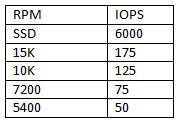
The basics are simple, RAID introduces a write penalty. The question of course is how many IOps do you need per volume and how many disks should this volume contain to meet the requirements? First, the disk types and the amount of IOps. Keep in mind I’ve tried to keep values on the safe side:

IOps?
(I’ve added SSD with 6000 IOps as commented by Chad Sakac)

So how did I come up with these numbers? I bought a bunch of disks, measured the IOps several times, used several brands and calculated the average… well sort of. I looked it up on the internet and took 5 articles and calculated the average and rounded the outcome.

[edit]
Many asked about where these numbers came from. Like I said it’s an average of theoretical numbers. I used a (now offline) article from ZDNet as the theoretical basis. ZDNet explains what the maximum amount of IOps theoretically is for a disk. In short; It is based on “average seek time” and the half of the time a single rotation takes. These two values added up result in the time an average IO takes. There are 1000 miliseconds in every second so divide 1000 by this value and you have a theoretical maximum amount of IOps. Keep in mind though that this is based on “random” IO. With sequential IO these numbers will of course be different on a single drive.
[/edit]

So what if I add these disks to a raid group:

For “read” IOps it’s simple, RAID Read IOps = Sum of all Single Disk IOps.

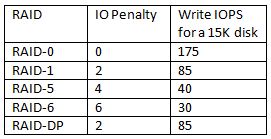
For “write” IOps it is slightly more complicated as there is a penalty introduced:

So how do we factor this penalty in? Well it’s simple for instance for RAID-5 for every single write there are 4 IO’s needed. That’s the penalty which is introduced when selecting a specific RAID type. This also means that although you think you have enough spindles in a single RAID Set you might not due to the introduced penalty and the amount of writes versus reads.

I found a formula and tweaked it a bit so that it fits our needs:

(TOTAL IOps × % READ)+ ((TOTAL IOps × % WRITE) ×RAID Penalty)

So for RAID-5 and for instance a VM which produces 1000 IOps and has 40% reads and 60% writes:

(1000 x 0.4) + ((1000 x 0.6) x 4) = 400 + 2400 = 2800 IO’s

The 1000 IOps this VM produces actually results in 2800 IO’s on the backend of the array, this makes you think doesn’t it?

Real life examples

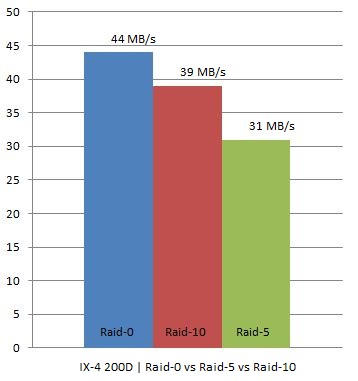
I have two IX4-200Ds at home which are capable of doing RAID-0, RAID-10 and RAID-5. As I was rebuilding my homelab I thought I would try to see what changing RAID levels would do on these homelab / s(m)b devices. Keep in mind this is by no means an extensive test. I used IOmeter with 100% Write(Sequential) and 100% Read(Sequential). Read was consistent at 111MB for every single RAID level. However for Write I/O this was clearly different, as expected. I did all tests 4 times to get an average and used a block size of 64KB as Gabes testing showed this was the optimal setting for the IX4.

In other words, we are seeing what we were expecting to see. As you can see RAID-0 had an average throughput of 44MB/s, RAID-10 still managed to reach 39MB/s but RAID-5 dropped to 31MB/s which is roughly 21% less than RAID-10.

I hope I can do the “same” tests on one of the arrays or preferably both (EMC NS20 or NetApp FAS2050) we have in our lab in Frimley!

<update: December 2012>
More info about storage / VMFS volume sizing can be found in the following articles:

  • VMFS-5 LUN Sizing
  • LUN sizes in the new Storage World
  • Should I use many small LUNs or a couple large LUNs for Storage DRS?

</update>


ESXi – lessons learned part 3

Duncan Epping · Dec 22, 2009 ·

This is probably one of the last blog articles this year as I’ve got two weeks of holiday! I wish you all a merry Christmas and a happy New Year! Let’s cut the crap, and start with why you are reading this… ESXi Lessons Learned:

I’ve been looking into creating an unattended install for ESXi. As mentioned in Lessons Learned part 2 this is not something that can be done out of the box unfortunately. I did a quick search on the internet and the VMware internal mailing lists but couldn’t find anything useful and that’s why I booted the ISO and logged into the console via “ALT-F1” -> Unsupported -> enter.

After some fiddling around in the ESXi iso I noticed a file called “/usr/lib/vmware/installer/ThinESXInstall.py”. I am not a python guru but I guess the following lines were pretty obvious:

Steps = [ WelcomeStep, LicenseStep, TargetSelectionStep, ConfirmStep, \
WriteStep, PostConfigStep, CompleteStep, RebootStep ]

This line describes the steps taken during the install. After I noticed these I did a quick search again on the filename and an article came up of my friend from down under, Stu aka Mr Vinternals. Stu describes which steps can be removed to decrease the amount of manual intervention:

Steps = [ TargetSelectionStep, WriteStep, PostConfigStep, RebootStep ]

Only the TargetSelectionStep requires input at the moment but that is also something that can be fixed. Look at the script “ThinESXInstallSteps.py”. There is a section that describes the disk selection, you can automate it by altering it and selecting a local disk with “IsLocal()”. That’s all I can say for now….

  • Page 1
  • Page 2
  • Page 3
  • Interim pages omitted …
  • Page 85
  • Go to Next Page »

Primary Sidebar

About the Author

Duncan Epping is a Chief Technologist and Distinguished Engineering Architect at Broadcom. Besides writing on Yellow-Bricks, Duncan is the co-author of the vSAN Deep Dive and the vSphere Clustering Deep Dive book series. Duncan is also the host of the Unexplored Territory Podcast.

Follow Us

  • X
  • Spotify
  • RSS Feed
  • LinkedIn

Recommended Book(s)

Also visit!

For the Dutch-speaking audience, make sure to visit RunNerd.nl to follow my running adventure, read shoe/gear/race reviews, and more!

Do you like Hardcore-Punk music? Follow my Spotify Playlist!

Do you like 80s music? I got you covered!

Copyright Yellow-Bricks.com © 2026 · Log in