VMware View Infrastructure Resiliency whitepaper published

One of the white papers I worked on in 2012 when I was part of Technical Marketing was just published. This white paper is about VMware View infrastructure resiliency. It is a common question from customers, and now with this white paper you can explore the different options and understand the impact of these options. Below is a link to the paper and the description is has on the VMware website.

VMware View Infrastructure Resiliency: VMware View 5 and VMware vCenter Site Recovery Manager
“This case study provides insight and information on how to increase availability and recoverability of a VMware View infrastructure using VMware vCenter Site Recovery Manager (SRM), common disaster recovery (DR) tools and methodologies, and vSphere High Availability.”

I want to thank Simon Richardson, Kris Boyd, Matt Coppinger and John Dodge for working with me on this paper. Glad it is finally available!

VMworld #NotSupported lightning talk slides – Hacking SRM

I presented this 15 minute talk at VMworld about hacking SRM or actually hacking the Storage Replication Adapter which is part of SRM. I noticed William Lam shared his slides so I figured I would do the same. This slidedeck was based on two articles I did a while back around hacking the SRA, you might want to read them as well. ( 1 , 2 )

I hope they are useful. Once again, thanks to Randy Keener for coming up with this excellent idea and thanks to the brownbag guys for helping hosting this great initiative. Lets hope we will see more of this next year at VMworld,

Demo time – vCloud Director 5.1 disaster recovery demo

When I was playing with the new vCloud Director 5.1 and Site Recovery Manager 5.1 I figured I would record a demo of the DR solution that Chris Colotti and I developed. The demo is fairly straight forward and hopefully helps you in the process of building a resilient cloud infrastructure. In this demo I have included:

  • vSphere 5.1
    • vSphere Replication
  • vCloud Director 5.1
  • Site Recovery Manager 5.1

Site Recovery Manager survey… please help us out!

I just received an email from the the Site Recovery Manager Product Management team. They created a new survey, and I was hoping each of you who is using, or will be purchasing SRM soon, could take the time to complete it. These types of surveys are very useful for Product Management when it comes to setting priorities for new features and identify gaps etc. Thanks!

We are conducting a survey about VMware vCenter Site Recovery Manager (SRM) to learn more about how people use our products. The survey will help us identify where we can improve the product to meet your needs and we would really appreciate getting your feedback.

The link to the survey is below, it typically takes less than 10 minutes to complete. http://www.surveymethods.com/EndUser.aspx?ECC8A4BDEDA6B9BAE7

Thanks!

Forced recovery option grayed out with Site Recovery Manager 5.0.1

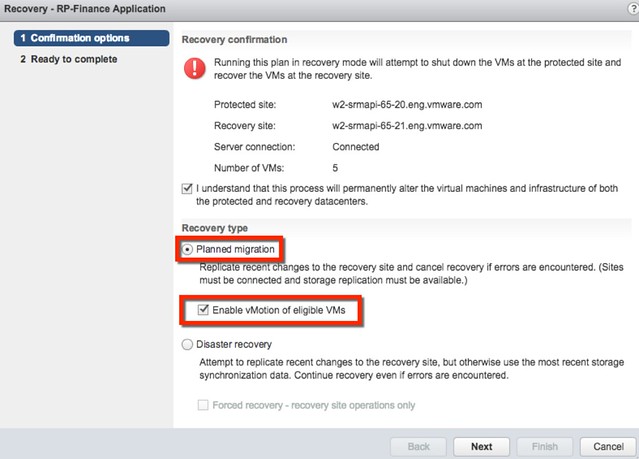
I was playing with Site Recovery Manager (SRM) 5.0.1 today and I wanted to trigger a fail-over. As I just wanted a quick test I figured I would use the “forced recovery” option. This option allows you to fail-over without SRM trying to sync the storage layer. In a normal situation I would probably try to sync my storage but as I knew the other site was dead and I just wanted to test it quickly I figured I would just tick it and get the recovery plan going. Unfortunately the option was grayed out.

You can enable this fairly simple  though:

  1. Right click in the left pane on your site
  2. Click “advanced settings”
  3. Click “Recovery”
  4. Select the “recovery.forcedFailover” setting

Now when you run your recovery plan it will not try to power-off/shutdown VMs or sync the storage. Nice right.

Another option that I spotted which many of you might need is “storageProvider.hostRescanRepeatCnt”, in the past I often had to rescan my storage system at least twice before LUNs would appear. That is where this setting comes in handy as it will do that for you. There’s some more nice new SRM 5.0.1 features to be found in this article by Ken Werneburg, make sure to read it.

Stretched Clusters and Site Recovery Manager

My colleague Ken Werneburg, also known as “@vmKen“, just published a new white paper. (Follow him if you aren’t yet!) This white paper talks about both SRM and Stretched Cluster solutions and explains the advantages and disadvantages of either. It provides a great overview in my opinion on when a stretched cluster should be implemented or when SRM makes more sense. Various goals and concepts are discussed and I think this is a must read for everyone exploring implementing a Stretched Clusters or SRM.

http://www.vmware.com/resources/techresources/10262

This paper is intended to clarify concepts involved with choosing solutions for vSphere site availability, and to help understand the use cases for availability solutions for the virtualized infrastructure. Specific guidance is given around the intended use of DR solutions like VMware vCenter Site Recovery Manager and contrasted with the intended use of geographically stretched clusters spanning multiple datacenters. While both solutions excel at their primary use case, their strengths lie in different areas which are explored within.

Avoid changing your VMs IP in a DR procedure…

I was thinking about one of the most challenging aspects with DR procedures, IP changes. This is a very common problem. Although changing the IP address of a VM is usually straight forward it doesn’t mean that this is propagated to the application layer. Many applications use hardcoded IP addresses and changing these is usually a huge challenge.

But what about using vShield Edge? If you look at how vShield Edge is used in a vCloud Director environment, mainly NAT’ing and Firewall functionality, you could use it in exactly the same way for your VMs in a DR enabled environment. I know there are many Apps out there which don’t use hardcoded IP adresses and which are simple to re-IP. But for those who are not, why not just leverage vShield Edge… NAT the VMs and when there is a DR event just swap out the NAT pool and update DNS. On the “inside” nothing will change… and the application will continue to work fine. On the outside things will change, but this is an “easy” fix with a lot less risk than re-IP’ing that whole multi-tier application.

I wonder how some of you out in the field do this today.