I received a couple of questions around my esxtop article yesterday so I guess it wasn’t completely clear what “locked” meant. I had a difficult time understanding it myself but I was fortunate enough that one of my colleagues (Thanks Valentin) got to the bottom of it and emailed me the following explanation. I rewrote parts of it and this is the outcome, hope that it clears things up:
As most of you know esxtop takes snapshots from VSI nodes (similar to proc nodes) to capture the running entities and their states. The rate in which these snapshots are taken can be changed with the “s”. The default setting is 5 seconds and the minimum, which most people probably use, is 2 seconds. This means that every entity (worlds, for instance a virtual machine) and the associated info is queried again every two seconds. As many of the metrics shown in esxtop are calculated based on the difference of two successive snapshots, e.g. %USED (CPU), esxtop just rereads all the info(all entities and all values) and calculates the values of the metrics.
As you can imagine this can cause stress on your CPU in a very large environment. The reason for this is the amount of data that needs to be gathered for these entities and the amount of calculations which need to take place. However, with “lock mode” enabled only the changing states from those entities will be read from the VSI nodes. The entities(VMs, Worlds, LUNs etc) themselves will be copied over from the first snapshot that was taken when esxtop was started. This does however mean that when a new helper world is spawned or a virtual machine is powered on or VMotioned to the host it will not appear within esxtop until esxtop is restarted!
Below you see an example of entities and values that will definitely not change as long as esxtop with lock mode is running. All other stats will be updated and you are still free to select whatever fields you want, everything will be available as if nothing happened.
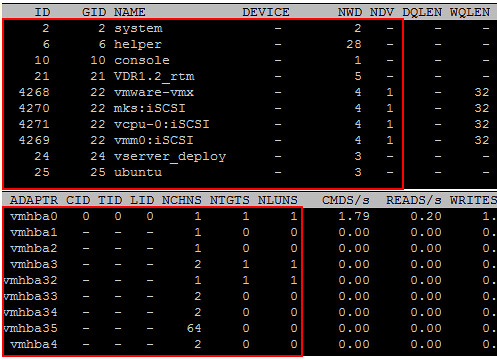
Since those entities and their relations don’t have to be read and calculated every time, esxtop’s CPU consumption will drop significantly. Again, please note that when a new VM is powered on, a VM is vMotion to the host or a new world is created it will not show up within esxtop when “-l” is used as the entities are locked! This also applies to starting esxtop in batch mode with -b.
Changing the delay between updates will of course also reduce load much. Try “-d ” if calling in batch mode (-b).
Batch mode puts out values in comma-separated values format, which you can redirect to a file:
esxtop -b -a -d 20 > my_esxtop_data_allFields.csv
The first row will be the header, which gives the names and order of every field. Every subsequent row will be just the values.
So if VMs were created during the run, you’d have to add more columns and therefore reprint a new header row. So that’s presumably why batch mode implies locked mode.
Correct, changing the delay will also reduce workload. However changing the delay also means that it’s not really real time monitoring.
Duncan, I wanted to leave this in the ESXTOP post you have pinned to the top, but the option wasn’t available.
A good thing to mention in the ESXTOP post would be utilizing vifs to move the csv file for individuals using ESXi/vMA. Maybe there is another way to do it, but this was the only way I could find after a bit of research.
vifs –server –username –password –put “[] /”
seems you can’t use lt/gt combos
vifs –server –username –password –put filename “[datastorename] folder/filename”
I like this site and saw it on AOL search. I think your thoughts on esxtop -l ? » Yellow Bricks are right on. Thanks for blogging about this and looking forward to reading more on your site.
I utterly liked reading about esxtop -l ? » Yellow Bricks and think it was well worth the read. The only other site I found on Bing wasnt as good as this one, thanks.