I’ve been playing around with my vSphere/Next gen ESX lab. I was replaying the VMworld lab and one of the assignments was to resize a VMFS volume. Yes that’s correct, resize not extent. Extents have been discussed by many and the general consensus is avoid them if/when possible. But when running out of diskspace you don’t always have the option to avoid them. Some can’t afford the downtime that comes with a “cold migration”, and most aren’t willing to take the risk of using storage vmotion when running out of diskspace. (Snapshot is placed on source VMFS volume) This has all been solved in the next version of ESX/vCenter. You can resize your VMFS volume without resorting to extents, and you can do this with the vCenter client.
The original size:
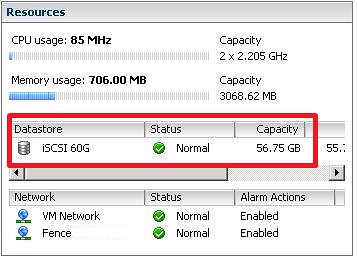
First thing you will need to do is increase the size of the LUN on your SAN. If your SAN doesn’t support LUN resizing you can still do it the old fashion way, extent.
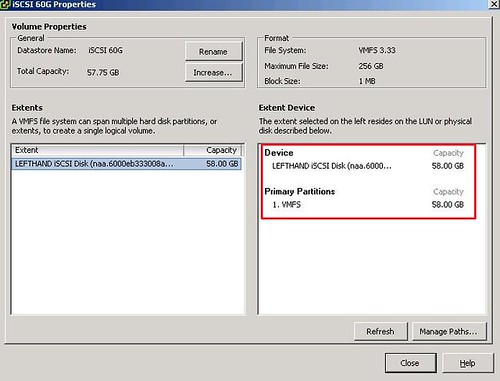
Next would be rescan your HBA, you all know how to do this, no point of showing a screenshot. Next up would be resizing your VMFS volume. Right click on your VMFS volumes and click properties on your LUN and check if it has grown:
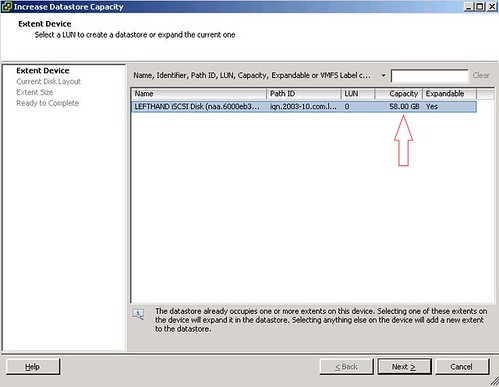
As you can see above it’s a 58GB LUN, now next screenshot will show you how much freespace there’s left on the LUN:
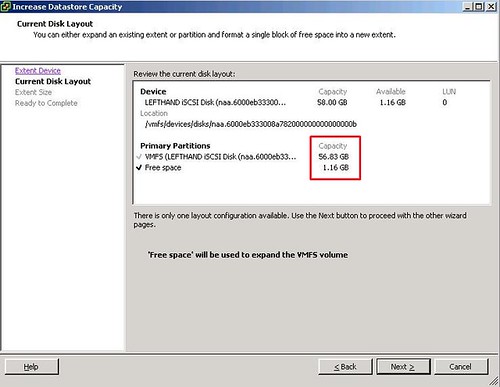
Fully utilize the LUN or keep some diskspace on the LUN:

Are you sure you want to resize it?
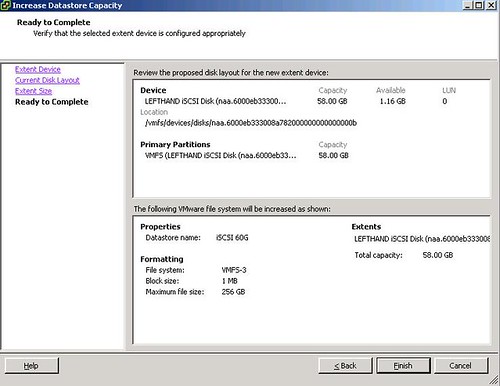
Proof:
No endless discussions anymore on the use of extents, just resize the volume!
Wait, what? It says right in the frigging wizard “Extent size”. The only thing it looks to me like they did was hide the fact they’re still using extents…
It seems like it, but this is definitely not the case. (according to what I’ve been told) I will do it again this evening and also check the fdisk -l output etc.
What about decreasing the size of a vmfs volume? It’s a common requirement (at least for us) in a multi-tennant environment when a client (for security – each client with own VMFS vol) wants to reduce his VM footprint (and thus wants to see a reduction in SAN storage costs).
I haven’t seen this option, reducing would mean: create new smaller vmfs and storage vmotion
I guess we’ll stick with NFS then where this stuff is easy. Speaking of which, do you know if the limit of 32 NFS DS’s is being increased any time soon?
Does this also do away with the limit of 4 extents per datastore?
@TimC:
They definitely are not extents, however, you may choose to still use extents for growing volumes.
http://www.boche.net/blog/index.php/2009/02/27/vmware-next-generation-datacenter-exploration/
“…So what is online volume grow? Answer: seamless VMFS volume growing without the use of extents. OVG facilitates a two step process of growing your underlying hardware LUNs (in a typical scenario this is going to be some type of shared storage like SAN, iSCSI, or NFS), then extending the VMFS volume so that it consumes the extra space on the LUNs. For the Microsoft administrators, you may be familiar with using the “DISKPART” command line utility to expand a non-OS partition . Same thing. Now, not everyone will have the type of storage that allows dynamic or even offline LUN growth at the physical layer. For this, VMware still allows VMFS volume growth through the use of extents but doing so doesn’t make my skin crawl any less than it did when I first learned about extents.”
Does anyone know when vSphere will be released to public?
The limit Extent count limit is 32.
Duncan, I love these bits of information. Keep them flowing.
I also love how everyone wants to default into the “NFS vs. VMFS” camp. I’m firmly in the pragmatic “use both appropriately” camp.
Yes, you cannot shrink a VMFS datastore (you can workaround by creating a new VMFS volume and storage vmotioning).
On the other hand, you can’t (currently) use SRM, or use RDMs (which you need for W2K3 MSCS and shortly W2K8 WSFC)
And, currently, NFS datastores use only two TCP sesssion (one for control, one for data) per datastore – so even with smart loadbalancing/link aggregation/routing techniques – you’re not able to drive more than a single ethernet link’s worth of bandwidth per datastore. Now – maybe that’s not a problem with a bunch of small VMs, or an IOps limited workload (not bandwidth limited), and you can use many datastores (up to 64 in vSphere).
Not saying NFS is bad, it’s good. Saying that the answer is being pragmatic – and tending to use both (frankly using all the tools available to you)
@virtualgeek: It’s call 10gbe ethernet. SRM support is on the way, and you can do software iSCSI from windows instead of an RDM, or you can do an RDM via iscsi…
@OP: how do they handle block allocation? Do you have to automatically choose the largest block size by default with this, or are you limited by the choice you made at creation time?
Blocksize you pick stays the same. I would always prefer using the largest blocksize possible at this point in time. I don’t know a single reason not to..
NDA?
Hmm.. I’m not quite sure if this works. I am following your steps as described. Only one screenshot is different at my side.
I receive the warning “The current disk layout will be destroyed. All file systems and data wil be lost permanently”
http://www.comserve-nl.com/vmwarevc.png
BP_LOZ – your screenshot says your partition is NTFS – not VMFS.
What version of VC/ESX is this feature in VC4 U1 ?
Hi,
Can i do this with my guest systens up?? Or do i need to stop and backup first.
Thx!!!
Havary,
I have tested this a few times vSphere 4.0 with vmfs 3.31. (Of course you have to perform the extend from a host in the cluster) with the guest running and it appears to work great. I am still a little hesitant to pull the trigger on some of critical production LUN’s. However I have no reasons at this point not to do so, other than the obvious. What if it doesn’t work just this one time? If anyone has done this on a full prod LUN, I would like to hear the results.
Thanks
Mikeis4AU,
Thanks for your answer,
I will backup my VM-data to secure my job and make the test of resizing my vmfs, then i post here the result.
Thx!!!
I am having an issue with this process. i have extended my array (raid 10) rescanned the HBA’s, connected to the host via the vClient, Checked and the space shows, go to the datastore, Properties, extend, and the extend device page comes up but it is blank. it is the same symptoms as if I am connecting via the vCenter rather than the client. I am stumped why it is happening. Any thoughts out there? PLEASE What am I missing?
jodisue,
I just ran into the same issue and was able to successfully extend by connecting directly to an ESX host instead of through vCenter. Hope this helps.
Same here! Connecting to the ESX host directly worked for me. It’s strange because I’ve done it before via the vSphere Management Server and never have to connect to one cluster host. Hope this will be fixed.
Response from vmware-support:
The behaviour you report is as expected. vCenter is not able to extend the Data Store capacity. This is a security feature and has been decided by the software developers.
This is by design, vCenter server has a lock on the existing VMFS/RDM volumes to ensure that they are not accidently formatted. To resolve this issue connect to the ESX host directly through VI Client and then follow the steps above to increase the size of the datastore.
Is there any way of Shrinking a datastore in VMware? I have reduced the LUN size on the SAN and Storage Adapter page shows the new size but the storage page still shows the old size even after a rescan and refresh.
Cheers
Steve
@SteveA : No that’s not possible currently.
OK thanks for the info Duncan.
I was able to grow the volume using vCentre, without having to logon to the host directly.
Hi Duncan,
We have been using the extents for a while, but we found out that we are limited to the four extents per LUN. We are currently trying to Storage VMotion the VM on LUN with multiple extents. So you know of way using powershell to pull all LUNs with multiple extents? I tried to pull the data but I get the LUN Information but not the extents. Thanks..
No sorry, but try Alan Renouf or LucD’s website. I am sure they can bake up something for you!
Hi,
What if i want to decrease the current Datastore on a Local ESX 4.0 server. Reason, going to attach ESX with EMC SAN. So need to decrease VMFS volume size on Local Server after VMs are moved to SAN.
Is it possible?
Thanks & Regards,
MAZ
@Max: not it is not
Hi,
I have the same problem as jodisue. I am connected to a standalone ESXi 4 server. I can see that the size of the existing RAID5 array has grown, but when I click on Increase I get a blank page.
Thanks,
Ivo
Ivo,
Can you confirm that you connected to the host directly and not via the vCenter?
I am unable to get the option to resize the datastore.
VMFS is v3.46 and I am running ESXi v4.1 Update 1.
My requirement was to resize 2 LUNs, both used for storing vswp files. I have increased the first LUN successfully. When I try to resize the second LUN, the option EXPANDABLE says NO and its asking me to add an extent rather than resize the LUN.
We are using IBM XIV as our SAN.
What could be the possible reason?
If the volume is shared on multiple servers, can this then be done from any host, and will the rest of the servers automagically see the extended vmfs?
any reply to this? I am having the same issue and have mulitple hosts in a cluster.
thanks
@Søren & Michael: yes, the other hosts will see the uptades of the datastores automatically. but if you really want to be sure, that everything is shown correctly, just check all datastores by right-klicking on a datacenter and choosing “recheck the datastores”.
Regards
i think you missed a screenshot to click on increase
that’s nice now try decreasing the lun 😉