In the “Multivendor post to iSCSI” article by Chad Sakac and others(Netapp, EMC, Dell, HP, VMware) a new multi-pathing method for iSCSI on the next version of ESX(vSphere) had already been revealed. Read the full article for in depth information on how this works in the current version and how it will work in the next version. I guess the following section sums it:
Now, this behavior will be changing in the next major VMware release. Among other improvements, the iSCSI initiator will be able to use multiple iSCSI sessions (hence multiple TCP connections).
I was wondering how to set this up and it’s actually quite easy. You need to follow the normal guidelines for configuring iSCSI. But instead of binding two nics to one VMkernel you create two(or more) VMkernels with a 1:1 connection to a nic. Make sure that the VMkernels only have 1 active nic. All other nics must be moved down to “Unused Adapters”. Within vCenter it will turn up like this:
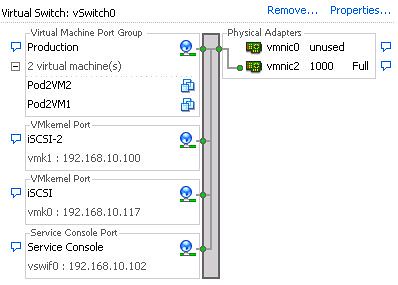
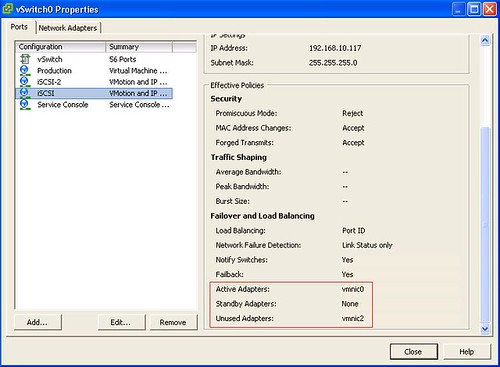

After you created your VMkernels and bound them to a specific nic you would need to add them to your Software iSCSI initiator:
-
esxcli swiscsi nic add -n vmk0 -d vmhba35
-
esxcli swiscsi nic add -n vmk1 -d vmhba35
-
esxcli swiscsi nic list -d vmhba35
(this command is only to verify the changes)
If you check the vSphere client you will notice that you’ve got two paths to your iSCSI targets. I made a screenshot of my Test Environment:
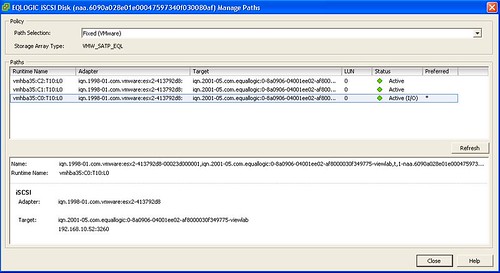
And the outcome in ESXTOP(s 2 n), as you can see two VMkernel ports with traffic:

There’s a whole lot more you can do with esxcli by the way, but it’s too much to put into this article. The whole architecture changed and I will dive into that tomorrow.
Great article Duncan – I need to get you some EMC arrays – not that EqualLogic stuff 🙂
Did you have to create a second Service Console port to configure iScsi SW initiator in this version?
works great for normal vSwitches but does not work for vDswitches, im getting an error :
add nic failed in ima
any ideas?
Itzik
great post, would I be able to get this to work with virtual connect interconnect?
Your picture actually shows 3 paths and not just 2. Where did the third one come from and how do I tell which path is using which physical nic?
I did some playing. If the multipathing is set up after the targets have been added, then the original path is still in the system (pre multipath) as well as the 2 new multipath paths. If you set up the switchs and the esxcli commands after enabling software iSCSI but before adding the targets, then only 2 paths are created..
Also, if you remove the targets after setting up multipathing and then readd them, then the extra third path will go away.
Still have not figured out how to tell which path is which NIC. It appears that if everything is done in order that vmhbaXX:C1 is the first vmk added ie: vmk0 and its NIC (ie. at least if vmk0 is added first vie esxcli). ps. Thanks for the info, it got me started. I found similar data in http://www.vmware.com/pdf/vsphere4/r40/vsp_40_iscsi_san_cfg.pdf.
Great stuff, but how can I do this with ESXi.
How ´s the syntax with vSphere CLI ?
Sorry, didn´t read it to the end
Could you please checl/update your image links? I think they’re broken.
they seem to be working here perfectly
Does iSCSI multipathing require the new Enterprise Plus license?
no, you can do this with any version.
How do you remove the extra (pre-multipathing) path? Mordock above said that you can do that by removing the targets and re-adding them, but I can’t figure out how do to that. I’ve tried simply removing the targets from the dynamic/static discovery tabs, but the vSphere client just hangs when I try to do that. I also tried to disable iSCSI on the host with the same result. As a result I can’t figure out how to remove the storage so I can re-add it without the extra path.
Just to followup on my prior comment, I was able to make this work by disabling the iSCSI adapter and then rebooting. At that point I could turn on the multi-pathing and re-enable iSCSI without a problem. I’m not sure why vCenter froze the first time I tried that, but it worked properly on the rest of my hosts.
One thing I am running into is as follows. Still getting details so this is a little vague. If the first vmkernel for that subnet, has no access to the network, vmkpings to that subnet will fail. Regardless of how many other vmkernels are in that subnet. In our case the physical nic attached to vmk0 is down for switch maintenance. While it is down, we are unable to mount additional volumes. Investigating reveals that the service console is able to ping that subnet, but vmkping fails. I confirmed with other hosts. Hosts that have vmk0 up, due to being attached to the other switch stack, are able to ping and vmkping just fine. All hosts that have vmk0 down are able to ping but not vmkping.
The other concern is that our EqualLogic SAN makes load balancing decisions that cause connections to log out and back into a different IP. I am not sure what will happen if a connection tries to reconnect.
Duncan,
Something I came across when setting this up was during a failover. If you failed one of the paths I can no longer use vmkping to verify that storage is accessible. However, IO to the backend storage is still flowing over the other paths. Have you seen this before? I have replicated this on 2 separate VM deployments and 2 differente backend iSCSI SANs.
Sorry to ask but what about the guest?
Should the guest continue to use their own iSCSI initiator as best practices? (Boot on VMFS and data volumes on iSCSI).
I’m a little confused on one item that I’m hoping someone can clarify for me.
In the ESXi v4.1 iSCSI Configuration Guide, page 35, it suggests that there are TWO ways to setup iSCSI to use multiple NICs. The first is to create two vSwitches, and place one physical NIC in each of the two vSwitches. The second is like what is outlined in this thread, which is to create a single vSwitch, then create a 1:1 binding between the NICs and the array.
Is there a benefit to using one method over another?
Thank you!
Luis…
Nah, it is just two different ways of doing the same thing 🙂
Duncan,
I’ve gone back and looked at the documentation for various versions of VMware, and I just want to verify something.
In ESXi v4.0 Update 1, the iSCSI Configuration Guide shows both methods, so we’re OK there. But, after the separate vSwitch method is shown (Pg. 33), it indicates that multipathing still needs to be activated, and directs the reader to page 35.
On page 35, it states that you still need to connect the iSCSI Initiator to the iSCSI VMKernel ports via the “esxcli swiscsi add -n -d ” command.
In ESXi v4.1, unless I’m misreading it, it implies that you only need to run the “esxcli swiscsi” command to connect the iSCSI Initiator to the vmnics if you’re using a single vSwitch.
I just want to confirm that regardless of if you have a single vSwitch (with two vmnics) or two vSwitches (each with a vmnic), that you still need to through and connect the vmnics to the iSCSI Initiator via the “esxcli swiscsi” command mentioned above.
Can you (or someone else) verify this for me?
Thank you.
Sincerely,
Luis
I have problem with 1 vSwitch(2xvmkernel+2x nic) but not with
2x vSwitch(1vmkernel+1 nic)
http://www.virtualizationbuster.com/?p=63
I have configuration exactly like in 1st picture. I can vmkping to the Dell MD3000i iSCSI storage on both nic but I can’t see storage LUN at all. If I use cross cable without switch, I can see the lun.
I move the iSCSI port to other empty slot, one time work, the other time not work.
Almost frustated with this problem, I found that article.
I follow that suggestion by using 2x (1 vmkernel for 1 nic).
That solve my problem even after reboot
Duncan-
Good evening could you answer a quick question?
Lets say you had a situation with a lot of networks on a switch meaning iscsi, service console, vmnetwork and you add your vmkernal with a -m 9000 for your iscsi vmkernal portgroup for jumbo frames but you don’t do it on the switch too? Can you do this? Could you answer this for both distributed switch and standard virtual switch?
Thanks!
Im good here…have to have the mtu set to 9000 on each switch.
Duncan,
How to do this with vDs?