Kodiak is a cross platform application(Windows, Linux, Mac) with which you can manage your virtual environment. Why would one want to use this instead of the VIC? Well you can run it from your Linux box without having to run a VM. What do you need? Well I tested it with Ubuntu and Windows and you should start with installing Adobe Air. For Windows it’s pretty straighton, but I couldn’t even find a download link for Ubuntu. After a couple of seconds on Google I found this Howto. It gave me a link and provided me with the info needed to install, although chmod and running the executable is pretty straight forward.
After the installation there was still the AIR package left to install that Bluebear provided. So I started Adobe Air, pointed towards the air package and that’s about it. It installed within a few minutes and I was ready to go.
So I wanted to do some extensive testing with Bluebear’s Kodiak and started out with Windows. Well after a couple of minutes all the “certificate” related messages started to irritate me so I quit with the Windows version and went straight on to Ubuntu. Luckily Ubuntu gave me the option to select “Always” when the same certificate message was dropped. (There’s a workaround for the certificate problem by the way, check this article)
So the next screen was sort of an inventory, the ESX host with it’s vSwitch and the VM attached to it. Reminds me a lot of the VMware maps functionality. But the cool thing about the map is that you can drag, drop and rotate in 3D. So as you can see in the screen below there’s a VM running…
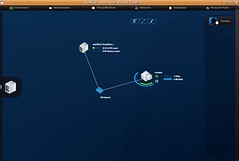
So now what, what can we do with Kodiak? Well to be honest, not that much at this moment. Power Off and Power On a VM works fine, but that’s about it for now. I can’t edit any config settings, I can’t do vmotion, I can’t add or remove a VM, I can open a console to the VM but there’s no response or whatsoever. The interface looks cool, but like Carlo said in his article, what will it look like when you’ve got over a dozen VM’s. The arcs around the VM represent the current CPU / MEM resource usage by the way. I opened up a couple more windows and this is what it looked like:
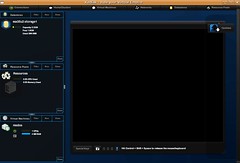
Is this tool worth checking out? I do think so, there’s not much you can do with it at this point but it’s got a nice “look and feel” that seems to be promissing for the future. Let’s hope these guys can incorporate some new functionality a.s.a.p. I think it will be really useful for the SMB’s out there that do not have a VirtualCenter server but do have more than 1 ESX(i) host. And the Linux/Mac users, although with the new VMware Workstation it’s possible to run the VirtualCenter client as a seamless app.
So for the bluebear people reading this, I would like to be able to edit VM config’s for starters and a couple of power on / power off / restart buttons at the top of the console would be handy.
Release notes:
Manual Installation for Windows
Download and install Adobe Air for Windows if you don’t already have it on your computer
Download the Kodiak Air Package
Locate the downloaded Air file and run it, the Air installer should automatically begin
Release Notes
Kodiak Beta 0.0.1 Release Notes:Thanks for downloading Kodiak! Kodiak is beta software, and no functionality is guaranteed, and is all subject to change.
We’ve really only validated functionality on Mac platforms. Our testing on Windows & Linux has been limited, but we haven’t encountered any problems. Your mileage may vary.
We’re completely interested in your feedback.
Here’s a quick idea of Kodiak usage, subject to change.
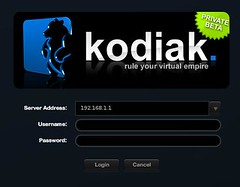
By default, Kodiak will open to a login screen. Enter your server address, your username/password, and off you go.
Kodiak will come up to a network map display, with a small server tab on the left-hand side of the screen. Double-clicking this tab will expand it into a list where you can view your VMs/Virtual switches/Resource Pools/Datastores, and for VMs, you’ll be able to power a VM on/off, and get to a console.
We added (today) a console dock on the right hand side where you can dock your consoles.
Kodiak’s map (in the background) is completely interactive, and will display resource usage information that’s updated on the fly. Click it, drag it, select it, poke it, launch consoles from it!
To use the map: Left click will select an individual VM. Left click + drag selects a group of VMs/hosts/networks Right Click + drag will pan the map around. Right Click + shift + drag will rotate the map in 3D.
To connect to a new server with kodiak, click the top-level “Connections” button that you see up in the upper-left hand corner, then click the “new” button you see there.
This will bring you to a new login screen. (FYI, Kodiak will keep track of your server names so you don’t have to type them in all the time.) Log in, and Kodiak will return your server into a new tab.
Currently, Kodiak WILL connect to a Virtual Center server, but we cannot guarantee that it will find all available hosts/VMs/resources.
If anyone wants an invite to the beta program than just drop your email here, or send me your email on duncan[@]yellow-bricks.com and I will hook you up. It’s still limited so be quick!
I’m all out. So you guys should help each other… over 60 invites within 24 hours. Bluebear is hot!
Hello
Concerning the black console windows. Here’s the reply of the bears:
–snip
The consoles actually SHOULD work…
We’re investigating that.
–snap
Just to have a decent VI-Client on Mac is worth keepin an eye on this application. And when it finally works with VC: just plain cool. 🙂
Regards
Roman
PS: thank you for the beta-invite…
I love shiny things and those VM maps look like they qualify. Worth taking a spin if only because you recommend it.
Also worth pointing out that talking directly to ESXi with the free license key via the SDK is (supposed to be) limited to read only operations… I don’t think you can even issue power operations, let along add/create VM’s or modify existing ones.
Hey Noodle!
Our most recent Development builds are working great with full support for the free version of ESXi.
Bears don’t write cripple-ware! Read-Write for all 🙂
RAWR!
“what will it look like when you’ve got over a dozen VM’s”
Click my title and find out!
(full size dev-build screenshot)
Hi Bear,
I’m not talking about what is technically possible… I’m talking about _legally_ possible. Unfortunately for both of us, circumventing the API restrictions is a no-no 🙁
http://itknowledgeexchange.techtarget.com/virtualization-pro/vmware-working-on-patch-for-esxi-api-exploit/
Kodiak offers full, legal support for ESXi free and licensed.
Noodle, the limitation you are thinking of is only with RCLI.
Click my title to see one (of the many) places in the VMware community site that affirm this.
Same concerns here. It’s gorgeous for small environments, and it’s easy to use – I love the visual metaphors for everything – but it doesn’t actually “do” anything yet. Even if the remote console didn’t work, it’d be nice if it would at least launch an RDP link, but it doesn’t even do that. It’s so cool to think I’ll be able to manage my ESX boxes from my Mac, but not quite there yet. Exciting, though.
Hi
I’m in the process of finishing a major datacenter setup using virtualization technology from VMware and Xen, and would love to try out Kodiak to handle the management.
So if anybody has any available invites i would really appreciate one.
Send it to michaellykke AT gmail.com.
:o)
Can someone send me an invite as well. Love to see what this product can do for our implementation.
edward.m.chan AT gmail.com
I’d love to get an invite as well. I can’t stand having to run a windows xp system to manage VI.
Send me a invite. thanks!
Hello everyone 🙂 Are there any kind souls out there with an invite left? We’ve got five hosts with 60-ish guests, and are currently tied to that proprietary expensive thing that came with them. We’d love to try this stuff out and add to all the commotion 😉
Thanks in advance, and Happy Holidays for thinking of us!
Mojo
Err, my email address is adamw AT searhc DOT org. Thanks again!
Hi
Can Anyone share a invite with me? uddo -put here some tail of an animal- studyit -and here a dot- nl ?
can i get invite too ?
I’m currently supporting 6 seperate VMware ESXi installs and my primary machine is a linux laptop. Can someone PLEASE send me an invite so I can try this out??
It would be greatly appreciated.
Jacob[dot]Sylvia_at_gmail[dot]com
If there are any invites available, PLEASE send one my way!
Thank you
Hey,
Can you please send me invite for the download…
–Shankar
Hi, guys, are there any invites left, that I may have?
Thanks,
Nathan
Can someone please please send me an invite too,
i would love to test it on my ESXi servers.
please
email: visendi AT lycos DOT com
Would someone be kind enough to send me an invite?
Thanks
kellyjones@Worldonline.co.uk
Hi Guys,
I learned abt KODIAK recently, but could not get hands on the download. Please send me an invite if can. I would appreciate if you could send it to sameoldvishal@gmail.com
Cheers!!
Vish
Hi Guys,
I learned about KODIAK through TECzilla , but could not get hands on the download. Please send me an invite if can. I would appreciate if you could send it to mdb@mur.co.za
I’d like to test the app. Please send me invite to it2350-gmail-com. Please replace deashes in the address. Thanks.
I’d like to test this app as we use linux solely in the workplace with vmware… Please send an invite to s3c23t AT gmail DOT com
can u please send me an invite to eugen_stef@yahoo.com
Hello at all
I’d like to test this app. too…! i looks very great!!! Please send me invite to c.dillier@gmx.ch
many thanks
I have been wanting to test this for some time as we do some admin work from Macs and Linux so it would be nice to have the ability to manage vmware without using virtual windows hosts.
Please send me an invite erik_bjers@dai.com
I’m using server virtualization(Citrix Xenserver), with CG render farm is operated.
I’d like to test kodiak app in vmware ESXi
Please send me an invite to elim_blade@hotmail.com
Thank you
i am a grait mac fan and i would like to get rid off all the windows stuff but i stiil stuck on one system for maintnance of the vmware grrrrrrr no app for vmware for mac … can some one please spare me an invite so i can have a peace of mind and get rid of the last piece off junk that gates has left on my lan my mail adress is jurgen@de-ruijter.biz
thanks
What happened? http://www.bluebearllc.net/kodiak/ has been down for a few weeks now. Did they fold up shop?
As an (untested) alternative I found this link for using ssh and X11 on a mac to access a GUI on mac: http://geekhut.org/2009/01/vmware-client-for-mac/ . It’s a year old so….
Good to determine you back again. And again through an interesting post.
As the http://www.bluebearllc.net/kodiak/ link no longer worked
I went looking and found….
http://bluebear.org/