Using VAAI ATS capable array and VMFS-5?

<update 21-Jan-2013>I have just been informed that this issue was fixed in vSphere 5.0 Update 1. The KB article and 5.0 U1 release notes will be updated shortly!</update>

If you are using a VAAI ATS capable array and VMFS-5 you might want to read this KB Article. The article describes a situation where it is impossible to mount VMFS volumes when they were formatted with VMFS-5 on a VAAI ATS (locking offloading) capable array. These are the kind of problems that you won’t hit on a daily basis but when you do you will be scratching your head for a while. Note that this also applies to scenarios where for instance SRM is used. The error to look for in your vmkernel log is:

Failed to reserve volume

So anyone with a 5.0 environment and newly formatted VMFS-5 volumes might want to test this. Although the article states that so far it has only been encountered with EMC Clariion, NS and VNX storage, it also notes that it might not be restricted to it. The solution fortunately is fairly simple, just disable VAAI ATS for now.

esxcli system settings advanced set -i 0 -o /VMFS3/HardwareAcceleratedLocking

For more details read the KB and I would also suggest following it with an RSS reader if you have this issue, that way you get notified when there is an update.

Using ESXTOP to check VAAI primitive stats

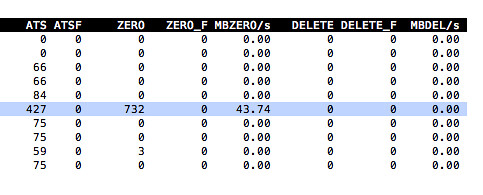
Yesterday a comment was made around a VAAI primitive on my article about virtual disk types and performance. In this case “write same” was mentioned and the comment was about how it would not be used when expanding a thin disk or lazy zero thick disk. Now the nice thing is that with ESXTOP you can actually see VAAI primitive stats. For instance “ATS” (locking) can be seen, but also… write same or “ZERO” as ESXTOP calls it.

If you open up ESXTOP and do the following you will see these VAAI primitive stats:

  • esxtop
  • press “u”
  • press “f”
  • press “o”
  • press “enter”

The screenshot below shows you what that should look like, nice right… In this case 732 blocks were zeroed out using the write-same / zero VAAI primitive.

VAAI primitive stats

vSphere 5.0: UNMAP (vaai feature)

With vSphere 5.0 a brand new primitive has been introduced which is called Dead Space Reclamation as part of the overall thin provisioning primitive. Dead Space Reclamation is also sometimes referred to as unmap and it enables you to reclaim blocks of thin-provisioned LUNs by telling the array that specific blocks are obsolete, and yes that command used is the SCSI “unmap” command.

Now you might wonder when you would need this, but think about it for a second.. what happens when you enable Storage DRS? Indeed, virtual machines might be moved around. When a virtual machine is migrated from a thin provisioned LUN to a different LUN you probably would like to reclaim the blocks that were originally allocated by the array to this volume as they are no longer needed for the source LUN. That is what unmap does. Now of course not only when a virtual machine is storage vmotioned but also when a virtual machine or for instance a virtual disk is deleted. Now one thing I need to point out that this is about unmapping blocks associated to a VMFS volume, if you delete files within a VMDK those blocks will not be unmapped!

When playing around with this I had a question from one of my colleagues, he did not have the need to unmap blocks from these thin-provisioned LUNs so he asked if you could disable it, and yes you can:

esxcli system settings advanced set --int-value 1 --option /VMFS3/EnableBlockDelete

The cool thing is that it works with net-new VMFS-5 volumes but also with upgraded VMFS-3 to VMFS-5 volumes:

  1. Open the command line and go to the folder of the datastore:
    cd /vmfs/volumes/datastore_name
  2. Reclaim a percentage of free capacity on the VMFS5 datastore for the thin-provisioned device by running:
    vmkfstools -y <value>

The value should be between 0 and 100, with 60 being the maximum recommended value. I ran it on a thin provisioned LUN with 60% as the percentage to reclaim. Unfortunately I didn’t have access to the back-end of the array so could not validate if any disk space was reclaimed.

/vmfs/volumes/4ddea74d-5a6eb3bc-f95e-0025b5000217 # vmkfstools -y 60
Attempting to reclaim 60% of free capacity 3.9 TB on VMFS-5 file system 'tm-pod04-sas600-sp-4t'.
Done.
/vmfs/volumes/4ddea74d-5a6eb3bc-f95e-0025b5000217 #

List of VAAI capable storage arrays?

I was browsing the VMTN community and noticed a great tip from my colleague Mostafa Khalil and I believe it is worth sharing with you. The original question was: “Does anybody have a list of which arrays support VAAI (or a certain subset of the VAAI features)?”. Mostafa updated the post a couple of days back with the following reponse which also shows the capabilities of the 2.0 version of the VMware HCL:

A new version of the Web HCL will provide search criteria specific to VAAI.

As of this date, the new interface is still in “preview” stage. You can access it by clicking the “2.0 preview” button at the top of the page which is at: http://www.vmware.com/go/hcl/

  • The criteria are grouped under Features Category, Features and Plugin’s.
  • Features Category: Choice of “All” or “VAAI-Block”
  • Features: Choice of “All”, Block Zero”, “Full Copy”, “HW Assisted Locking” and more.
  • Plugin’s: Choice of “All” and any of the listed plugins.

HCL.jpg

Unfortunately there appear to be some glitches when it comes to listing all the arrays correctly, but I am confident that it will be fixed soon… Thanks Mostafa for the great tip.

VAAI sweetness

Nothing deep technical this time, I just want to make clear how cool VAAI is! Last week I noticed on twitter that some people reported some nice figures around VAAI. I asked them if they were willing to run some tests and compare VAAI vs NON-VAAI runs. And these were some of the responses I received, I cut them down to the core of the message and I leave it up to you to visit these articles and read them. Thanks for helping me proof this point guys!

vSphere VAAI Performance on the HP P4000 G2 by Barrie Seed

The results are pretty conclusive. For block zeroing on a VMDK, VAAI accelerates the operation by 4-5x

  • VAAI enabled: 109 seconds
  • VAAI disabled: 482 seconds

VAAI Awesomeness by Anders Hansen

I guess a picture says more than a thousand words. Difference in percentage for Cloning:

Difference in time for Eager Zero Thick Creation:


Exploring the performance benefits of VAAI by Matt Liebowitz

To the results:

Time to create a 50GB eagerzeroedthick VMDK without VAAI: 10 minutes generating approximately 750 write IOPS on the array

Time to create a 50GB eagerzeroedthick VMDK with VAAI: 1 minute 30 seconds, could not measure IOPS (more on that later)

Clearly there is a significant difference in creating the blank eagerzeroedthick VMDK.  How about when Windows 2008 R2 is installed on that VMDK and then converted to a template?  How fast can we deploy that template?

Deploying 50GB eagerzeroedthick template without VAAI: 19 minutes generating between 1,200-1,600 IOPS (half read/write, which makes sense since it has to read from and write to the same array)

Deploying 50GB eagerzeroedthick template with VAAI: 6 minutes (again, couldn’t measure IOPS)


NetApp VMware VAAI Performance Tests by Jacint Juhasz

It’s not a surprise, the trend is the same.

Operation Enabled VAAI Disabled VAAI
50GB VMDK creation with cluster support (zeroed) 5:09 9:36
Clone VM within datastore (LUN) 8:36 13:38
Clone VM between datastores (LUN) 8:34 14:36
Storage VMotion 9:38 14:45

With VAAI enabled, there’s no write or read rate (as there’s no read or write from the host side), but the charts shows latency around 8-10ms. With disabled VAAI the chart looks a bit different. For the VMDK creation the write rate is around 100000KBps with 160ms latency (write only, no reads). The read/write operation shows 70000KBps IO rate with 10-15ms latency.

3PAR vSphere VAAI “Write Same” Test Results: 20x performance boost by Derek Seaman

“Write Same” Without VAAI:
70GB VMDK 2 minutes 20 seconds (500MB/sec)
240GB VMDK 8 minutes 1 second (498MB/sec)
1TB VMDK 33 minutes 10 seconds (502MB/sec)

Without VAAI the ESXi 4.1 host is sending a total 500MB/sec of data through the SAN and into the 4 ports on the 3PAR. Because the T400 is an active/active concurrent controller design, both controllers can own the same LUN and distribute the I/O load. In the 3PAR IMC (InForm Management console) I monitored the host ports and all four were equally loaded around 125MB/sec.

This shows that round-robin was functioning, and highlights the very well balanced design of the T400. But this configuration is what everyone has been using the last 10 years..nothing exciting here except if you want to weight down your SAN and disk array with processing zeros. Boorrrringgg!!

Now what is interesting, and very few arrays support, is a ‘zero detect’ feature where the array is smart enough on thin provisioned LUNs to not write data if the entire block is all zeros. So in the 3PAR IMC I was monitoring the back-end disk facing ports and sure enough, virtually zero I/O. This means the controllers were accepting 500MB/sec of incoming zeros, and writing practically nothing to disk. Pretty cool!

“Write Same” With VAAI: 20x Improvement
70GB VMDK 7 seconds (10GB/sec)
240GB VMDK 24 seconds (10GB/sec)
1TB VMDK 1 minute 23 seconds (12GB/sec)

I guess it is needless to say why VAAI rocks and why when you are looking to buy new storage it is important to inform if the array is VAAI capable, and if not make sure you ask when it will support VAAI!?! VAAI isn’t just for specific workloads, VAAI was designed to reduce stress on different layers and to decrease the cost of specific actions and more importantly for you to decrease the costs of operations!

RE: VMFS 3 versions – maybe you should upgrade your vmfs?

I was just answering some questions on the VMTN forum when someone asked the following question:

Should I upgrade our VMFS luns from 3.21 (some in 3.31) to 3.46 ? What benefits will we get?

This person was referred to an article by Frank Brix Pedersen who states the following:

Ever since ESX3.0 we have used the VMFS3 filesystem and we are still using it on vSphere. What most people don’t know is that there actually is sub versions of the VMFS.

  • ESX 3.0 VMFS 3.21
  • ESX 3.5 VMFS 3.31 key new feature: optimistic locking
  • ESX 4.0 VMFS 3.33 key new feature: optimistic IO

The good thing about it is that you can use all features on all versions. In ESX4 thin provisioning was introduced but it does need the VMFS to be 3.33. It will still work on 3.21. The changes in the VMFS is primarily regarding the handling of SCSI reservations. SCSI reservations happens a lot of times. Creation of new vm, growing a snapshot delta file or growing thin provisioned disk etc.

I want to make sure everyone realizes that this is actually not true. All the enhancements made in 3.5, 4.0 and even 4.1 are not implemented on a filesystem level but rather on a VMFS Driver level or through the addition of specific filters or even a new datamover.

Just to give an extreme example: You can leverage VAAI capabilities on a VMFS volume with VMFS filesystem version 3.21, however in order to invoke VAAI you will need the VMFS 3.46 driver. In other words, a migration to a new datastore is not required to leverage new features!

vStorage APIs for Array Integration aka VAAI

It seems that a lot of vendors are starting to update their firmware to enable virtualized workloads from the vStorage APIs for Array Integration, also known as VAAI. Not only the vendors are starting to show interest, also the bloggers are picking up on it. Hence the reason I wanted to reiterate some of the excellent details out there and wanted to make sure everyone understands what VAAI brings. Although currently there are “only” three major improvements they can and probably will make a huge difference:

  1. Hardware Offloaded Copy
    Up to 10x faster VM deployment, cloning, Storage vMotion etc. VAAI offloads the copy task to the array, enabling the usage of native storage based mechanism resulting in a decrease of deployment time but equally important reducing the amount of data flowing between the array and server. Check this post by Bob Plankers and this one by Matt Liebowitz which clearly demonstrates the power of hardware offloaded copies! (reducing cloning from 19Minutes to 6Minutes!)
  2. Write Same/Zero
    10 x times less I/O for common tasks. Take for instance a zero-out process. It typically sends the same SCSI command several times. By enabling this option the same command will be repeated by the storage platform resulting in reduced utilization of the server while decreasing the time span of the action.
  3. Hardware Offloaded Locking
    SCSI Reservation Conflicts…. How many times have I heard that during Health Checks / Design Reviews and while troubleshooting performance related issues. Well VAAI solves those issues as well by offloading the locking mechanism to the array, also known as Atomic Test & Set aka ATS. It will more than likely reduce latency in an environment where thin-provisioned disks are used or linked clones, or even where VMware based snapshots are used. ATS removes the need to lock the full VMFS volume but instead locks a block when an update needs to occur.

One thing I wanted to point out here, which I haven’t seen mentioned yet, is that VAAI will actually allow you to have larger VMFS volumes. Now don’t get me wrong, I am not saying that you can go beyond 2TB-512b by enabling VAAI… My point is that by having VAAI enabled you will reduce the “load” on the array and on the servers. I placed quotes around load as it will not reduce the load from a VM perspective. What I am trying to get at is that many people have limited the amount of VMs per VMFS volume because of “SCSI Reservation Conflicts”. With VAAI this will change. Now you can keep your calculations “simple” and base your VMFS size on the amount of eggs you can have in a single basket and the sum of all VMs IOPS requirements.

After reading about all of this goodness I bet many of you want to use it straight away, well of course your array will need to support it first. Tomi Hakala created a nice list of all storage platforms that are currently supported and those that will be supported soon including a time frame. If your array is supported this KB explains perfectly how to enable/disable it.

I started out with saying that there are currently only three major enhancements…. that means indeed that there is more coming up in the future. Some of which I can’t discuss and others that I can as those were already mentioned at VMworld. (If you have access to TA7121 watch it!) I can’t say when they will be available or in which release, but I think it is great to know more enhancements are being worked on.

  • Dead Space Reclamation
    Dead space is previously written blocks that are no longer used by the VM. Currently in order to reclaim diskspace (for instance when you’ve deleted a lot of files) these blocks you will need to zero them out with for instance sdelete and then Storage vMotion the VM. Dead Space Reclamation will enable the storage system to reclaim these dead blocks by giving block liveness information.
  • Out-of-space conditions notifications
    This is very much an improvement for day-to-day operations. It will enable notification of possible “out-of-space” conditions on both the array vendor’s tool both also within the vSphere client!

Must reads:

Chad Sakac – What does VAAI mean to you?
Bob Plankers – If you ever needed convincing about VAAI
AndreTheGiant – VAAI
VMware KB – VAAI FAQ
VMware Support Blog – VAAI changes the way storage is handled
Matt Liebowitz – Exploring the performance benefits of VAAI
Bas Raayman – What is VAAI, and how does it add spice to my life as a VMware admin?