I ran in to this error today that which says “Failed to connect to VMware Lookup Service”. Or to be more precise:
Failed to connect to VMware Lookup Service.
SSL certificate verification failed.
I had been playing around in my lab and I am guessing this error was caused by the fact that I changed the hostname of my vCenter Server Appliance after configuring it. When I rebooted the VCVA I bumped in to this issue. Luckily it is very easy to solve:
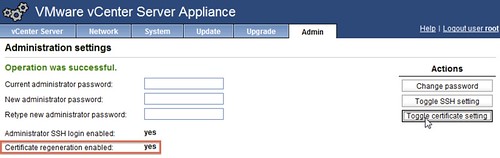
- Go to http://<vcenter ip address or fqdn>:5480
- Click “Admin” Tab
- Click “Toggle certificate setting” under “Actions”
- Restart the vCenter Server Appliance
- During the restart the certificates will be regenerated
- Click “Admin” Tab and disable the “Toggle certificate setting”