I briefly discussed the enhanced stretched cluster resiliency capability in my vSAN 7.0 U3 overview blog. Of course, immediately questions started popping up. I didn’t want to go too deep in that post as I figured I would do a separate post on the topic sooner or later. What does this functionality add, and in which particular scenario?
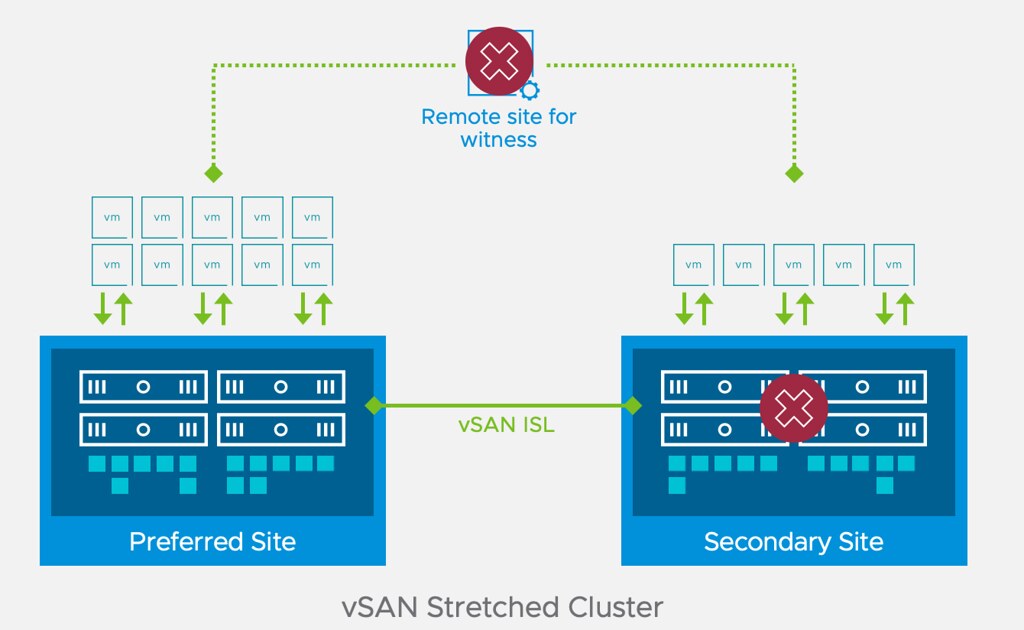
In short, this enhancement to stretched clusters prevents downtime for workloads in a particular failure scenario. So the question then is, what failure scenario? Let’s take a look at this diagram first of a typical stretched vSAN cluster deployment.

If you look at the diagram you see the following: Datacenter A, Datacenter B, Witness. One of the situations customers have found themselves in is that Datacenter A would go down (unplanned). This of course would lead to the VMs in Datacenter A being restarted in Datacenter B. Unfortunately, sometimes when things go wrong, they go wrong badly, in some cases, the Witness would fail/disappear next. Why? Bad luck, networking issues, etc. Bad things just happen. If and when this happens, there would only be 1 location left, which is Datacenter B.
Now you may think that because Datacenter B typically will have a full RAID set of the VMs running that they will remain running, but that is not true. vSAN looks at the quorum of the top layer, so if 2 out of 3 datacenters disappear, all objects impacted will become inaccessible simply as quorum is lost! Makes sense right? We are not just talking about failures right, could also be that Datacenter A has to go offline for maintenance (planned downtime), and at some point, the Witness fails for whatever reason, this would result in the exact same situation, objects inaccessible.
Starting with 7.0 U3 this behavior has changed. If Datacenter A fails, and a few (let’s say 5) minutes later the witness disappears, all replicated objects would still be available! So why is this? Well in this scenario, if Datacenter A fails, vSAN will create a new votes layout for each of the objects impacted. It basically will assume that the witness can fail and give all components on the witness 0 votes, on top of that it will give the components in the active site additional votes so that we can survive that second failure. If the witness would fail, it would not render the objects inaccessible as quorum would not be lost.
Now, do note, when a failure occurs and Datacenter A is gone, vSAN will have to create a new votes layout for each object. If you have a lot of objects this can take some time. Typically it will take a few seconds per object, and it will do it per object, so if you have a lot of VMs (and a VM consists of various objects) it will take some time. How long, well it could be five minutes. So if anything happens in between, not all objects may have been processed, which would result in downtime for those VMs when the witness would go down, as for that VM/Object quorum would be lost.
What happens if Datacenter A (and the Witness) return for duty? Well at that point the votes would be restored for the objects across locations and the witness.
Pretty cool right?!





 We’ve all seen those posts from people about worn-out SD/USB devices, or maybe even experience it ourselves at some point in time. Most of you reading this probably also knew there was an issue with 7.0 U2, which resulted in USB/SD devices wearing out a lot quicker. Those issues have been resolved with the latest patch for 7.0 U2. It has, however, resulted in a longer debate around whether SD/USB devices should still be used for booting ESXi, and it seems that the jury has reached a verdict.