I ran in to this error today that which says “Failed to connect to VMware Lookup Service”. Or to be more precise:
Failed to connect to VMware Lookup Service.
SSL certificate verification failed.
I had been playing around in my lab and I am guessing this error was caused by the fact that I changed the hostname of my vCenter Server Appliance after configuring it. When I rebooted the VCVA I bumped in to this issue. Luckily it is very easy to solve:
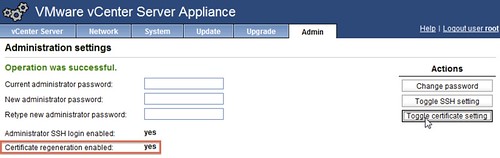
- Go to http://<vcenter ip address or fqdn>:5480
- Click “Admin” Tab
- Click “Toggle certificate setting” under “Actions”
- Restart the vCenter Server Appliance
- During the restart the certificates will be regenerated
- Click “Admin” Tab and disable the “Toggle certificate setting”
Hi Duncan,
This seems to be a common occurrence I had it on a new install of the venter Appliance and wrote a little blog @ http://www.myvmwareblog.com/2012/11/28/lookupservicesdk-ssl-certificate-verification-failed/ about my findings.
Jeremy
So I have this problem after changing the hostname of my lab environment.
Except I cannot regenerate the certs because my Admin tab does nothing.
I click on it and i get a blank white page.
Ideas?
Nevermind, apparently its a known Firefox issue.
http://www.vmware.com/support/vsphere5/doc/vsphere-vcenter-server-510b-release-notes.html
Off to find an alternate supported browser.
dag-nabit! got me too
I did this due to having the same problem, and had my vcenter server appliance take FOREVER to reboot… found this fix on vmware’s website:
http://kb.vmware.com/selfservice/microsites/search.do?language=en_US&cmd=displayKC&externalId=2058332
dear sir, thanks a lot…..very useful link
thanks man.. this helped a lot.