When we wrote the HA/DRS book both Frank and I were still very much in an “ESX Classic” mindset. Over the last weeks I had questions around resilient network configurations for ESXi. I referred people back to the book but the comments that I got were that the examples were very much ESX Classic instead of ESXi. Now in my opinion the configuration looks very much the same except that “Service Console” will need to be replace with “Management Network” but I figured I might as well just document my preference for a resilient ESXi Management Network as I needed to do it anyway as part of an update of the book to a future version of vSphere.
In our book we give two examples, one of which is the simple version with a single “Service Console Network” and one with a dual “Service Console Network” configuration. Now I figured I could update both but I’d rather do just one and explain why I prefer to use this one. The one that I have picked is the single “Management Network” setup. The main reason for it being is the reduced complexity that it brings and on top of that multiple Management Networks will make sense in an environment where you have many NICs and Switches but with all these converged architectures flying around it doesn’t really make sense anymore to have 4 virtual links when you only have 2 physical. Yes I understand that something can happen to a subnet as well, but if that is the case you have far bigger problems than your HA heartbeat network failing. Another thing to keep in mind is that you can also mitigate some of the risks of running into a false positive by selected a different “Isolation Response”, typically we see these set to “Leave Powered On”.
The below is an excerpt from the book.
Although there are many configurations possible and supported we recommend a simple but highly resilient configuration. We have included the vMotion (VMkernel) network in our example as combining the Management Network and the vMotion network on a single vSwitch is the most commonly used configuration and an industry accepted best practice.
Requirements:
- 2 physical NICs
- VLAN trunking
Recommended:
- 2 physical switches
The vSwitch should be configured as follows:
- vSwitch0: 2 Physical NICs (vmnic0 and vmnic1)
- When multiple physical PCI devices are available make sure to use a port of each to increase resiliency
- 2 Portgroups (Management Network and vMotion VMkernel)
- Management Network active on vmnic0 and standby on vmnic1
- vMotion VMkernel active on vmnic1 and standby on vmnic0
- Failback set to No
Each portgroup has a VLAN ID assigned and runs dedicated on its own physical NIC; only in the case of a failure it is switched over to the standby NIC. We highly recommend setting failback to “No” to avoid chances of a false positive which can occur when a physical switch routes no traffic during boot but the ports are reported as “up”. (NIC Teaming Tab)
Pros: Only 2 NICs in total are needed for the Management Network and vMotion VMkernel, especially useful in Blade environments. This setup is also less complex.
Cons: Just a single active path for heartbeats.
The following diagram depicts the active/standby scenario:
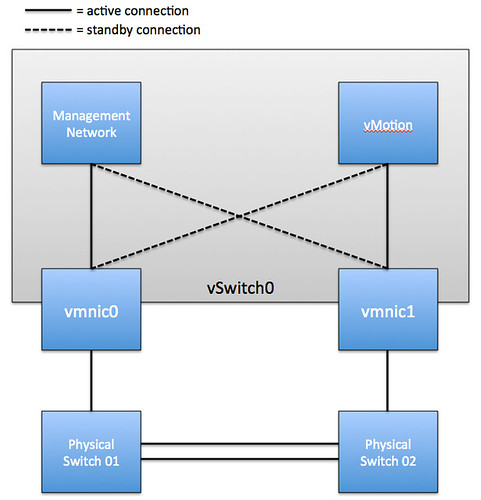
To increase resiliency we also recommend implementing the following Advanced Settings where the ip-address for “das.isolationaddress” should be a “pingable” device which is reachable by the ESXi hosts, preferably on the same subnet with as little hops as possible:
 das.isolationaddress = <ip-address>
 das.failuredetectiontime = 20000
This is the setup I use for all my ESXi hosts, except for the part about disabling failback.
I didn’t used to set the active/standby NICs for them and I found that when they share a port and I do something stressful (like put a host into maintenance mode, starting a lot of vmotions) that the vmotion traffic would overwhelm the management traffic to vcenter and the host would lose connection to vcenter. It was never a big deal, it would always eventually reconnect and finish the job on it’s own, but it was pretty disturbing if I was sitting there watching it.
My concern is that if failback is disabled I could still end up in this situation after a recovering from a failure. I’m less concerned about HA false positives since I also use the “Leave Powered On” isolation response.
I agree the failback set to no might lead to a problem later even from something simple like switch maintenance/reboots. To me, it seems like something easily missed once a failover happened. You would need to remember to go fix it. If I had a dollar for every time the network guys assumed they could update the switches and not tell anyone… I’d be rich.
I wonder, what is the risk from setting failback to yes and then setting das.failuredetectiontime to a higher number to give the switch enough time to finish initializing the port? What is 2 minutes, really, what is too high for that setting. I see a pro and con to both methods of madness. Maybe I’m not thinking it completely through, but I figured I’d get an answer from the best source possible :D.
I guess if you set Isolation Response to “leave powered on” there is no problem with setting “failback” to yes. But if you do set it to yes and the port is reported as “up” while it is not sending traffic for another 60 seconds or so you will end up with all of your VMs being powered down.
Couldn’t get you to give me a number… dang it. I was really playing devil’s advocate. My setup is exactly as you recommend with failback set to no. I’ve agreed with your previous recommendations about using a degraded host, so I use shutdown now (previously power off). Every environment will do it differently. However, I have had discussions about just setting the faildetectiontime much higher to allow for the port to initialize. I just don’t think there is a good number to use. If it was broken elsewhere you have bigger problems, and link state tracking as mentioned is very important and often missed when upstream switches are involved.
Forgive the noob question, but are you talking about spanning-tree when you are referring to the interface being active but not sending traffic? Would this still be a problem if “spanning-tree portfast trunk” has been enabled on the physical switches?
I unfortunately ran into a full blown isolation response in the past due to an upstream switch being rebooted and have been using beacon probing ever since.
This is why people use link-state tracking. If you have ports down on an upstream switch you can use link-state tracking to also shutdown the interfaces directly touching the ESX(i) host interfaces so that it will redirect traffic out one of the other NICs.
What Duncan was addressing with the failback set to “no” was when a switch restarts, there is a delay between when the switchport reports that it is up and when it actually starts passing traffic. That delay could cause an isolation response.
Does anyone know if there is a script (or built in monitoring) that can check to see if a vSwitch (dv or otherwise) is violating the nic teaming configuration for a given port group? I’ve tried to find something that would alert me that a failover had happened so that I could restore the intended configuration.
No I was specifically talking about when you reboot a switch. During boot the port will be reported as “Up” but as the switch is still booting it will not do anything with the packets.
In either way, something like Link State Tracking should be enable on the switches to reports link/switch failures beyond the switch that is directly connected to the ESX host…
das.isolationaddress shouldn’t be necessary unless your default gateway isn’t pingable and if you DO use it you should probably put in multiple IP’s so that a false positive like the other device being rebooted doesn’t cause your host to down an interface unnecessarily.
I am not saying it is needed. it is just an extra validation for isolation to prevent VMs being powered down when “powered off” is selected.
Hmm, as far as I can tell as soon as you set das.isolationaddress1 it stops checking the default gateway despite the fact that the documentation says das.usedefaultisolationaddress is still a variable and defaults to true. I say that because I couldn’t get vmware HA to come up at our DR site because of an unpingable default gateway and as soon as I set the first isolationaddress the error condition went away and the message about not being able to reach the gateway has never come back, but as soon as I rebooted the machine listed the hosts went into isolation response (luckily I have them set to leave power on) and soon thereafter I added additional hosts to the list. I guess it would be easy enough to lab out, set the isolationaddress to an IP that you can disable and see if the hosts go into isolation with that IP unavailable but the default gateway reachable.
It checks if either is available. if that is the case it continues configuring. It is still used during isolation though.
Appreciate the book you and Frank wrote. I remember reading about this topic in the book. Question; the servers we sell the motherboard has 2 broadcom nics and we add a 4 port GB Intel card at least. If no VLAN we then have 2 Nics per port group “Mgt, VM’s and vMotion” with a Nic in each portgroup going to a separate physical switchs when possible. We try to also have a Nic from a separate card in the portgroup that way if we lost a card then we have failover. The problem arises when you have mixed cards in the server. It’s also not a good idea to have a Nic from different vendors in the same portgroup. So which is a better design from a best practice point of view? 2 Nics from the same card in a portgroup or mixing Nics from different cards in a portgroup?
Thanks
Why wouldn’t that be a good idea? I would encourage mixing different types of NICs so that you can leverage the resiliency that adds around drivers / pci busses etc.
-d
Due to service denial attack reasons, some companies block the gateway ping. In such cases it might be a better idea to set a different IP in das.isolationaddress eg. domain controller.
That depends on the whether the DC is virtual of course. But indeed it needs to be a pingable and reliable device.
Well, I thought it was important to not mix Nic Brands in the same portgroup so the virtual switch was not using different drivers for the same portgroup. I “thought” that was mentioned in the VMware HealthAnalyzer but I don’t see it. It’s been a good day as I learned something new again.
Thanks for your feedback. I’ll have to make sure to share this with our VMware install team.
It’s definitely not part of any recommendation we give. If you do happen to find one let me know and I will make sure they fix it. That is the cool thing about VMware you can mix cards without issues!
I thought this was fabulous when I read it in the book! One thing that has been bothering me is why bother with the VLAN per port group? Will the VLAN really help much?
Thanks,
Bob
Well it is a general best practice to isolate traffic accordingly. Management and vMotion for instance are one of those. Management for obvious reasons and vMotion because it doesn’t need to go anywhere else and it isn’t encrypted so could be considered a security issue. Although I would highly recommend it and it is a best practice it is up to you to decide if it is required for your environment, with or without it it will work fine.
Hi
Could someone explain why its better to have a dedicated vmnic for each port group with a second card as standby rather than load balancing the two port groups over both vmnics.
Thanks,
Because with load balancing you cannot predict what ends where. In this case, and especially when it comes to management, knowing where your traffic flows through will most definitely help when troubleshooting etc.
-d
I don’t see the con of having one NIC for Heartbeat. Service console in a normal scenario does not need more than 10 MBPS bandwidth (few exceptions like P2V). With 1 GBPS vMotion; I guess datastore bottleneck will pop-up before bandwidth bottleneck.
It that with regards to my article? if so I am talking about a single heartbeat “path” / mechanism. If you would use a secondary service console you would have two heartbeat mechanism, but it is more complex.
what about this option that let us enable vMotion in the Management Traffic?
so it’s not a good practice to have both on the same vmnic (of course both are defualt vlan or same vlan)?
that’s what I usually do.
I enable vMotion in the Management Traffic and set both NICs to Active
should I continue doing this?
I wouldn’t what if you are doing many vMotions. This could swap the NIC and result in heartbeats being pushed away and ultimately in an HA isolation response.
thanks a lot Duncan yeah I thought about that
but lately I deployed 2 scenarios were only 2 NICs were available…. so I either saturate Management Traffic vmnic or the vmnic for Virtual Network…
I think in my next scenarios for two NICs would be better put vMotion let say vmnic0 and Administration Management and Virtual Networks vmnic1
thanks
If I configure as described and use the same VLAN/Subnet for Management and vMotion then when I perform a vMotion the traffic comes out of the active vmnic for the Management interface and not the active vmnic for vMotion. This starts to be an issue when configured as Duncan recommends as the management nic is on a different physical switch to the vMotion nic so the vMotion traffic now has to go via the interconnect between the two physical switches. I describe my finding in more detail here http://pelicanohintsandtips.wordpress.com/2011/06/16/esxi4-1-vmotion-using-incorrect-vmnic/
This is not an issue when management and vMotion are on different VLANs/Subnets.
I know vMotion traffic does not need to be routable but I don’t like configuring something that can not access it’s default gateway. You can only configure a global VMKernel default gateway and therefore management and vMotion automatically use this configured gateway. Assuming you configure the default gateway on the same subnet as the management interface then the vMotion interface will not be able to connect to the default gateway as it is on a different subnet. Not a big issue but I just don’t like the look of it when you go in to the properties of the vMotion VMKernel port and see what looks like a incorrect gateway. I worry that someone will click on the edit button and change it to what they think it should be and then the management interface can no longer see the default gateway and we may start having HA isolation issues.
Does this require stacking the switches (Cisco StackWise, etc), or can this be run with two regular, non-stackable switches with a regular link between them?
No it does not, you can use regular switches…
Duncan, has your opinion changed with this configuration now that esxi 5.0 supports multiple nics for vMotion traffic?
Would you run both nics active with vMotion enabled on each as well as management?
Duncan, what is your opinion on the VMware recommended design option for blades (#2) “Dynamic Configuration with NIOC and LBT” from the VMware networking blog? In this design option, both the mgmt network and the vmotion network would be set to LBT (no active/standby).
I am also curious about everyone’s thoughts on mgmt and vmotion going active / active (lbt). I have noticed some quirks on a new cluster configured this way on a HP chassis and two flex10 nic. I am relying on nioc to ensure mgmt and vmotion traffic.
What I am seeing is that with this config a vmotion will cause my portgroup policy to reject Mac changes to kick in and take the vmotioned vm to go off net.
I am going to try active/standby for the mgmt and vmotion portgroups to see of that in fact resolves my issue.
Curious if trying to go active/active (lbt) in a converged blade environment is in fact the source of my headache.
Thoughts?
I’m a little confused by this comment. If I have the isolation response set to “leave powered on” why would the VMs power off after 60 seconds?
I was referring to Duncan’s comment: “I guess if you set Isolation Response to “leave powered on” there is no problem with setting “failback” to yes. But if you do set it to yes and the port is reported as “up” while it is not sending traffic for another 60 seconds or so you will end up with all of your VMs being powered down.”
Hello all!
I had a quick question about the configuration diagram above.
My assumption is that you cannot use a Management Network vmk0 on vmnic0 with a vMotion vmk1 on vmnic4, trunked/ether-channeled together, using route based on IP hash and have them use the other vmnic as a failover NIC. Correct?
When I tried move the second vmnic down to Standby Adapters, I get the error message, “The IP hash based load balancing does not support Standby uplink physical adapters. Change all Standby uplinks to Active status, NOOB!”
I am assuming the above diagram isn’t using trunked/ether-channeled physical NICs (uplinks) and therefore use the other’s uplinks as their standby adapters…
Thanks,
Scottie
This post (and the book) detail the active / standby recommendations for the portgroups within vswitch0, but what about the teaming settings of vswitch0 itself? Should it be active / active?
You can define them active / active. The portgroup details will override these.
I am using MGMT Vmkernel and vMotion Vmkernel on vSwitch0 and attempting to “tune” everything to work together. Limited number of uplinks and I Am trying to maximize redundancy where possible.
What should the “stacked” switch port configuration be? channel group mode ON ? Am I correct that configuring the vSwitch is set to active/active route by IP hash and then each of the vmkernels is set to active/passive virtual port ID?
Is it (correct) behaviour to give an error on management network redundancy when there are two vmnics configured for management, but one is 1000mbit and one is 100mbit?
Shouldn’t give an error, but never tested it to be honest
Have two vSwitches, each with one physical NIC. The vSwitch0 has a VMkernel port named Management Network with the Management Traffic checkbox enabled. The vSwitch1 has a redundant VMkernel port named Management Network 2 with the checkbox for Management Traffic disabled. The vSwitch1 is used for vMotion/FT too and can only “see” using VLANs the other host’s vSwitches1. This way I have a 2nd Management Network and isolated vMotion/FT traffic.
Does I need to enable the checkbox for Management Traffic too on the 2nd vSwitch? When I need to use it? Can’t find more references about the checkbox and setups like mine, which should be commom I think.
Thank you Duncan, your blog always help us a lot here in Brazil.
If you use HA and want ‘heartbeat network’ resiliency you will need to tick that box indeed!
Ok, even if the VMkernel interfaces for the Management Network 2 at the vSwitch1 are isolated with VLANs and can only ping themselves and same interfaces on other hosts? They will never ping the gateway or any other IP address.
kb 1002641 say “When the secondary Service Console is set up, you must configure multiple VMware HA isolation addresses. For more information about setting multiple isolation response addresses, see Setting Multiple Isolation Response Addresses for VMware High Availability (1002117).”.
Who can I use for isolation address since on this VLAN I have only the 2nd Management Network for all hosts? Does I need to put another device on it only to use as an isolation address?
Doesn’t that network have a gateway address?
No, but I can provide one. This is the only way I see to have the ‘heartbeat network’ resiliency, am I right?
You can set up:
1) two management network
2) a resilient management network by giving it multiple nics.
So either way you are good, as long as you have multiple isolation addresses as well.
Hi Duncan,
Have you ever configured an environment with Juniper switches?
We are implementing VDI and the VDI network has its own vswitch. (Version is ESXi 4.1)
I have read everywhere that LACP in Active mode is not supported in VMware unless you use a vDS.
The vSwitch is made up of 4 x 1Gbps connections to 2 x EX4200 juniper switches in a stack.
IP Hash is configured at the VMware end.
The below post explains this but in the Cisco world.
http://andrew-pearce.blogspot.co.uk/2010/09/etherchannel-link-aggregation-with.html
The juniper port channel with the 4 connections is up but configured as LACP active.
The network is communicating but I am not sure if it is load balancing across them all with LACP as Active.
Any ideas?
You could check with esxtop if multiple links are utilized or not. LACP is not supported in active with a VDS or a regular vSwitch! Well, unless you are running vSphere 5.1 then there is support with the VDS.
I guess you need to ask yourself why you are creating a portchannel. Is there any benefit in a VDI environment? I think “virtual port id” will work just fine without the added complexity.
Hi Duncan,
The original request from our deployment guys was as much throughput as possible.
People have different views to what nic teaming type is deployed.
A lot of people do reccommended using etherchannels with VDI?
Maybe I am missing it, but with VDI what would be the point? A single VM is accessed by a single person right? So path for that VM in terms of traffic will me the same. I can see a reason for doing this with your storage network, but VMs… Not sure I get it. Again, it could be me as I am not a VDI expert.
I have an esxi5 (update1) environment (hp blades with 2 uplinks) – trunk and using network I/0. On one occasion, two of my hosts encountered network partition then network isolation and the host shutdown with the VMs (VMs were inaccessible).
I am not sure if this is normal (as I thought HA will kick in. In what scenario will HA fail to failover VMs?
Thanks
Chris
A good post that stood out was http://www.tcpdump.com/kb/virtualization/vmware-esx-server/esx-nic-teaming/load-balancing-methods.html
Hi Duncan,
We have a weird problem with this setup. Setup is same as your example but failback checkbox is not ticked (not sure what it defaults to) and no vlans are used.
Now it works just fine but for some reason the (static configured) ip of the vMotion is forced on the (static configured) ip of the management network. Strangely it only shows if looking at the host console. In vCenter it shows the ip setup as it was originally made!
Even changing the ip on the console back to the intended ip only last for a couple of minutes before it switches back….
DNS is setup correctly, both ips are in same subnet
Any clues how this behaviour can occur?
Regards,
Eugene
Are you saying that the the vMotion VMkernel is using the same Physical NIC as the Management VMkernel? Or do you really mean that vMotion takes on the IP of the Management Network?
Management takes the IP of the vMotion while in vCenter everything shows normal. Its really weird, I’ll take some screens tomorrow on the job.
Anyways I’ve been reading your post on Multiple-Nic for vMotion which sounds like a real speed winner so we might create a seperate management with its own failover.
Goss, so many options 😉
btw, the Load Balancing should remain ‘Route based on the originating virtual port ID’ or set to ‘explicit failover order’?
either should work
I am intrested to understand your thoughts regarding the best practice design described in this article using kb.vmware.com/kb/2007467. Is this still an option. I was designing a new ESXi infrastructure using HP BL685c and but this has change to BL465c because budget. The new blades reduces the number of NICs available have to the virtual connect.
My original design was to have
vSwitch 0 – 2 NIC Team- Both NICs Active , 2 x Resilient Management Networks
VMkernel PortGroup – Management-02 – pNIC 4 Active – pNIC 0 Standby
VMkernel PortGroup – Management-01 – pNIC 0 Active – pNIC 4 Standby
vSwitch 1 – 2 NIC Team – Both NICs Active – 2GB Multi NIC vMotion. kb.vmware.com/kb/2007467
VMkernel PortGroup – vMotion-01 pNIC1 Active – pNIC5 Standby
VMkernel PortGroup – vMotion-02 – pNIC5 Active – pNIC1 Standby
Are there any concerns with this configuration being placed onto the same vSwitch ?
And if they want IP storage and FT should dedicate the vSwitch?
Thanks
Darren
Hi Duncan,
I have some question regarding management network design. Is it recommended to do team (active/passive) for management network using two vmnic which have different speed. Let’s say vmnic1 is 10Gbps and vmnic2 is 1Gbps. Is it OK to team them together for management ?
The other one is about iSCSI and production Network. I plan to team these interfaces together using active/passive concept for sure. But, for iSCSI I plan to use jumbo frames while for production Network I am not willing to use that. Do you have any recommendation on this situation?
Thanks before for your advice.
Wiliam