Last week a customer asked me a question about how to respond to for instance a partial failure in their SAN environment. A while back I had a similar question from one of my other customers so I more or less knew where to look, and I actually already blogged about this over a year ago when I was showing some of the new vSphere features. Although this is fairly obvious I hardly ever see people using this and hence the reason I wanted to document one of the obvious things that you can implement…. Alarms
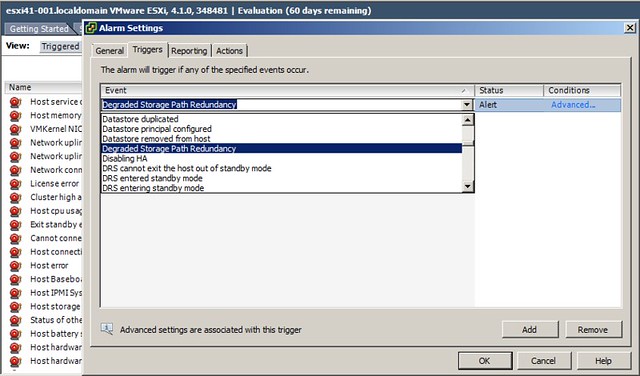
Alarms can be used to trigger an alert, and that is of course the default behavior of predefined alarms. However you can also create your own alarms and associate an action with it. I am showing the possibilities here and am not saying that this is a best practice, but the following two screenshots show that it is possible to place a host in maintenance mode based on degraded storage redundancy.
First you define the alarm:
And then you define the action:
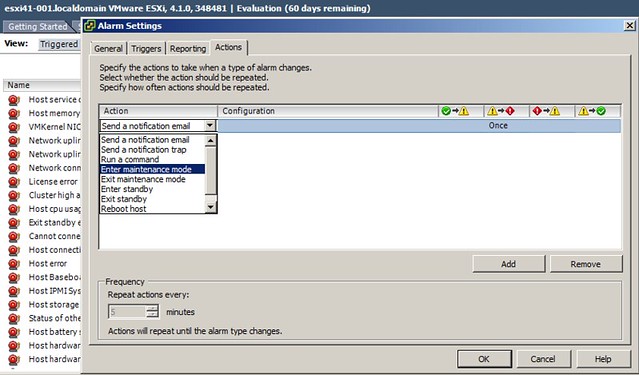
Again, this is action could have a severe impact when a switch fails and I wouldn’t recommend it, but I wanted to ensure everyone understands the type of combinations that are possible. I would generally recommend to send an SNMP trap or even a notification email… and I would recommend to at least define the following alarms:
- Degraded Storage Path Redundancy
- Duplicate IP Detected
- HA Agent Error
- Host connection lost
- Host error
- Host warning
- Host WWN changed
- Host WWN conflict
- Lost Network Connectivity
- Lost Network Redundancy
- Lost Storage Connectivity
- Lost Storage Path Redundancy
Many of these deal with hardware issues and you might already be monitoring for them, if not make sure you monitor them through vCenter and take appropriate action when needed.
I literally cringed when I saw the “Put host in maintenance mode” after storage path resiliency lost. Glad you put the “I wouldn’t recommend this” after that! To echo Duncan’s sentiment, you’re pretty much NEVER going to want to do that! Just alert!
The Sydney-based vSpecialist, David Lloyd, created a demo and support tool to help with this exact same issue:
http://vpivot.com/2011/01/11/vcenter-custom-alarms-instruction-tips-tools/
Scott
Hadn’t seen that one yet Scott, thanks for pointing it out… very cool tool!
I think it would be a good idea to update this article and show that at least in vCenter 5.0 some of these alarms are already configured but they are not enabled. For example Lost Storage Connectivity, Lost Storage Path Redundancy, and Degraded Storage Path Redundancy are all under the default defined alarm “Cannot connect to storage”. However the status of each trigger is set to Unset…this has to be set to Warning or Alert and then set an action such as send an email.
This article clarifies:
http://www.pearsonitcertification.com/articles/article.aspx?p=1928231&seqNum=6
Correction to my previous comment…looks like you don’t have to set a status to have email notifications sent for all Normal, Warning, and Alerts.