Rob de Veij has done it again…. a brand new version of RVTools, 2.5!
Here are the new features of this release:
- The installation file now understands how to upgrade without the need to uninstall the previous version first.
- The documentation file is now also deployed to the program directory.You can start the Adobe reader from the RVTools “help” menu.
- New fields on vInfo tab: Network #1 to Network #4
- New fields on vDisk tab: Level, Shares, SCSI Controller, Unit id and vmdk path name. I’m now using the “config.hardware” information to fill this tab page. In the previous versions of the program I was using the guest information which have a strong dependency with the VMware tools.
- New fields on vNetwork tab: Adapter type and Mac Address type.I’m now using the “config.hardware” information to fill this tab page. In the previous versions of the program I was using the guest information which have a strong dependency with the VMware tools.
- New field on vHost tab: Number of VMs per core
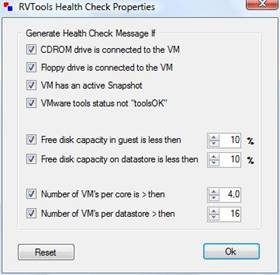
- New tab! vHealth. Displays health check messages.There are 8 possible “Health Check” messages:
- VM has a CDROM device connected!
- VM has a Floppy device connected!
- VM has an active snapshot!
- VMware tools are out of date, not running or not installed!
- On disk xx is yy% disk space available! The threshold value is zz%
- On datastore xx is yy% disk space available! The threshold value is zz%
- There are xx VMs active per core on this host. The threshold value is zz%
- There are xx VMs active on this datastore. The threshold value is zz%
- You can set your “own” health check threshold values in the “Health Check Properties” form.
It’ll become the one of the ‘must have’ tools of the year…. -:)
No but really, it’s clear that the tool itself is a great value. Great features. Bravo to Rob.
I agree with Vladan a “must have” for any VMware professional. Not to mention this version understand how to upgrade. Yipee one of my pet peeves.
Anybody know if there is a way to change ESX hosts on the fly w/o exiting the program first and re-entering in your IP/Hostname & credentials?
thanks for letting us know the must have tool of the year is updated. I love this tool!!!