Arne blogged about a cool feature of BGInfo yesterday, but his post is in dutch so it’s not on the Planet V12 RSS feed which is a shame cause it’s definitely usefull info.
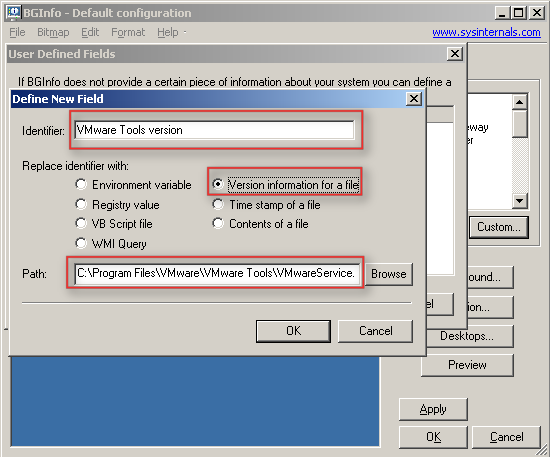
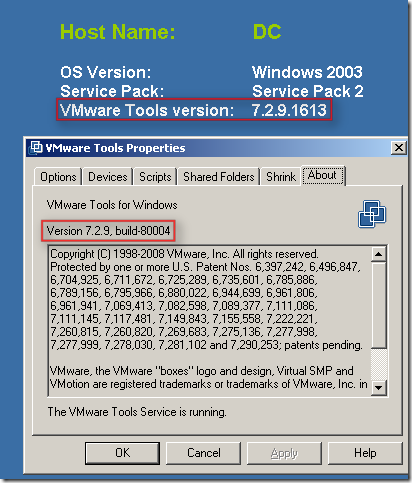
In short: BGInfo is a handy little SysInternals tool which sets a desktop wallpaper with pre-defined info like total memory, disk info, ip info etc. With BGInfo it’s also possible to define a specific field with for instance the version information of a file. Arne discovered that it’s possible to point towards the VMware tools executable and display the VMware tools version on your server desktop aka wallpaper.
I guess a picture says more than words:
Hi Duncan,
can you please write me an eMail to [email protected]? Ich have some questions about your blog.
Thanks a lot,
Thomas
That was a pretty cool tip. I’m already using BgInfo on my VM’s to keep track of them and that tip will be useful to know what is installed where and at which version.
thanks!
The bginfo as mentioned above only shows the file versoin of the vmware tools file and not the VMWare Version as displayed in the vmware tools window which is 3.5.0 build 103908.
Does anyone know how to display that in bginfo.
Very, very cool tip. Thanks for translating Arne’s post!